


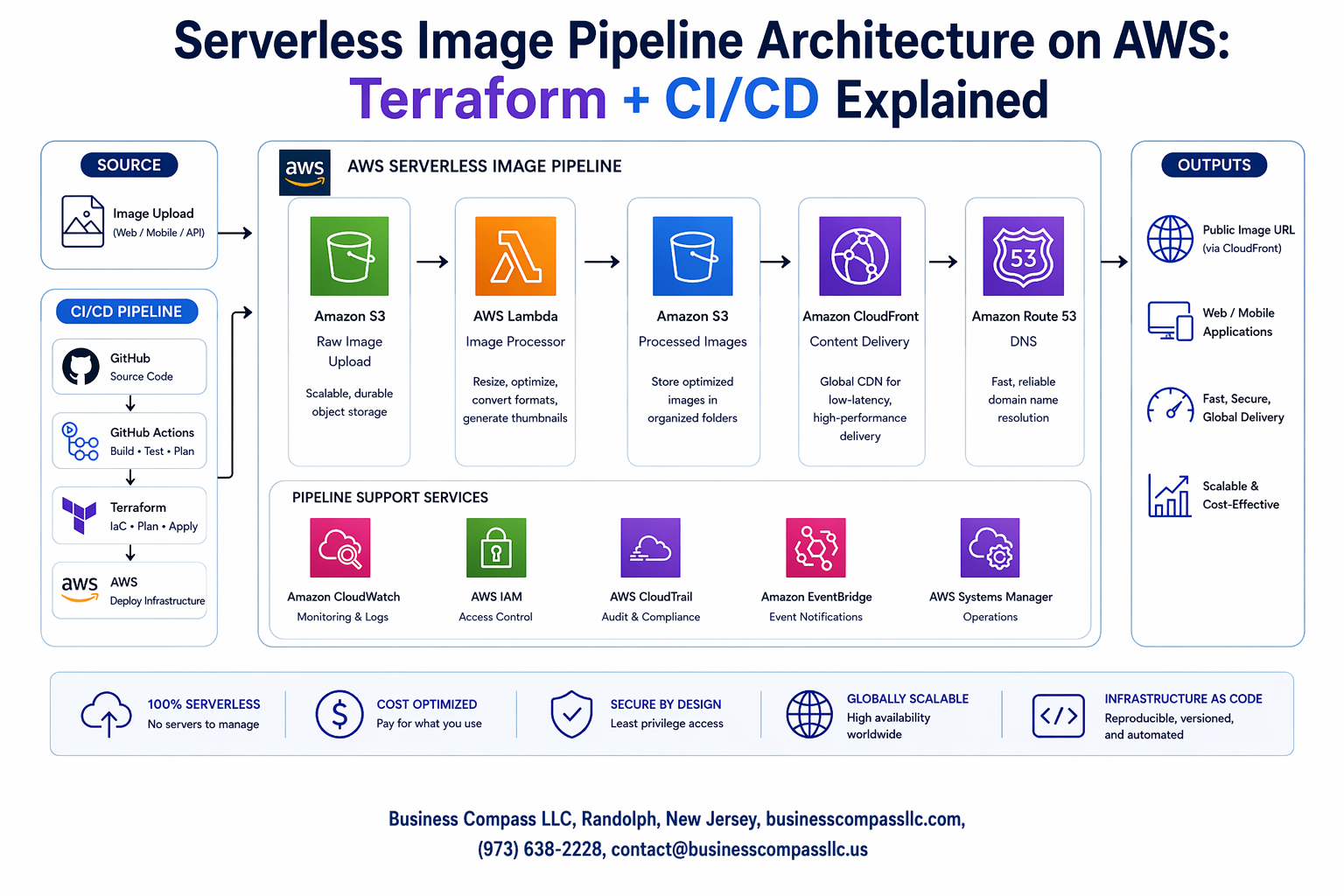
Building a serverless image processing pipeline on AWS can transform how you handle image workflows at scale. This guide targets DevOps engineers, cloud architects, and developers who want to create automated, cost-effective image processing solutions using AWS serverless architecture.
Manual image processing workflows drain resources and slow down deployment cycles. With AWS serverless image processing, you can build pipelines that scale automatically, process thousands of images in parallel, and only charge you for actual usage. Combining Terraform infrastructure as code with proper CI/CD pipeline automation creates a maintainable, repeatable system that your team can deploy confidently.
We’ll walk through designing a complete serverless image pipeline architecture that handles uploads, processing, and storage using AWS Lambda image processing and AWS S3 image storage. You’ll learn how to structure your Terraform AWS deployment for maximum flexibility and implement a robust serverless CI/CD implementation that automates testing and deployments. Finally, we’ll cover essential security practices and performance optimization techniques to ensure your image processing pipeline AWS setup runs efficiently in production.
Serverless Image Pipeline Fundamentals

Core benefits of serverless architecture for image processing
AWS serverless image processing eliminates server management overhead while providing automatic scaling based on demand. Your infrastructure responds instantly to traffic spikes without manual intervention, making it perfect for applications with unpredictable image processing workloads. The event-driven nature means resources activate only when images arrive, creating an efficient processing pipeline that scales from zero to thousands of concurrent operations seamlessly.
Serverless architecture tutorial principles show how AWS Lambda functions can handle various image transformations like resizing, format conversion, and optimization without provisioning virtual machines. This approach reduces operational complexity while maintaining high availability, as AWS manages the underlying infrastructure, patching, and monitoring automatically.
Key AWS services for building scalable image pipelines
AWS S3 image storage serves as the foundation for trigger-based processing workflows, automatically initiating Lambda functions when new images upload. Amazon API Gateway provides RESTful endpoints for image uploads, while Amazon EventBridge orchestrates complex processing workflows across multiple services. DynamoDB stores metadata and processing status, creating a complete serverless ecosystem.
AWS Lambda image processing integrates with services like Amazon Rekognition for AI-powered analysis, CloudFront for global content delivery, and Step Functions for coordinating multi-step image transformations. This service mesh creates powerful processing capabilities without managing individual servers.
Cost optimization advantages over traditional infrastructure
Serverless CI/CD implementation reduces costs by charging only for actual compute time and storage usage. Traditional virtual machines run continuously whether processing images or sitting idle, while serverless functions execute only when triggered. This pay-per-execution model can reduce costs by 80-90% for intermittent workloads compared to always-on server infrastructure.
Terraform AWS deployment automates resource provisioning, preventing over-allocation of expensive compute resources. The granular billing model charges for milliseconds of execution time, making small-scale processing economically viable while automatically scaling for enterprise workloads without upfront capacity planning.
Performance and scalability considerations
Image processing pipeline AWS architecture handles concurrent processing through automatic function scaling, with each Lambda execution processing images independently. Cold start latency affects performance for infrequently used functions, but provisioned concurrency can eliminate this delay for critical workflows. Memory allocation directly impacts processing speed and cost, requiring optimization based on image sizes and complexity.
Terraform infrastructure as code enables consistent performance tuning across environments by codifying optimal configurations. Regional deployment strategies reduce latency for global users, while CloudWatch metrics provide insights for performance optimization and capacity planning decisions.
Essential AWS Services for Image Pipeline Implementation

AWS Lambda for image transformation and processing logic
AWS Lambda serves as the computational backbone for serverless image processing, executing transformation tasks without managing servers. Lambda functions handle operations like resizing, format conversion, watermarking, and quality optimization with automatic scaling based on demand. The event-driven architecture triggers processing when images are uploaded to S3, creating an efficient workflow. Lambda’s pay-per-execution model makes it cost-effective for variable workloads while supporting multiple programming languages including Python, Node.js, and Java for image manipulation libraries.
Amazon S3 for secure image storage and retrieval
Amazon S3 provides scalable, durable storage for both source and processed images with built-in security features. S3 buckets can be configured with lifecycle policies to automatically transition older images to cheaper storage classes or delete temporary files. The service integrates seamlessly with Lambda through event notifications, triggering processing workflows when new images arrive. S3’s global edge locations enable fast content delivery while versioning capabilities protect against accidental overwrites or deletions.
Amazon API Gateway for RESTful endpoint management
API Gateway creates secure, scalable REST endpoints for image upload and retrieval operations while handling authentication and rate limiting. The service manages request routing to appropriate Lambda functions and provides built-in CORS support for web applications. API Gateway’s integration with AWS services eliminates complex backend infrastructure while offering request/response transformations. Custom domain names and SSL certificates ensure professional API presentation with automatic scaling to handle traffic spikes.
AWS Step Functions for workflow orchestration
Step Functions coordinate complex image processing workflows by orchestrating multiple Lambda functions in sequence or parallel. The visual workflow designer makes it easy to create multi-step processes like image validation, multiple format generation, and metadata extraction. Error handling and retry logic ensure robust processing while state machines provide clear visibility into workflow execution. Step Functions excel at managing long-running processes and coordinating between different AWS services for comprehensive image pipeline automation.
CloudWatch for monitoring and logging capabilities
CloudWatch provides comprehensive monitoring for Lambda execution metrics, S3 storage usage, and API Gateway performance data. Custom dashboards visualize pipeline health while automated alarms notify teams of errors or performance degradation. CloudWatch Logs aggregate function outputs and error messages for troubleshooting while X-Ray tracing tracks requests across service boundaries. The monitoring data helps optimize costs and performance while maintaining service reliability through proactive alerting and detailed operational insights.
Terraform Infrastructure as Code Strategy

Modular Terraform Configuration for Reusable Components
Building a robust Terraform infrastructure as code strategy starts with creating modular configurations that promote reusability across different environments. Break down your serverless image pipeline architecture into logical modules like Lambda functions, S3 buckets, and IAM roles. Each module should encapsulate a specific functionality, making it easy to version, test, and deploy independently across development, staging, and production environments.
Resource Provisioning Best Practices for Serverless Environments
AWS serverless image processing requires careful resource provisioning to optimize costs and performance. Configure Lambda memory and timeout settings based on image processing workloads, implement S3 lifecycle policies for storage optimization, and use CloudWatch for monitoring. Set up proper IAM permissions with least-privilege principles, ensuring your pipeline components can only access necessary resources while maintaining security boundaries.
State Management and Backend Configuration Optimization
Proper Terraform state management becomes critical when deploying serverless CI/CD implementation across multiple environments. Configure remote state backends using S3 with DynamoDB locking to prevent concurrent modifications. Implement state file encryption and versioning to maintain deployment history. Organize state files by environment and use workspace separation to isolate infrastructure changes while enabling consistent Terraform AWS deployment practices across your team.
Building the Core Image Processing Pipeline
Automated image upload and validation workflows
Setting up automated validation ensures only quality images enter your AWS serverless image processing pipeline. Configure S3 event triggers that instantly fire Lambda functions when files upload, checking file types, sizes, and basic integrity. Your Terraform infrastructure as code should define strict bucket policies and Lambda validators that reject corrupted or unsupported formats before processing begins.
Real-time image resizing and format conversion
AWS Lambda image processing functions handle dynamic resizing requests through API Gateway endpoints, scaling images based on URL parameters or predefined configurations. Sharp or Pillow libraries within Lambda containers convert between JPEG, PNG, and WebP formats while maintaining optimal quality ratios for different use cases.
Thumbnail generation and multiple output formats
Generate thumbnail variations automatically using Lambda functions triggered by S3 uploads, creating multiple sizes (small, medium, large) and formats simultaneously. Store outputs in organized S3 prefixes like /thumbnails/, /webp/, and /original/ for efficient retrieval and CDN distribution.
Error handling and retry mechanisms
Dead letter queues capture failed processing attempts while Step Functions orchestrate complex retry logic with exponential backoff. Configure CloudWatch alarms to monitor failure rates and automatically trigger alternative processing paths when Lambda functions encounter memory limits or timeout errors.
Implementing Robust CI/CD Pipeline Integration

Git-based workflow automation for infrastructure changes
Setting up Git-based automation for your AWS serverless image processing infrastructure requires establishing clear branching strategies and pull request workflows. Configure GitHub Actions or GitLab CI to automatically validate Terraform configurations when developers push changes, ensuring infrastructure modifications follow proper review processes before reaching production environments.
Automated testing strategies for serverless functions
Comprehensive testing for serverless CI/CD implementation involves unit tests for Lambda functions, integration tests for API Gateway endpoints, and infrastructure validation using Terraform plan outputs. Implement AWS SAM local testing alongside pytest for Python-based image processing functions, while using tools like Terratest to verify your Terraform AWS deployment configurations match expected infrastructure states.
Blue-green deployment patterns for zero-downtime updates
Blue-green deployments for serverless image pipeline architecture leverage AWS Lambda aliases and weighted routing to gradually shift traffic between function versions. Create separate environment stacks using Terraform infrastructure as code, allowing instant rollbacks when issues arise during deployment of updated image processing logic or infrastructure changes.
Environment promotion and configuration management
Environment promotion workflows automate the progression of tested code from development through staging to production using parameter stores and environment-specific Terraform variable files. Configure AWS Systems Manager Parameter Store to manage sensitive configuration values, while maintaining separate Terraform workspaces for each environment to ensure consistent deployment patterns across your serverless architecture tutorial implementations.
Security and Compliance Implementation

IAM Role Configuration for Least Privilege Access
Creating secure IAM roles for your serverless image pipeline requires careful permission mapping. Lambda functions should only access specific S3 buckets, CloudWatch logs, and required AWS services. Define separate roles for processing, storage, and monitoring functions with explicit resource ARNs. Use IAM policy conditions to restrict access based on source IP, time windows, or request attributes.
Image Content Validation and Malware Scanning
Implement automated content validation using AWS Lambda triggers on S3 uploads. Integrate Amazon Rekognition for content moderation and ClamAV for malware detection within your processing pipeline. Set up quarantine buckets for suspicious files and implement real-time notifications through SNS when threats are detected.
Data Encryption at Rest and In Transit
Enable S3 bucket encryption using AWS KMS keys with automatic rotation policies. Configure SSL/TLS endpoints for all API Gateway connections and Lambda function URLs. Use VPC endpoints for internal AWS service communication to avoid internet transit. Implement envelope encryption for sensitive metadata and configure CloudTrail logging for comprehensive audit trails of all access patterns.
Performance Optimization and Monitoring

Lambda Function Tuning for Optimal Execution Times
Memory allocation directly impacts AWS Lambda image processing performance and cost efficiency. Configure memory between 1024-3008 MB for compute-intensive image transformations, as increased memory proportionally boosts CPU power. Enable provisioned concurrency for predictable workloads to eliminate cold start delays. Optimize your deployment package size by removing unnecessary dependencies and using Lambda layers for shared libraries like PIL or Sharp.
CloudWatch Metrics and Custom Dashboards Setup
CloudWatch provides essential visibility into your serverless image pipeline architecture through built-in Lambda metrics like duration, error rate, and throttles. Create custom dashboards combining S3 object counts, API Gateway latency, and Lambda concurrent executions. Set up detailed logging with structured JSON format to track image processing stages, file sizes, and transformation types for comprehensive pipeline monitoring.
Cost Monitoring and Budget Alert Configuration
Implement AWS Budgets to track spending across Lambda executions, S3 storage, and data transfer costs within your serverless architecture. Configure threshold alerts at 80% and 95% of monthly budgets to prevent cost overruns. Use Cost Explorer to analyze spending patterns by service and optimize resource allocation based on actual usage metrics from your Terraform-deployed infrastructure.
Building a serverless image pipeline on AWS combines powerful cloud services with smart automation to create a scalable, cost-effective solution. We’ve walked through the essential components – from leveraging Lambda functions and S3 for core processing to using Terraform for consistent infrastructure deployment. The CI/CD integration ensures your pipeline stays updated and reliable, while proper security measures and monitoring keep everything running smoothly.
The real magic happens when all these pieces work together. Your images get processed automatically, costs stay low because you only pay for what you use, and scaling happens without any manual intervention. Start small with a basic pipeline, test it thoroughly, and gradually add more features as your needs grow. With the right setup, you’ll have an image processing system that handles everything from thumbnails to complex transformations without breaking a sweat.









