


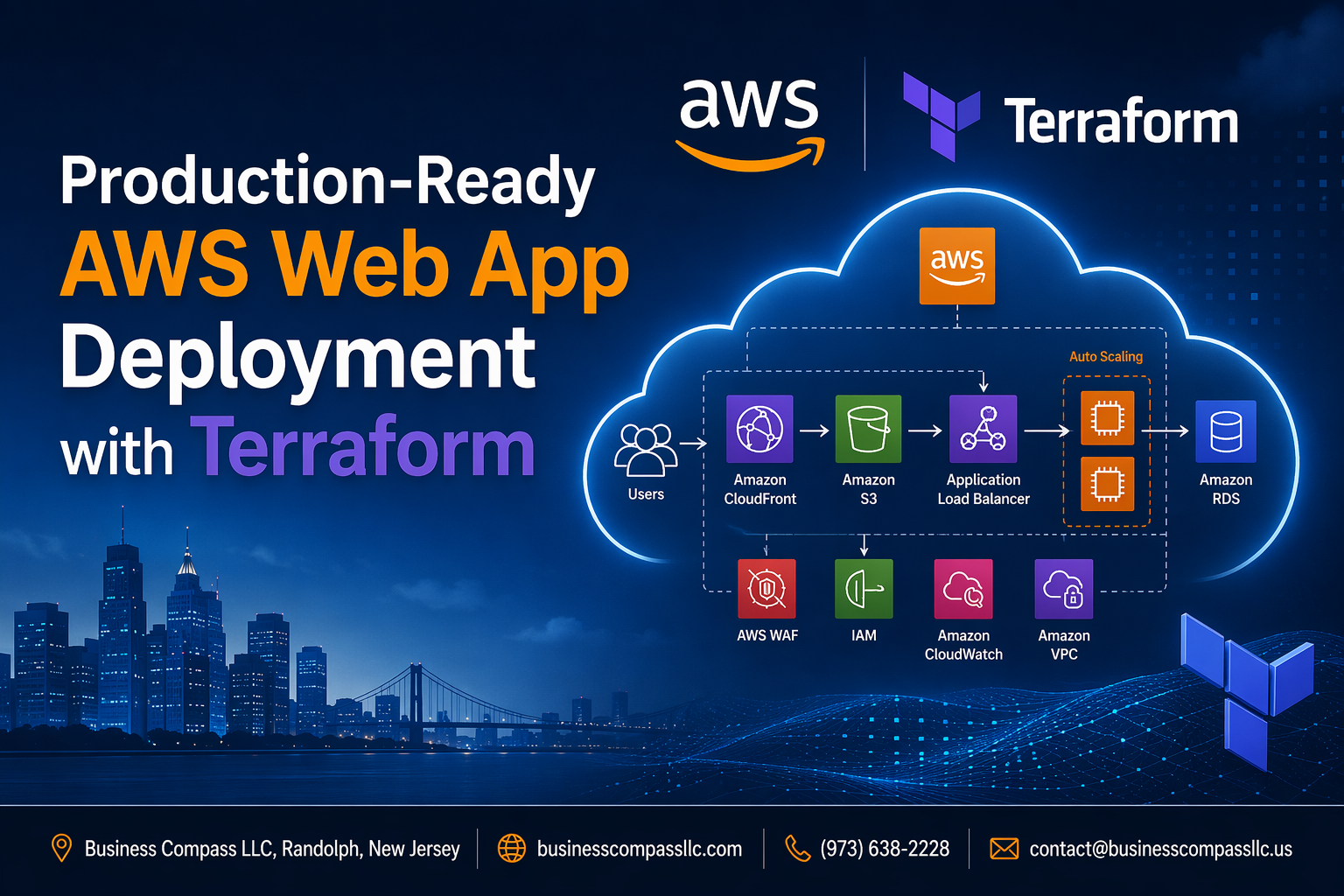
Production-Ready AWS Web App Deployment with Terraform
Deploying web applications to AWS can feel overwhelming when you’re trying to get everything right from day one. This guide walks you through building a production-ready web app deployment using Terraform that actually scales and stays secure.
Who this is for: DevOps engineers, cloud architects, and developers who need to deploy web applications to AWS using infrastructure as code. You should have basic AWS knowledge and some experience with Terraform fundamentals.
We’ll cover how to design scalable AWS architecture that grows with your application without breaking the bank. You’ll learn to build production-grade Terraform modules that your team can reuse and maintain easily. We’ll also walk through setting up AWS CI/CD pipeline automation so your deployments happen smoothly every time.
By the end, you’ll have a complete blueprint for AWS infrastructure as code that handles real-world traffic, stays secure, and makes your ops team happy.
Essential Prerequisites for AWS Terraform Deployment

AWS Account Setup and IAM Configuration
Setting up your AWS account correctly forms the foundation for secure AWS Terraform deployment. Create a dedicated IAM user specifically for Terraform operations rather than using your root account. Configure programmatic access with appropriate policies like PowerUserAccess or custom policies that match your deployment needs.
Implement the principle of least privilege by creating role-based permissions that allow Terraform to manage only the resources it needs. Store your AWS credentials securely using AWS CLI profiles or environment variables, and consider using AWS IAM roles for cross-account deployments in larger organizations.
Terraform Installation and Version Management
Installing Terraform requires downloading the appropriate binary for your operating system from HashiCorp’s official website. Use version managers like tfenv or tfswitch to handle multiple Terraform versions across different projects, ensuring consistency in your infrastructure automation AWS workflows.
Pin specific Terraform versions in your configuration files to prevent compatibility issues during team collaboration. This approach maintains stability in your production-ready web app deployment pipeline and prevents unexpected breaking changes when new Terraform versions are released.
AWS CLI Configuration and Authentication
Configure the AWS CLI using aws configure command or by setting up credential files in your home directory. Create named profiles for different environments (development, staging, production) to prevent accidental resource modifications in the wrong account during your AWS infrastructure as code implementation.
Test your authentication setup by running basic AWS CLI commands like aws sts get-caller-identity to verify your credentials work correctly. This step ensures your Terraform scripts can authenticate properly when provisioning AWS resources for your web application deployment.
Understanding Infrastructure as Code Principles
Infrastructure as Code transforms manual server provisioning into declarative configuration files that can be version-controlled, tested, and automated. This approach eliminates configuration drift and ensures your infrastructure remains consistent across all environments, making your Terraform production deployment guide more reliable and maintainable.
Embrace immutable infrastructure concepts where resources are replaced rather than modified in place. This philosophy aligns perfectly with modern AWS DevOps with Terraform practices, enabling blue-green deployments and reducing the risk of configuration errors in production environments.
Designing Scalable AWS Architecture Components

VPC and Network Configuration Strategy
Building a scalable AWS architecture starts with a well-designed Virtual Private Cloud that spans multiple Availability Zones. Your VPC should use a /16 CIDR block, allowing for future growth while maintaining proper subnet segmentation across public, private, and database tiers. Public subnets handle load balancers and NAT gateways, while private subnets host application servers and databases.
Route tables, internet gateways, and NAT gateways form the backbone of your network traffic flow. Configure separate route tables for each subnet type to control traffic patterns effectively. This layered approach ensures your Terraform deployment creates a production-ready foundation that supports both current needs and future scaling requirements while maintaining security boundaries.
Auto Scaling Groups and Load Balancer Setup
Auto Scaling Groups paired with Application Load Balancers create the dynamic scaling foundation your web application needs. Configure your ASG with minimum, desired, and maximum instance counts based on expected traffic patterns. Target tracking policies automatically adjust capacity based on CPU utilization or custom CloudWatch metrics, ensuring your application handles traffic spikes without manual intervention.
Application Load Balancers distribute incoming traffic across healthy instances while performing health checks to remove unhealthy targets automatically. Set up multiple target groups to support blue-green deployments and configure sticky sessions when needed. This combination provides high availability and fault tolerance essential for production environments.
Database and Storage Solutions Selection
RDS Multi-AZ deployments offer automated failover and backup capabilities perfect for production workloads. Choose between Aurora for demanding applications requiring high performance and standard RDS for cost-effective solutions. Configure read replicas in different regions to reduce latency and distribute read traffic effectively across your infrastructure.
S3 buckets handle static assets and application backups with versioning enabled for data protection. EFS provides shared storage for applications requiring concurrent file access across multiple instances. These storage solutions integrate seamlessly with your Terraform modules, creating a robust data layer that scales with your application demands.
Security Groups and Access Control Planning
Security groups act as virtual firewalls controlling traffic at the instance level. Design a layered security model with separate groups for web servers, application servers, and databases. Web tier security groups allow HTTP/HTTPS from anywhere, while application tiers only accept traffic from the web layer, creating defense in depth.
Database security groups restrict access exclusively to application servers using specific ports and protocols. Never allow direct internet access to your database layer. Implement the principle of least privilege by opening only required ports and restricting source IP ranges to internal subnets whenever possible for maximum security.
Building Production-Grade Terraform Modules
Creating Reusable and Modular Code Structure
Breaking down your AWS infrastructure as code into distinct, reusable modules transforms complex deployments into manageable components. Each module should focus on a specific functionality – like VPC networking, EC2 instances, or RDS databases – with clear input variables and outputs. This modular approach enables teams to share infrastructure patterns across projects while maintaining consistency and reducing code duplication.
Implementing Variable Management and Validation
Terraform modules require robust variable definitions with proper validation rules to prevent configuration errors before deployment. Define variables with clear descriptions, appropriate types, and validation blocks that enforce business rules. Use locals blocks to compute derived values and organize complex logic, while sensitive variables should leverage Terraform’s built-in mechanisms to protect credentials and API keys from exposure in logs or state files.
Setting Up Remote State Management with S3
Remote state storage with S3 provides centralized state management essential for team collaboration and production deployments. Configure S3 bucket versioning and encryption to protect state files, while implementing DynamoDB state locking prevents concurrent modifications that could corrupt infrastructure. Backend configurations should include proper IAM policies restricting access to authorized team members and CI/CD systems only.
Configuring Terraform Workspaces for Multiple Environments
Terraform workspaces enable environment isolation by maintaining separate state files for development, staging, and production environments. Each workspace can reference environment-specific variable files while sharing the same underlying module code. This pattern simplifies promotion workflows where infrastructure changes flow through environments systematically, ensuring production deployments match tested configurations from lower environments.
Implementing Security Best Practices

Encrypting Data at Rest and in Transit
AWS Terraform security best practices start with encryption at every layer. Configure RDS instances with encryption enabled using KMS keys, set S3 bucket encryption to AES-256 or SSE-KMS, and enable EBS volume encryption in your Terraform modules. For data in transit, implement SSL/TLS certificates through AWS Certificate Manager and enforce HTTPS-only traffic using security groups and load balancer listeners.
Managing Secrets with AWS Systems Manager
Store sensitive configuration data like database passwords, API keys, and connection strings in AWS Systems Manager Parameter Store or Secrets Manager. Reference these secrets directly in your Terraform configuration using data sources, avoiding hardcoded credentials in your infrastructure as code. This approach keeps secrets encrypted and provides automatic rotation capabilities for production-ready web app deployment.
Implementing Least Privilege Access Policies
Design IAM roles and policies that grant only the minimum permissions required for each service. Create specific roles for EC2 instances, Lambda functions, and other AWS resources with targeted policy attachments. Use Terraform’s IAM policy documents to define granular permissions, and regularly audit access patterns to maintain security compliance across your AWS infrastructure deployment.
Setting Up Continuous Integration and Deployment

Automated Testing and Validation Pipelines
Implementing robust AWS CI/CD pipeline automation requires comprehensive testing strategies that validate your Terraform infrastructure as code before production deployment. Your testing pipeline should include terraform validate, terraform plan with cost estimation, security scanning using tools like Checkov or tfsec, and integration tests that verify actual AWS resource functionality. These automated checks catch configuration errors, security vulnerabilities, and cost overruns early in the development cycle.
Blue-Green Deployment Strategies
Blue-green deployments provide zero-downtime updates for your production-ready web app deployment by maintaining two identical environments. Switch traffic between environments using AWS Application Load Balancer weighted routing or Route 53 DNS records with health checks. This Terraform production deployment guide approach allows instant rollbacks if issues arise, ensuring maximum availability while deploying new application versions or infrastructure changes.
Monitoring and Rollback Procedures
Effective monitoring combines AWS CloudWatch metrics, custom application logs, and infrastructure health checks to detect deployment issues quickly. Set up automated alerts for key performance indicators like response times, error rates, and resource utilization. Create automated rollback triggers based on these metrics, allowing your system to automatically revert to the previous stable state when predefined thresholds are exceeded.
Integration with Version Control Systems
Version control integration forms the backbone of infrastructure automation AWS workflows, triggering deployments through GitHub Actions, GitLab CI, or AWS CodePipeline when changes are merged to specific branches. Store Terraform state files in S3 with DynamoDB locking to prevent conflicts during concurrent deployments. Implement branch protection rules requiring pull request reviews and successful automated tests before merging infrastructure changes to your main branch.
Monitoring and Maintenance Strategies

CloudWatch Metrics and Alerting Setup
Effective production monitoring starts with configuring comprehensive CloudWatch metrics for your AWS infrastructure as code deployment. Set up custom dashboards that track key performance indicators like CPU utilization, memory consumption, and application response times across your EC2 instances, RDS databases, and load balancers. Create targeted alerts that trigger when thresholds exceed normal operating parameters, ensuring your team gets notified before issues impact users.
Configure SNS topics to route alerts to appropriate channels like Slack, email, or PagerDuty based on severity levels. Your Terraform modules should include CloudWatch alarm resources that automatically scale with your infrastructure, maintaining consistent monitoring coverage as you deploy new environments. This proactive approach prevents downtime and maintains service quality.
Log Management and Analysis
Centralized logging becomes critical when managing production-ready web app deployment across multiple AWS services. Deploy CloudWatch Logs agents on your EC2 instances and configure log groups with appropriate retention policies to balance cost and compliance requirements. Structure your application logs with consistent formatting and include correlation IDs to trace requests across distributed components.
AWS CloudTrail provides audit trails for all API calls, while VPC Flow Logs capture network traffic patterns that help identify security threats and performance bottlenecks. Use CloudWatch Insights queries to analyze log patterns and identify trending issues before they escalate into production incidents.
Cost Optimization and Resource Monitoring
Smart resource monitoring prevents budget overruns while maintaining performance standards. Enable AWS Cost Explorer and set up billing alerts to track spending against your infrastructure automation AWS budget. Use AWS Trusted Advisor recommendations to identify underutilized resources like oversized EC2 instances or unused Elastic IP addresses that drain your budget unnecessarily.
Implement automated cleanup policies through Lambda functions that terminate idle resources and resize instances based on actual usage patterns. Tag all resources consistently in your Terraform production deployment guide to enable detailed cost allocation reporting across different environments, teams, and projects for better financial accountability.
Deploying a production-ready web application on AWS with Terraform isn’t just about spinning up servers and hoping for the best. You need to nail the basics first – proper AWS credentials, well-designed architecture that can handle growth, and rock-solid security from day one. The modular approach to Terraform code makes your life easier when things need to change, and trust me, they always do.
The real magic happens when you combine automated deployments with smart monitoring. Set up that CI/CD pipeline so your team can ship features without breaking a sweat, then keep an eye on everything with proper logging and alerts. Your future self will thank you when something goes wrong at 2 AM and you can actually figure out what happened. Start small, automate early, and build something you’d be proud to show off to other developers.





