AWS S3 Data Security: Find Sensitive Data with Amazon Macie
If you’re storing data in AWS S3, there’s a good chance some of it is more sensitive than you realize — think PII, credentials, or financial records sitting in buckets you haven’t audited in months. That’s a real problem, especially when compliance requirements and data breaches don’t wait for a convenient time.
This guide is for AWS developers, cloud engineers, and security teams who want a practical handle on sensitive data discovery in AWS S3 using Amazon Macie. No fluff, just what you need to actually get this working.
Here’s what we’ll walk through:
- Why S3 data security risks are easy to underestimate — and what’s commonly hiding in plain sight inside your buckets
- How to set up Amazon Macie and run discovery jobs — covering the core configuration steps and how to target your scans effectively
- How to read Macie findings and act on them — plus smart ways to reduce Amazon Macie costs without sacrificing coverage
By the end, you’ll know how to spot sensitive data before it becomes a compliance headache — and how to keep your AWS data privacy posture tight without burning through your budget.
Understanding the Risks of Storing Sensitive Data in AWS S3

Common Types of Sensitive Data Found in S3 Buckets
- PII (names, SSNs, emails), financial records, healthcare data, API keys, and credentials frequently end up in S3 buckets — often unintentionally.
Real-World Consequences of S3 Data Breaches
Misconfigurations have exposed millions of records, triggering GDPR fines and reputational damage.
Why Manual Data Discovery Falls Short
Manually scanning buckets across large AWS environments is slow, error-prone, and nearly impossible to scale without AWS S3 data security automation.
What Amazon Macie Does and Why It Matters

Core Capabilities That Set Macie Apart
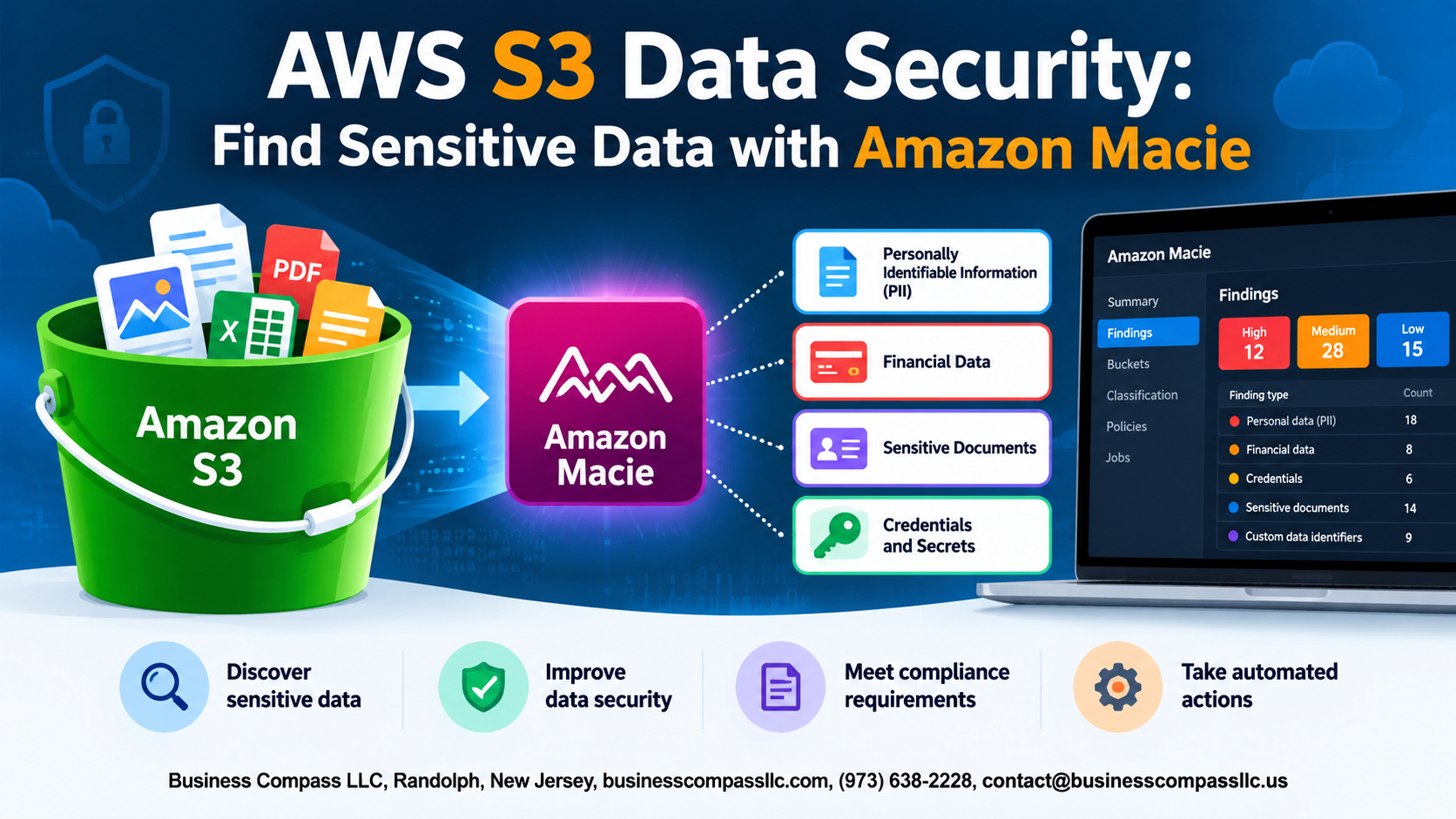
Amazon Macie automatically scans your S3 buckets for sensitive data like PII, credentials, and financial records. It flags public buckets, unencrypted objects, and risky access patterns — helping you stay ahead of breaches while meeting AWS data privacy compliance standards like GDPR, HIPAA, and PCI DSS effortlessly.
Setting Up Amazon Macie for Your S3 Environment

Prerequisites and Initial Configuration Steps
- Enable Macie via AWS Console under Security services
- Ensure IAM permissions include
macie2:* - Confirm S3 buckets exist in the target region
Connecting Macie to Your S3 Buckets
Macie auto-discovers buckets once enabled.
Customizing Sensitive Data Discovery Settings
- Add custom data identifiers for business-specific patterns
- Schedule recurring jobs targeting high-risk buckets
Running Sensitive Data Discovery Jobs Effectively

Choosing Between One-Time and Scheduled Discovery Jobs
Run one-time jobs for quick audits; schedule recurring jobs for ongoing sensitive data discovery in AWS.
Targeting Specific Buckets and Object Types
Focus on high-risk buckets and filter by file types like CSV or JSON for faster results.
Using Managed and Custom Data Identifiers
Combine AWS-managed identifiers with custom regex patterns to catch industry-specific sensitive data.
Monitoring Job Progress
Track status via the Macie console dashboard.
Interpreting and Acting on Macie Findings

Breaking Down the Macie Findings Dashboard
Review findings by severity, data type, and bucket location to quickly spot patterns.
Prioritizing High-Severity Findings for Immediate Action
Focus on credentials and financial data first—these carry the highest breach risk.
Automating Responses with AWS Security Hub and EventBridge
- Route Macie findings to Security Hub
- Trigger EventBridge rules to auto-quarantine buckets
Reducing Costs While Maximizing Macie Coverage

Estimating Macie Costs Before Running Large Jobs
Use Macie’s built-in cost estimator before scanning large buckets — it shows projected charges based on data volume.
Scoping Discoveries Strategically
Target high-risk buckets first. Exclude logs, backups, and already-reviewed data to reduce Amazon Macie costs significantly.
Leveraging S3 Inventory Reports
S3 Inventory helps identify bucket sizes upfront, letting you prioritize scanning smartly.
Tracking Usage Over Time
Monitor Macie usage via AWS Cost Explorer regularly.

Keeping sensitive data safe in AWS S3 is not something you want to leave to chance. From understanding the real risks of exposed data to setting up Amazon Macie, running discovery jobs, and making sense of the findings, you now have a solid roadmap for taking control of your S3 security. And with the right approach, you can do all of this without letting your costs spiral out of control.
The next step is simple — if you haven’t already, go ahead and enable Amazon Macie in your AWS environment and run your first sensitive data discovery job. You might be surprised by what’s sitting in your buckets. The sooner you know, the sooner you can fix it.