Stop Letting Unscanned Files Into Your S3 Buckets
If your app accepts file uploads and drops them straight into S3 without scanning, you’re one bad upload away from a serious problem. Infected files sitting in your cloud storage can spread to other systems, hit your users, and create a compliance nightmare that’s genuinely painful to clean up.
This guide is for Node.js developers and backend engineers building file upload features on AWS who want to add real, automated malware scanning — not just checkbox security.
Here’s what we’ll walk through together:
- Why secure S3 file uploads need malware scanning baked in — not bolted on after something goes wrong
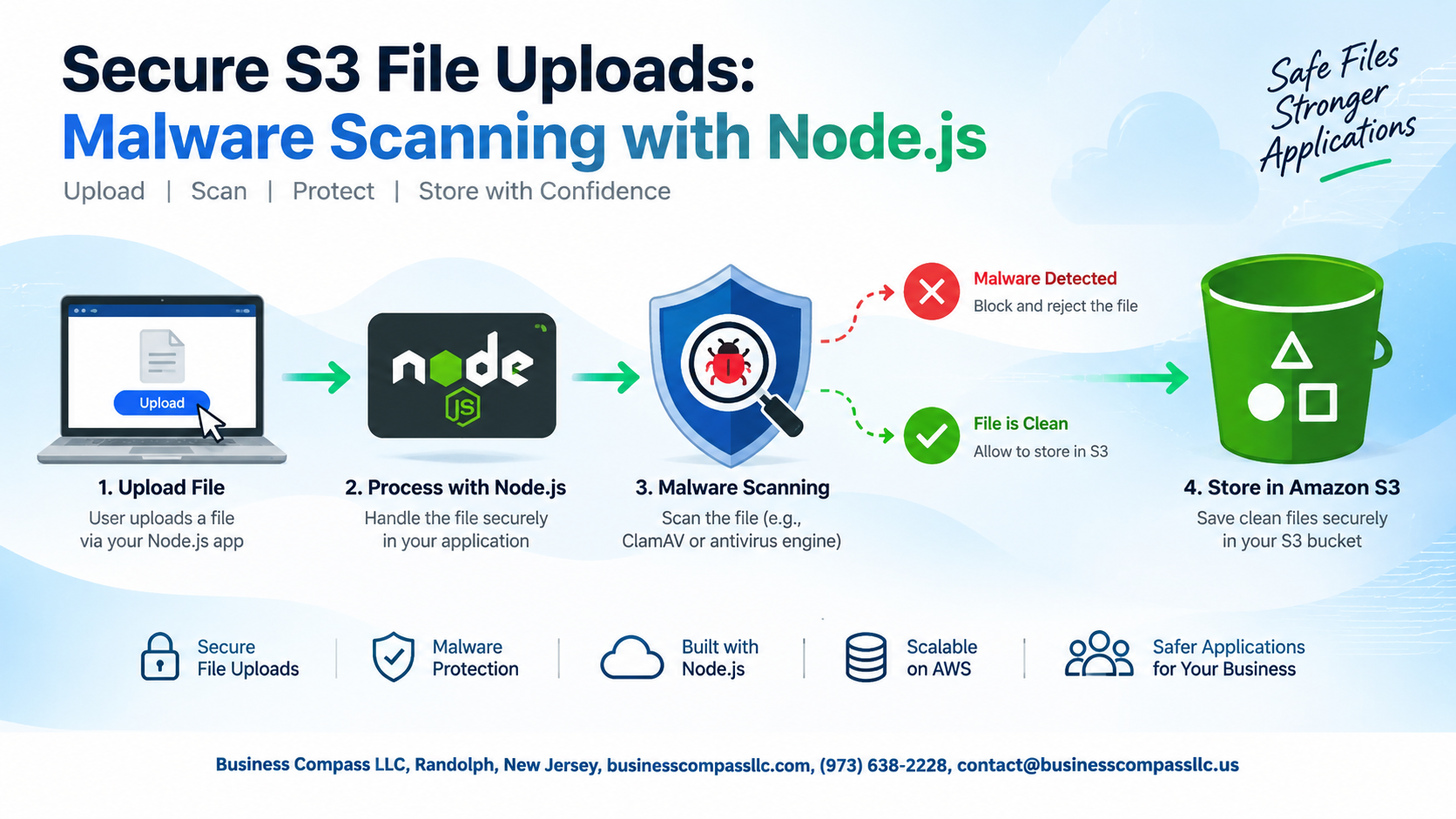
- How to build a Node.js S3 upload pipeline that scans every file before it reaches your main storage bucket
- How to wire up AWS Lambda and S3 event triggers so scans run automatically and your team gets alerted the moment something suspicious shows up
By the end, you’ll have a solid, production-ready approach to AWS S3 virus scanning that you can actually ship with confidence.
Why Malware Scanning S3 Uploads Is Non-Negotiable

Real-World Risks of Unscanned File Uploads
Unscanned uploads can silently weaponize your infrastructure—spreading ransomware, exfiltrating data, or corrupting systems.
Common Attack Vectors Targeting Cloud Storage
- Malicious PDFs, disguised executables, infected images
Compliance and Liability Implications of Skipping Scans
HIPAA, PCI-DSS, and GDPR all demand secure S3 file uploads. Skipping AWS S3 virus scanning exposes you to massive fines and lawsuits.
Choosing the Right Malware Scanning Solution for S3

Comparing ClamAV, VirusTotal, and Commercial APIs
When picking an S3 malware scanning tool, your three main options are:
- ClamAV – free, open-source, self-hosted
- VirusTotal API – multi-engine, pay-per-scan
- Commercial APIs (e.g., Metadefender) – managed, faster detection, higher cost
Match your choice to your traffic volume and budget.
Setting Up Your Node.js Environment for Secure Uploads

A. Required Dependencies and Why Each One Matters
aws-sdk— talks directly to S3multer— handles multipart uploadsnode-clamav— runs virus checks
B. Configuring AWS SDK Credentials Safely
Use IAM roles or .env files via dotenv. Never hardcode keys.
C. Structuring Your Project for Scalability
Keep /upload, /scan, and /notify as separate modules.
Implementing the S3 Upload Pipeline with Malware Scanning

A. Accepting and Validating Files Before They Reach S3
Check MIME types and file extensions server-side before anything touches S3.
B. Routing Uploads Through a Temporary Quarantine Bucket
Drop every upload into a quarantine bucket first.
C. Triggering the Malware Scan Automatically on Upload
S3 event triggers fire your Lambda scanner instantly.
D. Moving Clean Files to the Production Bucket
Only verified clean files get moved.
E. Blocking and Deleting Infected Files Immediately
Delete infected files right away, no exceptions.
Automating Scans with AWS Lambda and S3 Event Triggers

Creating a Lambda Function to Invoke Your Scanner
Deploy a Node.js Lambda that triggers on S3 ObjectCreated events, downloads the file, and runs your scanner.
Connecting S3 Event Notifications to Your Lambda
Link your bucket’s event notifications directly to the Lambda ARN.
Handling Scan Timeouts and Large File Edge Cases
- Stream large files instead of loading them into memory
- Set Lambda timeout to 15 minutes max
Responding to Threats and Alerting Your Team

Logging Infected File Metadata for Audit Trails
Log filename, S3 key, timestamp, and scan result to CloudWatch or a database immediately after detection.
Sending Real-Time Alerts via SNS or Slack
Trigger SNS notifications or Slack webhooks with infected file details so your team responds fast.
Notifying End Users Without Exposing Security Details
Tell users their file “failed validation” — skip mentioning malware scanning specifics.
Building a Quarantine Review Workflow
Move flagged files to a restricted quarantine bucket, tag them, and assign ownership for manual review.
Testing and Hardening Your Scanning Implementation

Using EICAR Test Files to Verify Scanner Accuracy
Upload the standard EICAR test file to confirm your scanner catches threats without risking real malware.
Simulating High-Volume Upload Scenarios
- Stress-test your Node.js S3 upload pipeline with concurrent requests
Reviewing IAM Permissions to Follow Least Privilege
- Grant Lambda only
s3:GetObjectands3:PutObjectTagging
Keeping your S3 uploads clean isn’t just a nice-to-have — it’s the kind of thing that can save you from a really bad day. From picking the right scanning solution to wiring up your Node.js pipeline, setting up Lambda triggers, and making sure your team gets alerted when something looks off, every piece of this setup works together to keep malicious files from sneaking into your storage.
The good news is that once everything is in place and tested, it largely runs itself. Take the time to harden your implementation, run real-world threat scenarios, and don’t skip the alerting piece — knowing about a threat in real time is what turns a potential disaster into a quick fix. Start with the basics, build it out step by step, and you’ll have a solid, automated defense layer sitting quietly between your users and your data.