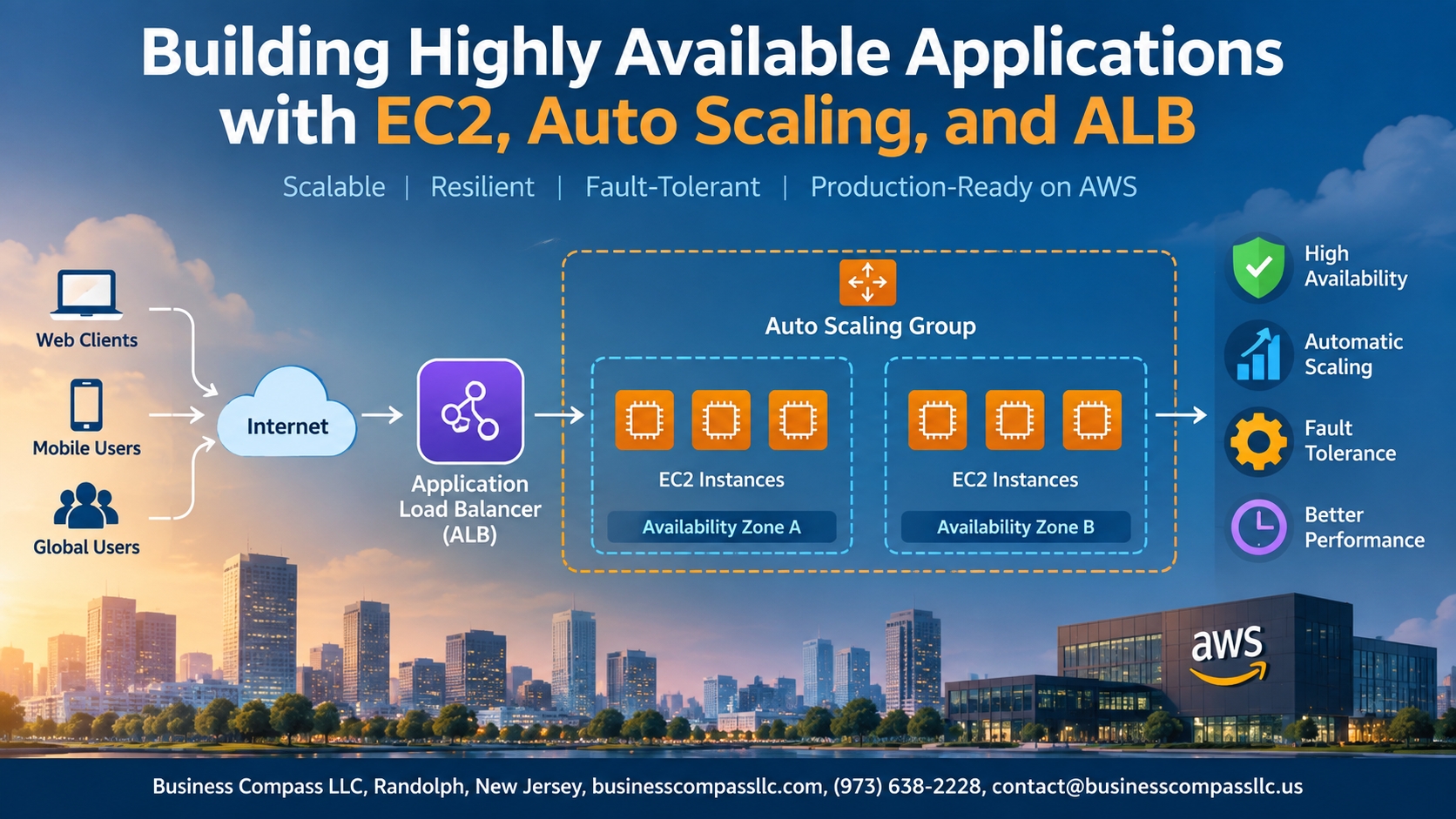
Stop Worrying About Downtime: Build Highly Available Applications with EC2, Auto Scaling, and ALB
Your app going down at 2 AM is not a fun call to get. If you’re a cloud engineer, solutions architect, or developer moving workloads to AWS, building a high availability AWS architecture is one of the most practical skills you can have in your toolkit.
This guide walks you through exactly how to do that — no fluff, no theory dumps.
Here’s what you’ll get out of this:
- How EC2 Auto Scaling works and why it’s your best defense against traffic spikes and instance failures
- How to set up an Application Load Balancer to distribute traffic across healthy instances automatically
- How to connect all the pieces into a fault-tolerant architecture that stays up even when things break
By the end, you’ll know how to design scalable cloud infrastructure that handles real-world failures without manual intervention. Whether you’re studying for an AWS cert or building production systems, the concepts here apply directly to what you’ll actually ship.
Let’s get into it.
Understanding High Availability and Why It Matters

A. High Availability and Business Continuity
High availability (HA) keeps your app running despite failures, targeting 99.9%+ uptime.
B. The Real Cost of Downtime
Downtime costs businesses thousands per minute — lost revenue, damaged reputation, unhappy users.
C. AWS Services Eliminating Single Points of Failure
- EC2 Auto Scaling replaces failed instances automatically
- ALB reroutes traffic instantly
- Multi-AZ deployments ensure resilience across AWS high availability architecture
Getting Started with EC2 for Reliable Compute Power

A. Choose the Right EC2 Instance Types
Pick compute-optimized for CPU-heavy tasks, memory-optimized for databases.
B. Leverage Multiple Availability Zones
Spread instances across AZs to build a truly fault-tolerant architecture on AWS.
C. Use Placement Groups
Cluster for low latency; spread for fault tolerance.
D. Secure Instances
Attach IAM roles; tighten security groups to minimal required ports.
Scaling Automatically with EC2 Auto Scaling

Set up Auto Scaling Groups to Match Demand Without Overpaying
EC2 Auto Scaling groups automatically add or remove instances based on actual traffic, keeping your auto scaling groups AWS setup lean. Pair this with predictive scaling, real-time policies, health checks for automatic instance replacement, and mixed On-Demand/Spot fleets to cut costs while maintaining solid high availability AWS performance.
Distributing Traffic Efficiently with Application Load Balancer

A. How ALB Routes Traffic Intelligently
ALB distributes incoming requests across healthy EC2 instances using round-robin or least-outstanding-requests algorithms.
B. Target Groups
Point your ALB to specific instance groups, ports, or Lambda functions.
C. Health Checks
Auto-removes unhealthy instances from rotation.
D. Advanced Routing
Split traffic by URL path or hostname across multiple services.
Designing a Fault-Tolerant Architecture End to End

Integrate EC2, Auto Scaling, and ALB into a Unified Resilient Setup
Pair your Auto Scaling group with an ALB across multiple Availability Zones, so traffic routes only to healthy EC2 instances.
Test Failure Scenarios
- Terminate instances manually and watch Auto Scaling replace them.
Monitor with CloudWatch
- Set alerts for CPU, latency, and unhealthy host counts.

Building highly available applications doesn’t have to be complicated. By combining EC2’s reliable compute power, Auto Scaling’s ability to grow and shrink with demand, and the Application Load Balancer’s smart traffic distribution, you get an architecture that stays up and running even when things go wrong. Tying all of this together into a fault-tolerant end-to-end design means your users get a smooth experience without ever knowing there was a hiccup behind the scenes.
Now it’s time to put this into practice. Start small if you need to — spin up a few EC2 instances, set up a basic Auto Scaling group, and put an ALB in front of it. As you get comfortable, layer in more resilience across multiple availability zones. The goal is to build something that can handle the unexpected, because in production, the unexpected always shows up eventually.