


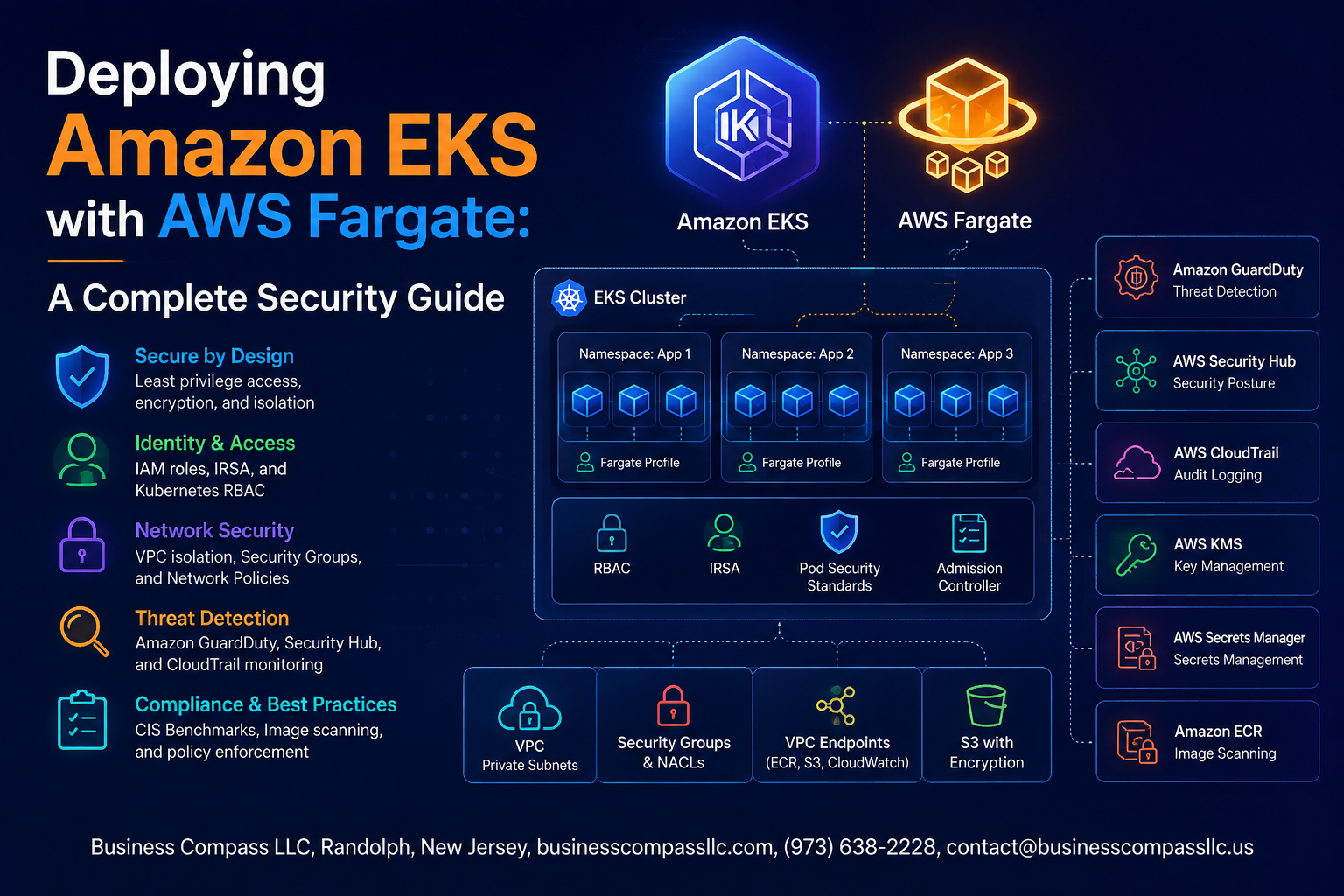
Deploying Amazon EKS with AWS Fargate: A Complete Security Guide
Running Kubernetes on AWS gets a lot easier with Amazon EKS and AWS Fargate — but easy setup doesn’t automatically mean secure setup. If you’re a DevOps engineer, cloud architect, or security-focused developer trying to lock down your containerized workloads without managing the underlying infrastructure, this guide is written for you.
We’ll walk through how to build a secure EKS cluster with Fargate from the ground up — starting with the core architecture so you know exactly what you’re working with. From there, we’ll get into hardening pod security using Fargate best practices and Fargate pod security policies, because default configurations leave more gaps than most teams realize. We’ll also cover managing secrets in Kubernetes the right way, setting up AWS EKS network security controls, and putting solid EKS monitoring and auditing practices in place so you can catch threats before they become incidents.
No fluff, no theory-only content — just practical steps to help you ship secure Kubernetes workloads on AWS with confidence.
Understanding Amazon EKS and AWS Fargate Architecture

How EKS and Fargate Work Together to Simplify Container Management
AWS Fargate removes the need to manage EC2 nodes — EKS schedules pods directly onto Fargate’s serverless compute, handling OS patching automatically.
Key Differences Between Fargate and EC2 Launch Types for Security
- Fargate: Isolated per-pod micro-VMs, no shared kernel
- EC2: Shared node, broader attack surface
Core Components Defining Your Cluster Security Posture
IAM roles, pod execution roles, and VPC networking form your foundation.
Setting Up a Secure EKS Cluster with Fargate

A. Configuring IAM Roles for Least Privilege
Attach only necessary permissions to your EKS node and pod execution roles.
B. Creating Fargate Profiles
Target specific namespaces and labels to control pod scheduling tightly.
C. Enabling Private Endpoint Access
Block public API server exposure completely.
D. VPC Networking Rules
Isolate workloads using private subnets and strict security groups.
Hardening Pod Security with Fargate Best Practices
Applying Pod Security Standards to Prevent Privilege Escalation
Use the restricted Pod Security Standard to block privilege escalation in your EKS Fargate pods.
Enforcing Read-Only File Systems and Dropping Unnecessary Capabilities
- Set
readOnlyRootFilesystem: true - Drop
ALLcapabilities
Using Resource Limits to Reduce the Attack Surface
Always define CPU/memory limits to prevent noisy-neighbor attacks.
Managing Secrets and Sensitive Data Securely

Integrating AWS Secrets Manager to Eliminate Hardcoded Credentials
Use the AWS Secrets Manager CSI driver to mount secrets directly into Fargate pods, keeping credentials out of your codebase entirely.
Encrypting Kubernetes Secrets with AWS KMS
Enable envelope encryption on your EKS cluster using a customer-managed KMS key.
Using IRSA to Grant Pods Scoped AWS Permissions
Bind IAM roles to Kubernetes service accounts for least-privilege pod access.
Implementing Network Security Controls

A. Kubernetes Network Policies
Restrict pod-to-pod traffic using label selectors to allow only necessary connections.
B. Security Groups for Pods
Attach AWS security groups directly to pods for granular traffic control.
C. AWS WAF for Ingress
Block malicious requests before they hit your services.
D. VPC Flow Logs
Capture and analyze traffic patterns to spot anomalies fast.
Monitoring, Auditing, and Responding to Threats

A. Enable GuardDuty for EKS Runtime Threat Detection
Activate GuardDuty’s EKS Runtime Monitoring to catch suspicious container behavior instantly.
B. Centralize Logs with CloudWatch Container Insights
Stream pod logs directly to CloudWatch for real-time EKS monitoring and auditing.
C. Audit API Activity with CloudTrail
Track every cluster API call automatically.
D. Automate Incident Response with Security Hub
Connect GuardDuty findings to Security Hub, triggering Lambda-based remediation workflows.
E. Scan Container Images Regularly
Use Amazon ECR’s built-in scanning to catch vulnerabilities before deployment.

Securing your Amazon EKS workloads on AWS Fargate does not have to be overwhelming. By building a strong foundation with a properly configured cluster, locking down pod security, handling secrets the right way, setting up solid network controls, and keeping a close eye on what is happening across your environment, you can run containerized workloads with real confidence. Each layer of security works together, so skipping one can leave gaps that put your entire setup at risk.
Now is a great time to take a hard look at your current EKS Fargate setup and see where you stand. Start with the basics, work through each security layer, and make monitoring and threat response a regular habit rather than an afterthought. The effort you put in now will save you a lot of headaches down the road and keep your applications and data in safe hands.









