


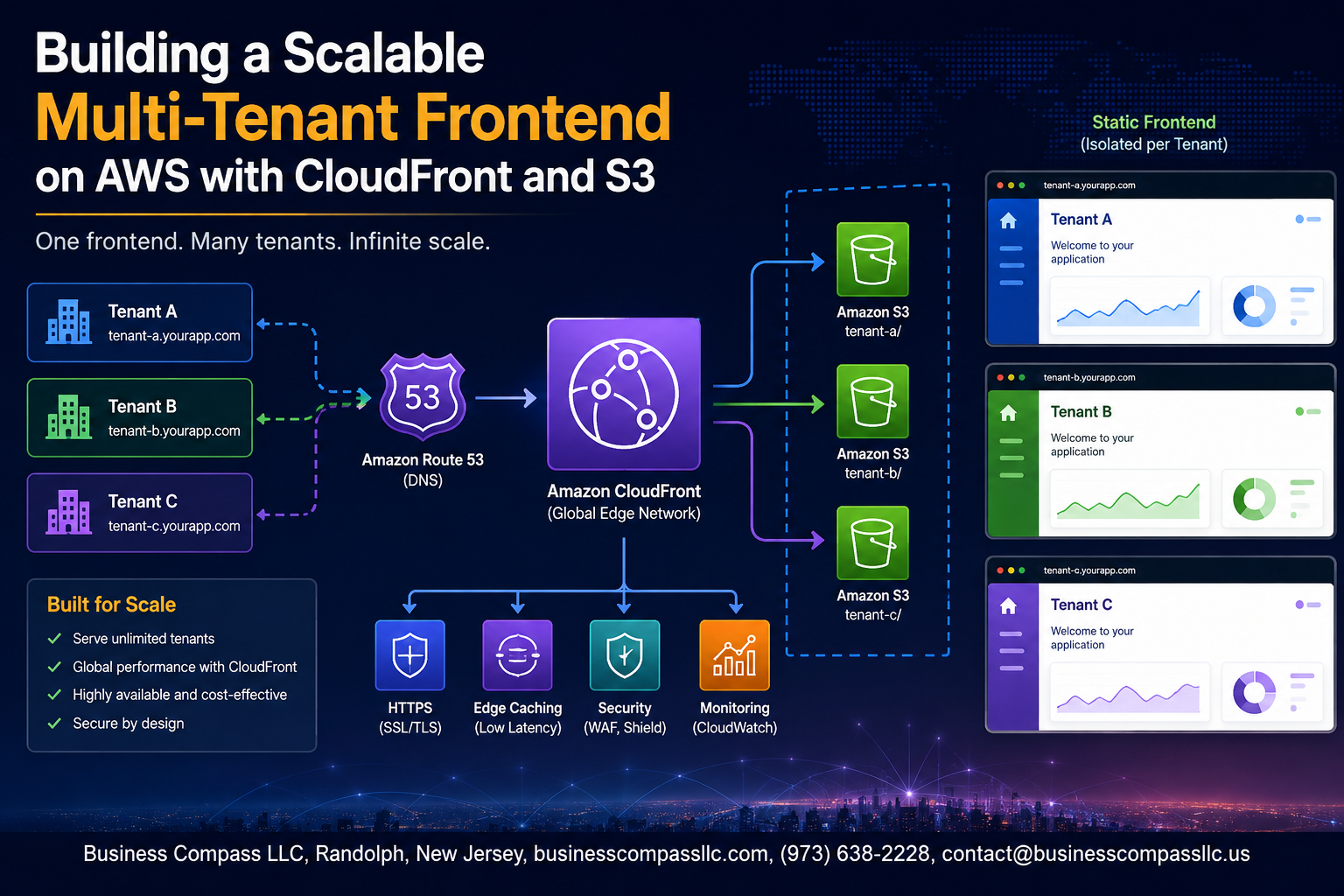
Building a Scalable Multi-Tenant Frontend on AWS with CloudFront and S3
If you’re building a SaaS product and need one frontend to serve dozens — or hundreds — of different customers without spinning up separate infrastructure for each one, you’re in the right place. This guide is for frontend engineers, solutions architects, and SaaS developers who want a clean, production-ready approach to multi-tenant frontend AWS architecture using tools they likely already have access to.
We’ll walk through the core pieces that actually matter: how to design your CloudFront S3 multi-tenancy setup so each tenant gets their own isolated content, how to handle tenant routing and identification so the right customer always sees the right experience, and how to lock down security so one tenant’s data never bleeds into another’s.
By the end, you’ll have a solid blueprint for a scalable SaaS frontend architecture that grows with your customer base — without your infrastructure costs or your ops headaches growing at the same rate.
Understanding Multi-Tenant Frontend Architecture

Key Differences Between Single-Tenant and Multi-Tenant Frontends
Single-tenant apps serve one customer per deployment. Multi-tenant frontends share infrastructure across customers, using tenant IDs to separate experiences.
Why AWS CloudFront and S3 Are Ideal for Multi-Tenancy
- Global edge caching
- Cost-efficient shared storage
Common Challenges
- Cross-tenant data leakage
- Routing complexity
Designing Your S3 Bucket Strategy for Multiple Tenants

A. Choosing Between Shared and Isolated Bucket Approaches
- Isolated buckets offer stronger tenant isolation AWS frontend security
- Shared buckets reduce costs but require strict folder-level controls
B. Organizing Folder Structures
- Use
/tenant-id/assets/prefixes consistently
C. Bucket Policies Per Tenant
- Scope IAM policies to tenant prefixes
D. Versioning for Safe Deployments
- Enable versioning for easy rollbacks
Configuring CloudFront for Tenant-Specific Content Delivery

Using Custom Domains and SSL Certificates for Each Tenant
- Map
tenant.yoursaas.comsubdomains using Route 53 and ACM wildcard certificates.
Leveraging CloudFront Origins to Route Tenant Traffic Correctly
- Point each tenant’s origin to their dedicated S3 prefix or bucket.
Setting Up Cache Behaviors to Isolate Tenant Responses
- Use path patterns and custom headers to keep tenant cached content completely separate, preventing cross-tenant leakage.
Implementing Tenant Routing and Identification Logic

Using Subdomains vs. Path-Based Routing
- Subdomains (
tenant.app.com) feel cleaner for branding; path-based (app.com/tenant) is simpler to manage.
Extracting Tenant Context at the Edge
CloudFront Functions read the host header, pulling tenant ID before requests hit your origin.
Passing Tenant Headers Downstream
Forward a custom X-Tenant-ID header to backend services for scoped data access.
Handling Unknown Tenants
Return a branded 404 or redirect unknown tenants immediately at the edge.
Testing Routing Logic
Run curl requests simulating different tenant subdomains across staging configurations.
Securing Tenant Data and Preventing Cross-Tenant Leakage

Enforcing Origin Access Control Between CloudFront and S3
Use OAC policies to block direct S3 access, ensuring only CloudFront serves tenant content.
Restricting Cache Sharing to Prevent Data Bleed Between Tenants
- Add tenant ID to cache keys via headers or query strings
Auditing Access Logs to Detect Unauthorized Tenant Activity
Enable S3 and CloudFront access logs, then push them to CloudWatch for real-time alerts on cross-tenant anomalies.
Automating Tenant Onboarding and Infrastructure Provisioning

Using Infrastructure as Code to Spin Up Tenant Resources Quickly
Automating tenant onboarding with AWS CloudFormation or Terraform cuts manual work dramatically. A reusable template handles S3 buckets, CloudFront distributions, SSL certificates via ACM, and DNS records automatically — spinning up a fully isolated tenant environment in minutes, making scalable SaaS frontend architecture genuinely achievable without engineering bottlenecks.
Monitoring Performance and Optimizing Costs at Scale

Tracking Per-Tenant Usage with CloudFront Access Logs and Metrics
Enable CloudFront access logs per distribution, sending data to S3 or CloudWatch for tenant-level breakdowns.
Reducing Latency by Fine-Tuning Cache TTL Settings
- Set longer TTLs for static assets
- Shorter TTLs for tenant-specific configs
Controlling Costs by Optimizing S3 Storage Classes
Move rarely accessed tenant assets to S3-IA automatically.

Building a scalable multi-tenant frontend on AWS doesn’t have to be overwhelming. By structuring your S3 buckets thoughtfully, configuring CloudFront for tenant-specific delivery, and nailing your routing and identification logic, you set yourself up with a solid foundation that grows with your user base. Keeping tenant data secure, preventing cross-tenant leakage, and automating onboarding are what separate a system that just works from one that’s genuinely production-ready.
The last piece of the puzzle — monitoring performance and keeping costs in check — is what keeps everything sustainable long-term. Start small, automate early, and revisit your architecture as your tenant count grows. If you’re ready to get started, pick one section from this guide, apply it to your current setup, and build from there. Small, deliberate steps lead to a system you’ll actually be proud to scale.









