

AWS CDK for Healthcare: How to Build a Scalable and Secure Patient Portal
Building a patient portal on AWS sounds straightforward until you hit the reality of HIPAA compliance, data encryption, audit logs, and access controls — all before a single patient logs in.
This guide is for cloud engineers, healthcare developers, and DevOps teams who need to ship a secure patient portal on AWS without reinventing the wheel every time compliance comes up. If you’re already comfortable with AWS basics but want a structured, repeatable way to handle AWS CDK healthcare infrastructure, you’re in the right place.
Here’s what we’ll walk through together:
- Why AWS CDK is a strong fit for healthcare apps — specifically how infrastructure as code cuts down on human error and keeps your environments consistent
- How to design a HIPAA-compliant AWS architecture that scales with patient load without turning into a security nightmare
- What monitoring and cost optimization actually look like in a healthcare context — because logging everything and spending everything are two very different things
No fluff, no theory for theory’s sake. Just practical patterns you can start applying to your own AWS CDK infrastructure today.
Why AWS CDK Is the Right Choice for Healthcare Applications

A. Simplify Complex Infrastructure with Reusable Code Constructs
B. Accelerate Deployment While Maintaining Compliance Standards
C. Reduce Human Error with Automated Infrastructure Provisioning
AWS CDK healthcare teams love how reusable constructs turn complex, HIPAA compliant AWS architecture into shareable building blocks. Deploy a secure patient portal cloud environment in hours, not weeks. Automated provisioning eliminates manual misconfigurations—your biggest compliance risk—making AWS CDK infrastructure as code the smartest foundation for any healthcare application.
Key Healthcare Compliance Requirements to Address from the Start

A. Understanding HIPAA Obligations for Patient Data Protection
Encrypt data at rest and in transit, sign a BAA with AWS, and restrict PHI access tightly.
B. Implementing Audit Trails
Use AWS CloudTrail and CloudWatch for tamper-proof logs.
C. Data Residency
Pin workloads to specific AWS regions.
D. Role-Based Access Controls
Apply least-privilege IAM policies across all patient records.
Designing a Scalable Patient Portal Architecture with AWS CDK

A. Structuring Your CDK App for Modular Growth
Break your CDK app into stacks: networking, compute, data, and security. This keeps teams independent and deployments clean.
B. Right AWS Services for Each Layer
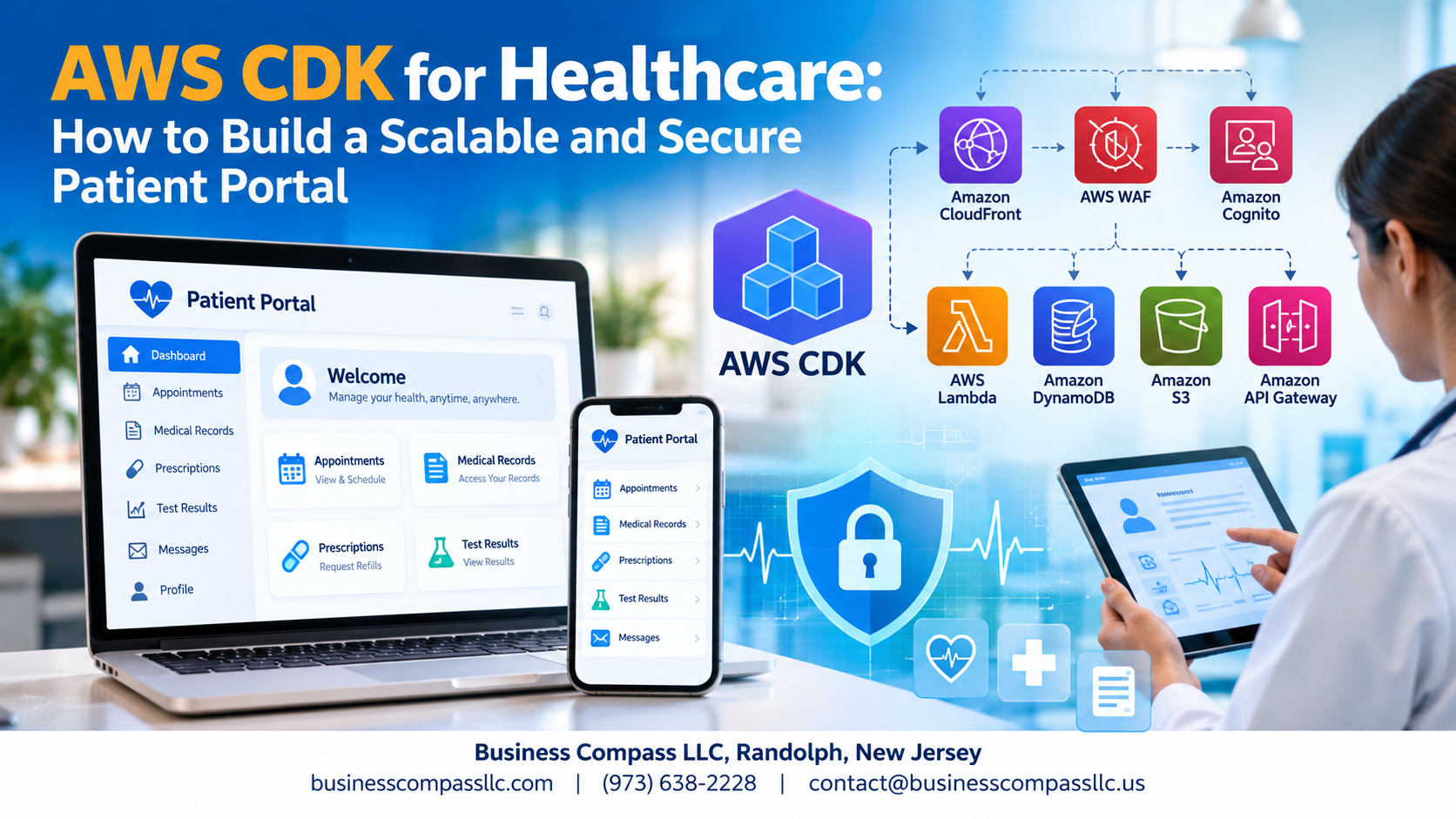
- Frontend: CloudFront + S3
- Backend: Lambda, API Gateway
- Data: DynamoDB, RDS Aurora
Auto Scaling handles patient traffic spikes automatically, keeping your HIPAA compliant AWS architecture responsive without over-provisioning.
Locking Down Security at Every Layer of the Portal

Encrypting Patient Data at Rest and in Transit Using AWS KMS
Use AWS KMS with CDK to auto-encrypt patient records across DynamoDB, S3, and RDS.
Securing Authentication with Amazon Cognito and MFA
Cognito handles login flows with built-in MFA, keeping unauthorized users out of your HIPAA compliant AWS architecture.
Protecting APIs with WAF and Shield
Block SQL injection and DDoS attacks targeting your patient portal APIs automatically.
Applying Least Privilege IAM Roles
Grant each Lambda or service only the exact permissions needed—nothing more.
Monitoring, Logging, and Incident Response for Healthcare Systems

Gaining Full Visibility with CloudWatch Dashboards and Alarms
Set up real-time CloudWatch dashboards tracking API latency, error rates, and login attempts.
Centralizing Logs with AWS CloudTrail for Compliance Audits
CloudTrail captures every API call, keeping your HIPAA compliant AWS architecture audit-ready.
Automating Incident Detection and Response with AWS Config
AWS Config flags misconfigurations automatically, triggering Lambda remediation before breaches happen.
Optimizing Cost Without Sacrificing Performance or Security

Right-Sizing Resources Using AWS Compute Optimizer Insights
Use Compute Optimizer recommendations directly in your CDK stacks to match instance types to actual workload patterns.
Cutting Storage Costs with Intelligent Tiering in Amazon S3
Configure S3 Intelligent-Tiering in CDK for automatic cost-optimized healthcare cloud storage without touching compliance guardrails.
Eliminating Idle Resources Through CDK Scheduled Automation
CDK-scheduled Lambda functions can spin down non-critical resources overnight, keeping your cost-optimized healthcare cloud lean without sacrificing HIPAA compliant AWS architecture standards.
Building a secure, scalable patient portal doesn’t have to feel overwhelming when you have the right tools in your corner. AWS CDK makes it possible to define your entire infrastructure as code, keeping your architecture consistent, repeatable, and compliant with healthcare regulations like HIPAA right from the start. From designing a solid multi-layer architecture to locking down security, setting up robust monitoring, and keeping costs under control, every piece of the puzzle works together to create a portal that patients and providers can actually trust.
The best part? You don’t have to trade performance for security or compliance for cost efficiency. With thoughtful planning and AWS CDK’s powerful abstractions, you can build a patient portal that scales with your organization’s needs while staying ahead of potential threats and audit requirements. If you’re ready to get started, pick up one section of your infrastructure, define it in CDK, and build from there. Small, deliberate steps lead to a production-ready healthcare application you can be proud of.