


Building production-grade EKS clusters that actually work in the real world requires more than just spinning up a few worker nodes and calling it done. This guide walks DevOps engineers, platform architects, and Kubernetes practitioners through designing EKS production architecture using the AWS Well-Architected Framework Kubernetes principles that keep systems running smoothly at scale.
You’ll learn how to architect clusters that grow with your business while keeping costs under control. We’ll dig into EKS security best practices that protect your workloads without slowing down development teams. Plus, you’ll discover proven AWS EKS design patterns for building reliable platforms that handle production traffic without breaking a sweat.
The guide covers setting up scalable cluster foundations, implementing security controls that actually make sense, and establishing DevOps workflows that teams love using. Whether you’re starting fresh or fixing an existing setup, you’ll walk away with actionable strategies for Kubernetes cluster scalability, EKS cost optimization, and performance tuning that works in production environments.
Understanding AWS Well-Architected Framework for Kubernetes
Core pillars and their application to container orchestration
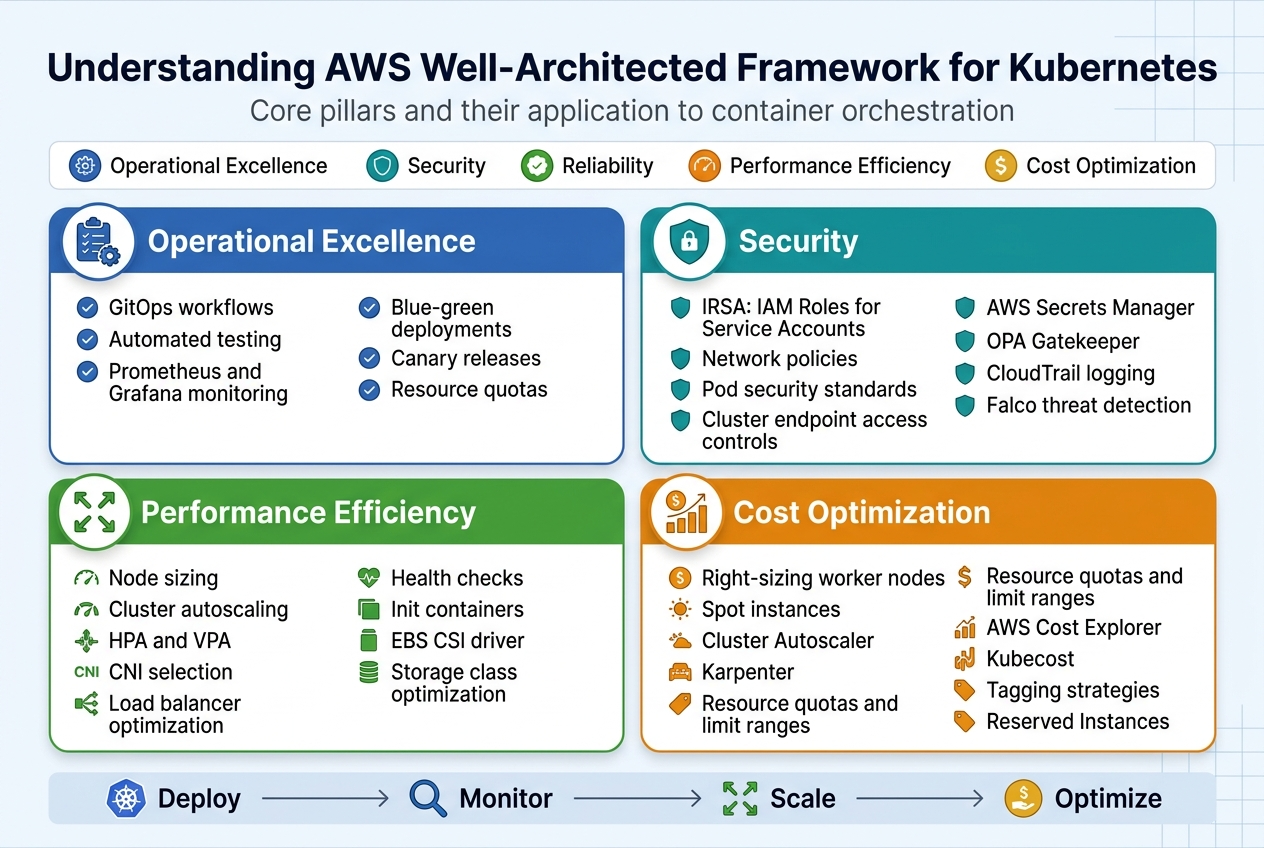
The AWS Well-Architected Framework provides five essential pillars that guide production-grade EKS cluster design: operational excellence, security, reliability, performance efficiency, and cost optimization. These principles translate directly to Kubernetes environments through automated deployment pipelines, comprehensive monitoring strategies, and infrastructure as code practices. When applied to container orchestration, these pillars ensure your EKS production architecture can scale reliably while maintaining security and cost effectiveness.
Operational excellence in EKS means implementing GitOps workflows, automated testing, and observability tools like Prometheus and Grafana. Production Kubernetes deployment strategies should include blue-green deployments, canary releases, and proper resource quotas to maintain system stability and enable rapid recovery from failures.
Security considerations specific to EKS environments
EKS security best practices start with proper IAM roles and service accounts integration through IRSA (IAM Roles for Service Accounts). Network policies, pod security standards, and cluster endpoint access controls form the foundation of a secure Kubernetes environment. Secrets management through AWS Secrets Manager or external secret operators prevents credential exposure.
Runtime security scanning, admission controllers like OPA Gatekeeper, and regular vulnerability assessments protect against threats. Enable CloudTrail logging and use tools like Falco for real-time threat detection across your containerized workloads.
Performance optimization strategies for containerized workloads
EKS performance tuning requires careful attention to node sizing, cluster autoscaling configuration, and resource allocation strategies. Horizontal Pod Autoscaling (HPA) and Vertical Pod Autoscaling (VPA) work together to optimize resource consumption based on actual workload demands. Kubernetes cluster scalability depends on proper networking configuration, including CNI selection and load balancer optimization.
Application-level optimizations include implementing proper health checks, using init containers for dependencies, and configuring appropriate resource requests and limits. Persistent volume performance can be enhanced through EBS CSI driver configuration and storage class optimization.
Cost management principles for cloud-native infrastructure
EKS cost optimization starts with right-sizing worker nodes and leveraging Spot instances for non-critical workloads. Cluster Autoscaler and Karpenter help maintain optimal node utilization by automatically scaling infrastructure based on pod scheduling requirements. Resource quotas and limit ranges prevent cost overruns from misconfigured applications.
Regular cost analysis through AWS Cost Explorer and third-party tools like Kubecost provides visibility into spending patterns. Implementing proper tagging strategies and using Reserved Instances for predictable workloads can significantly reduce operational expenses while maintaining performance standards.
Setting Up Scalable EKS Cluster Architecture
Multi-availability zone deployment strategies
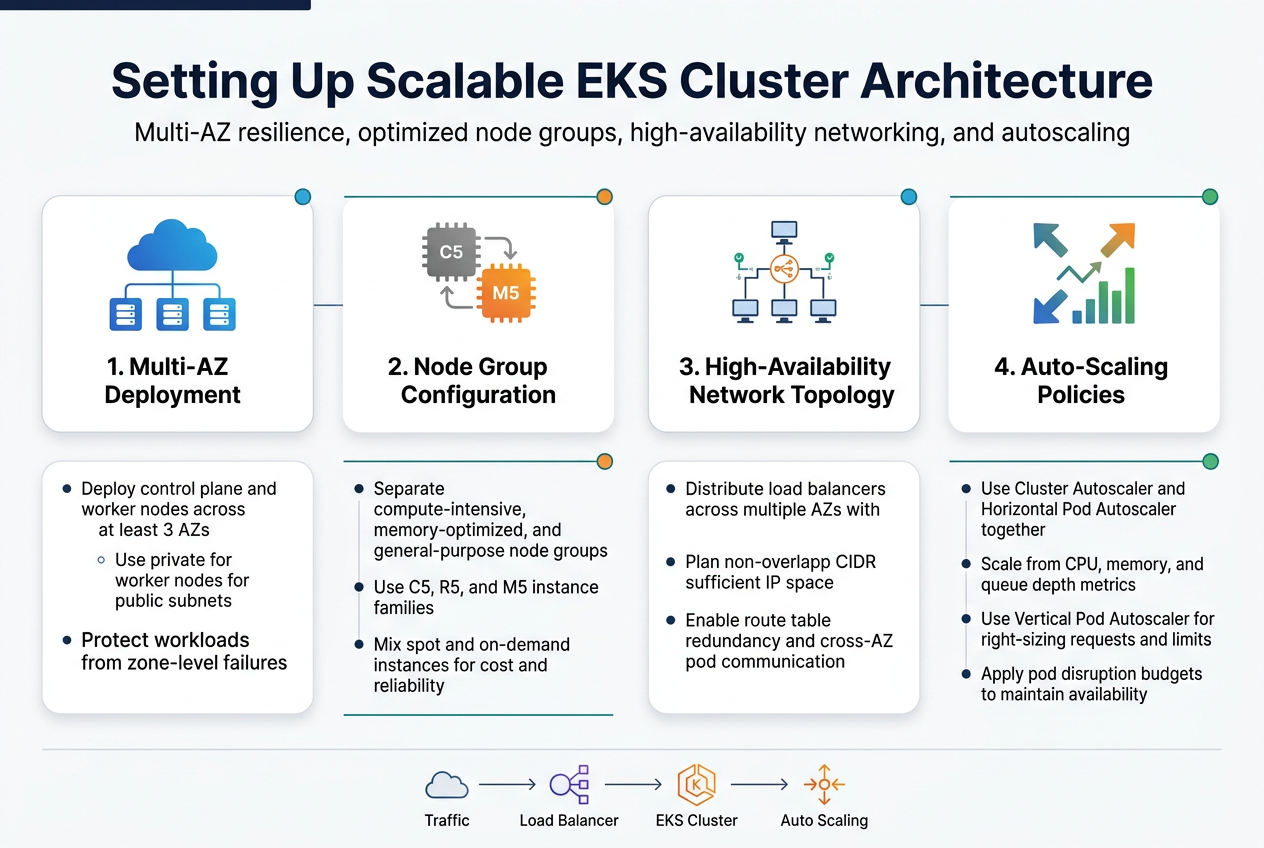
Spreading your EKS cluster across multiple availability zones creates the foundation for a resilient production-grade EKS cluster. Deploy your control plane and worker nodes across at least three AZs within a single region to protect against zone-level failures. This AWS Well-Architected Framework approach ensures your applications stay running even when an entire data center goes down.
Configure your subnets strategically with both private and public subnets in each AZ. Place worker nodes in private subnets while keeping load balancers in public subnets. This network segmentation pattern strengthens security while maintaining high availability for your production Kubernetes deployment.
Node group configuration for optimal resource utilization
Design diverse node groups based on workload characteristics rather than using one-size-fits-all instances. Create separate node groups for compute-intensive applications using C5 instances, memory-optimized workloads with R5 instances, and general-purpose tasks with M5 instances. This targeted approach maximizes resource efficiency while controlling costs.
Mix spot and on-demand instances within your node groups to balance cost and reliability. Use spot instances for fault-tolerant workloads like batch processing while reserving on-demand instances for critical services. Configure multiple instance types within each node group to improve spot instance availability and reduce interruption rates.
Network topology design for high availability
Build your EKS network topology with redundancy at every layer. Deploy Application Load Balancers across multiple AZs with health checks that automatically route traffic away from unhealthy targets. Use Network Load Balancers for latency-sensitive applications that require consistent performance characteristics.
Implement proper CIDR planning with non-overlapping IP ranges for each subnet. Design your VPC with sufficient IP address space for cluster growth, typically using /16 or /20 CIDR blocks. Configure route tables that provide multiple paths to critical resources and enable cross-AZ communication for pod-to-pod networking.
Auto-scaling policies for dynamic workload management
Configure Cluster Autoscaler and Horizontal Pod Autoscaler to work together seamlessly. Set up node group auto-scaling policies that respond quickly to pending pods while avoiding unnecessary over-provisioning. Use custom metrics like memory usage and queue depth alongside CPU utilization for more accurate scaling decisions.
Implement Vertical Pod Autoscaler for right-sizing resource requests and limits. This helps optimize cluster density and reduces waste from over-allocated resources. Combine these scaling mechanisms with pod disruption budgets to maintain application availability during scaling events while ensuring your Kubernetes cluster scalability meets production demands.
Implementing Robust Security Controls
IAM roles and service accounts integration
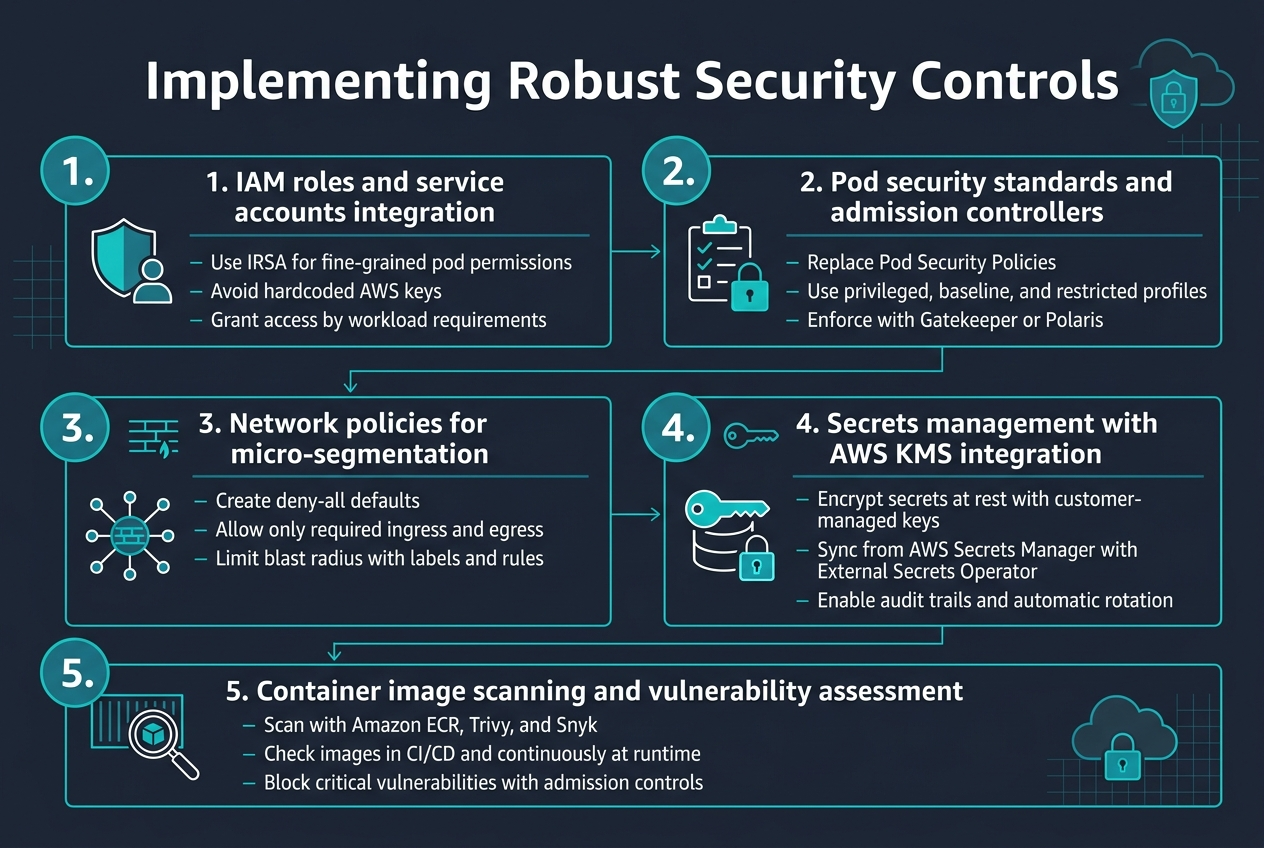
Setting up proper IAM roles with service accounts creates the foundation for secure EKS operations. Use AWS IAM Roles for Service Accounts (IRSA) to provide pods with fine-grained permissions without storing credentials. This approach eliminates the need for hardcoded AWS keys while enabling workloads to access specific AWS services based on their requirements.
Pod security standards and admission controllers
Pod Security Standards replace deprecated Pod Security Policies, offering three security profiles: privileged, baseline, and restricted. Configure admission controllers like Gatekeeper or Polaris to enforce security policies automatically. These tools validate pod specifications against your security requirements, blocking deployments that don’t meet EKS security best practices.
Network policies for micro-segmentation
Network policies create virtual firewalls between pods, enabling micro-segmentation within your cluster. Start with deny-all policies and explicitly allow required communication paths. Use labels to group workloads logically and define ingress/egress rules that match your application architecture. This defense-in-depth approach limits blast radius during security incidents.
Secrets management with AWS KMS integration
Integrate AWS KMS with EKS to encrypt secrets at rest using customer-managed keys. Deploy External Secrets Operator to sync secrets from AWS Secrets Manager directly into your cluster. This setup provides audit trails, automatic rotation capabilities, and centralized secret management across multiple environments while maintaining encryption standards.
Container image scanning and vulnerability assessment
Implement multi-layered scanning using Amazon ECR image scanning combined with tools like Trivy or Snyk. Scan images during CI/CD pipelines and continuously monitor running containers for new vulnerabilities. Set up admission controllers to block images with critical vulnerabilities from deploying to your production-grade EKS cluster, maintaining security posture automatically.
Optimizing Performance and Reliability
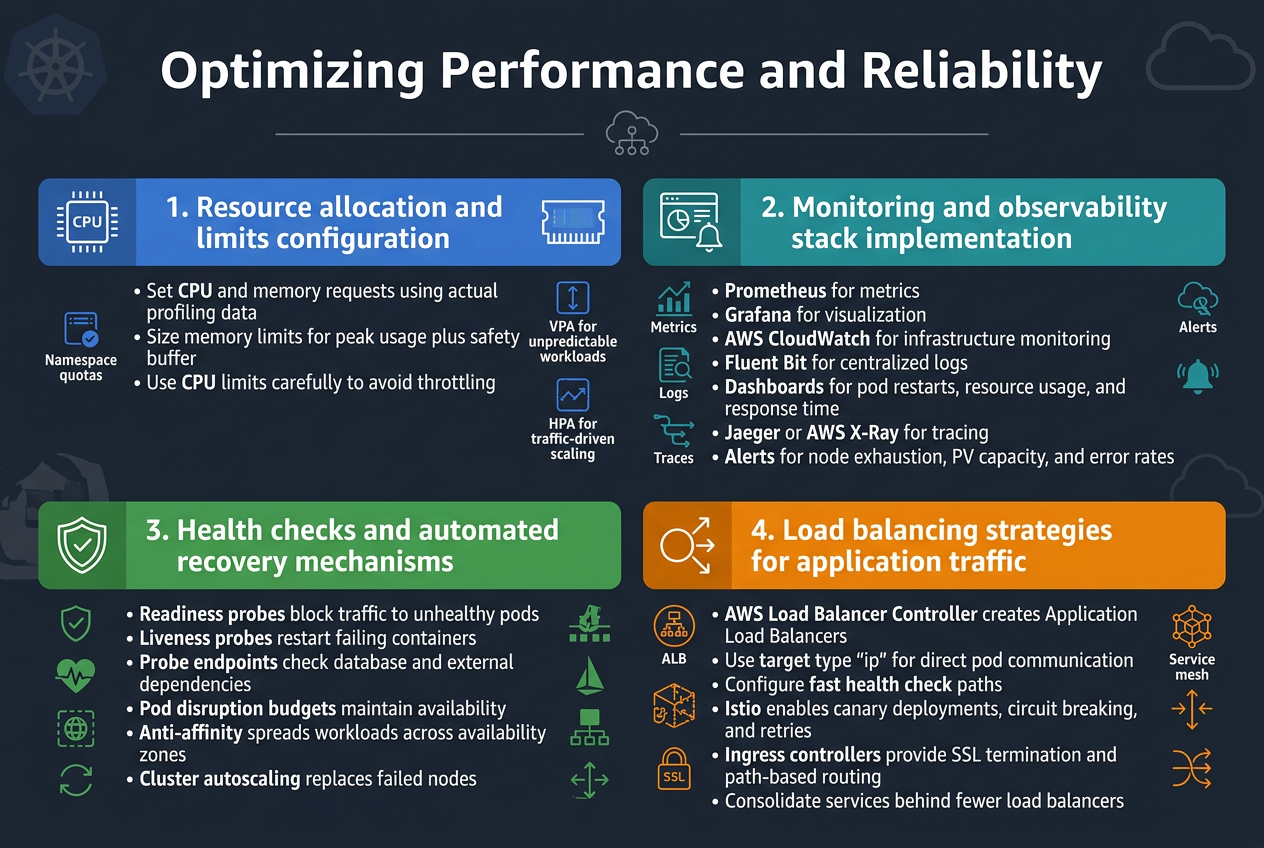
Resource allocation and limits configuration
Setting proper resource requests and limits creates the foundation for stable EKS performance. Configure CPU and memory requests based on actual application profiling data, not guesswork. Memory limits should account for peak usage patterns plus a safety buffer, while CPU limits need careful consideration to avoid throttling legitimate workloads.
Implement resource quotas at the namespace level to prevent resource hogging and guarantee fair distribution across teams. Use vertical pod autoscaling for applications with unpredictable resource patterns, and horizontal pod autoscaling for traffic-driven scaling scenarios.
Monitoring and observability stack implementation
Deploy a comprehensive monitoring stack combining Prometheus for metrics collection, Grafana for visualization, and AWS CloudWatch for infrastructure monitoring. Install Fluent Bit as a lightweight log forwarder to centralize application and cluster logs. Configure custom dashboards tracking key performance indicators like pod restart rates, resource utilization trends, and application response times.
Implement distributed tracing with Jaeger or AWS X-Ray to track request flows across microservices. Set up alerting rules for critical metrics like node resource exhaustion, persistent volume capacity, and application error rates to enable proactive issue resolution.
Health checks and automated recovery mechanisms
Configure readiness and liveness probes for every container to enable Kubernetes’ built-in healing capabilities. Readiness probes prevent traffic routing to unhealthy pods, while liveness probes restart failing containers automatically. Design probe endpoints that accurately reflect application health, including database connectivity and external service dependencies.
Implement pod disruption budgets to maintain service availability during cluster maintenance or node failures. Use anti-affinity rules to spread critical workloads across availability zones, and configure cluster autoscaling to handle node failures gracefully by launching replacement capacity.
Load balancing strategies for application traffic
Deploy the AWS Load Balancer Controller to create Application Load Balancers that integrate seamlessly with EKS services. Use target type “ip” for better performance and direct pod communication, bypassing additional network hops through kube-proxy. Configure health check paths that return quickly and accurately reflect service readiness.
Implement service mesh technologies like Istio for advanced traffic management including canary deployments, circuit breaking, and retry policies. Use ingress controllers with SSL termination and path-based routing to consolidate multiple services behind single load balancers, reducing costs while maintaining performance.
Managing Costs and Resource Efficiency
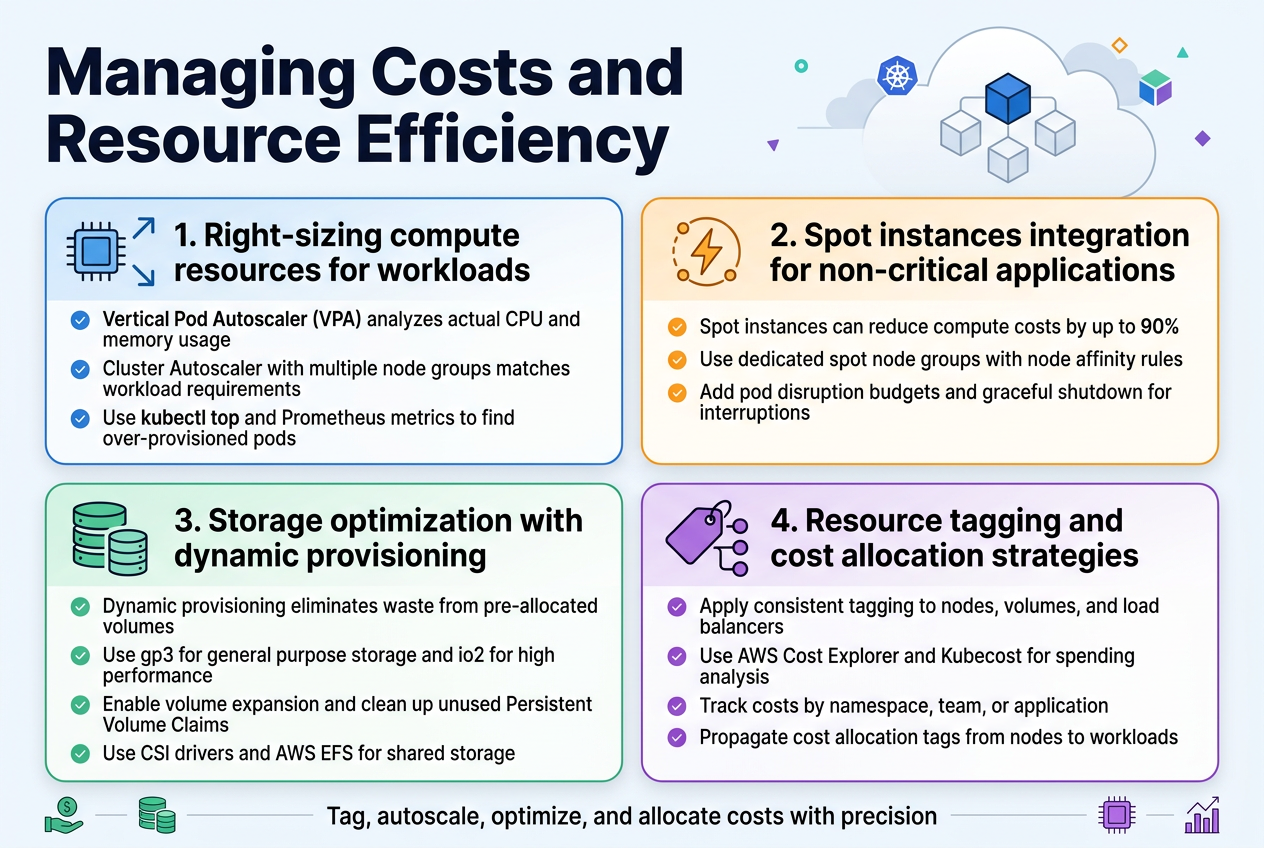
Right-sizing compute resources for workloads
Resource allocation directly impacts your EKS cost optimization strategy. Start by implementing Vertical Pod Autoscaler (VPA) to analyze actual CPU and memory usage patterns across your workloads. Configure Cluster Autoscaler with multiple node groups using different instance types – this allows matching specific workload requirements with appropriate compute resources. Consider using tools like kubectl top and Prometheus metrics to identify over-provisioned pods that consume unnecessary resources.
Spot instances integration for non-critical applications
Spot instances can reduce compute costs by up to 90% for fault-tolerant workloads in your production-grade EKS cluster. Create dedicated node groups for spot instances and use node affinity rules to schedule non-critical applications like batch jobs, CI/CD runners, and development environments. Implement pod disruption budgets and graceful shutdown procedures to handle spot interruptions effectively while maintaining application availability.
Storage optimization with dynamic provisioning
Dynamic storage provisioning eliminates waste from pre-allocated volumes. Configure StorageClasses with different performance tiers using gp3 volumes for cost-effective general purpose storage and io2 for high-performance requirements. Enable volume expansion and implement automated cleanup policies for unused Persistent Volume Claims. Use CSI drivers to leverage AWS EFS for shared storage needs across multiple pods.
Resource tagging and cost allocation strategies
Comprehensive tagging enables granular cost tracking across teams and projects. Implement consistent tagging policies for all EKS resources including nodes, volumes, and load balancers. Use AWS Cost Explorer and third-party tools like Kubecost to analyze spending patterns by namespace, team, or application. Set up cost allocation tags that automatically propagate from nodes to running workloads for accurate chargeback reporting.
Establishing DevOps and GitOps Workflows
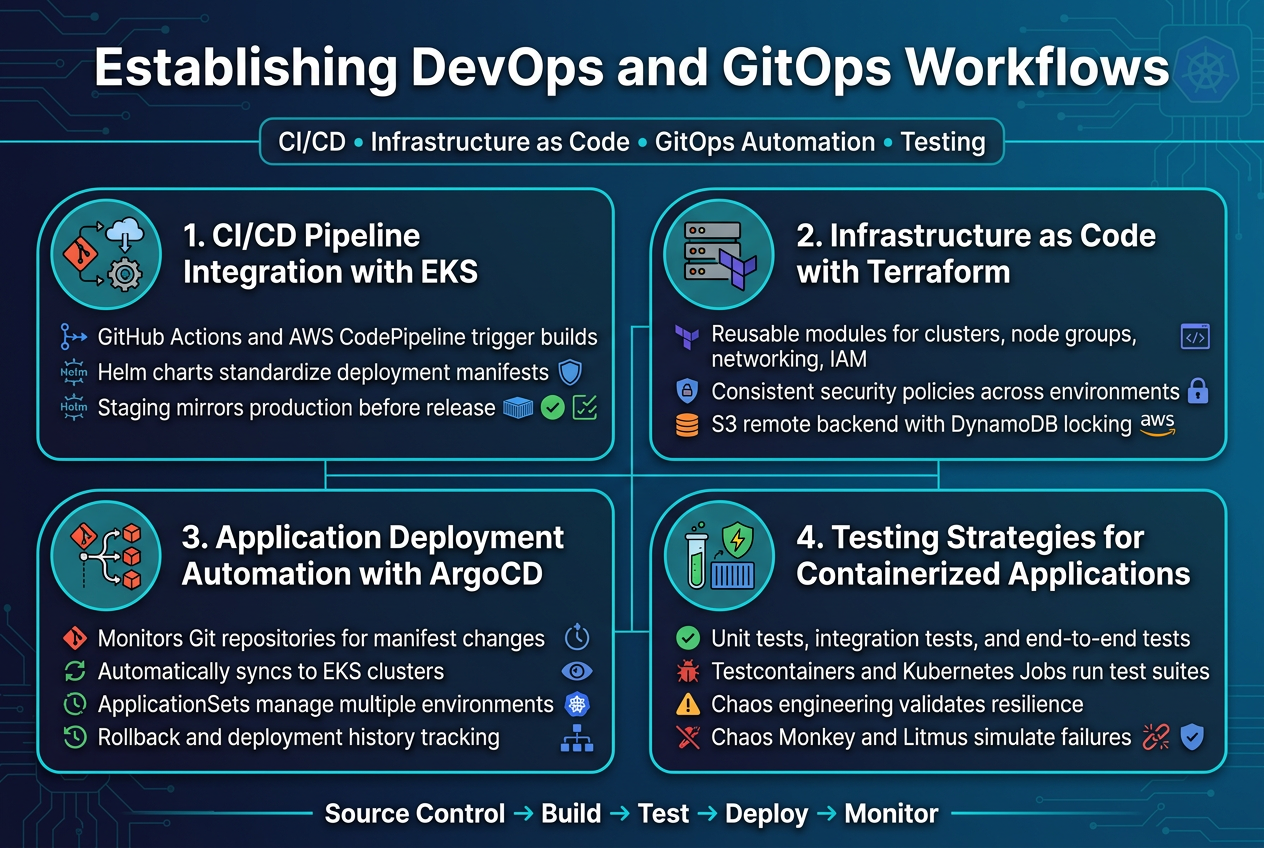
CI/CD Pipeline Integration with EKS Deployments
Building effective CI/CD pipelines for EKS requires seamless integration between your source control, build systems, and Kubernetes clusters. GitHub Actions and AWS CodePipeline work exceptionally well for triggering automated builds when code changes occur, while tools like Helm charts standardize your deployment manifests across environments.
The key lies in establishing proper staging environments that mirror your production EKS cluster configuration. Your pipeline should include automated security scanning, container image vulnerability assessments, and integration tests before any workload reaches your production-grade EKS cluster.
Infrastructure as Code Implementation with Terraform
Terraform modules provide the foundation for reproducible EKS infrastructure deployments across multiple environments. Create reusable modules that define your cluster configuration, node groups, networking components, and IAM roles with consistent security policies.
Version control your Terraform state files using remote backends like S3 with DynamoDB locking. This approach ensures your AWS EKS design patterns remain consistent while enabling collaborative infrastructure management across your DevOps teams.
Application Deployment Automation with ArgoCD
ArgoCD transforms your Kubernetes DevOps workflows by implementing GitOps principles for application deployment automation. Configure ArgoCD to monitor your Git repositories and automatically sync application manifests to your EKS clusters when changes are detected.
Set up application sets to manage deployments across multiple environments simultaneously. ArgoCD’s declarative approach ensures your applications maintain desired state while providing rollback capabilities and deployment history tracking for your production Kubernetes deployment scenarios.
Testing Strategies for Containerized Applications
Implement multi-layered testing approaches that include unit tests, integration tests, and end-to-end testing within your containerized environments. Use tools like Testcontainers for integration testing and Kubernetes Job resources for running test suites directly within your EKS clusters.
Chaos engineering practices help validate your application resilience by deliberately introducing failures. Tools like Chaos Monkey and Litmus can simulate real-world scenarios, ensuring your applications handle disruptions gracefully while maintaining EKS performance tuning standards.
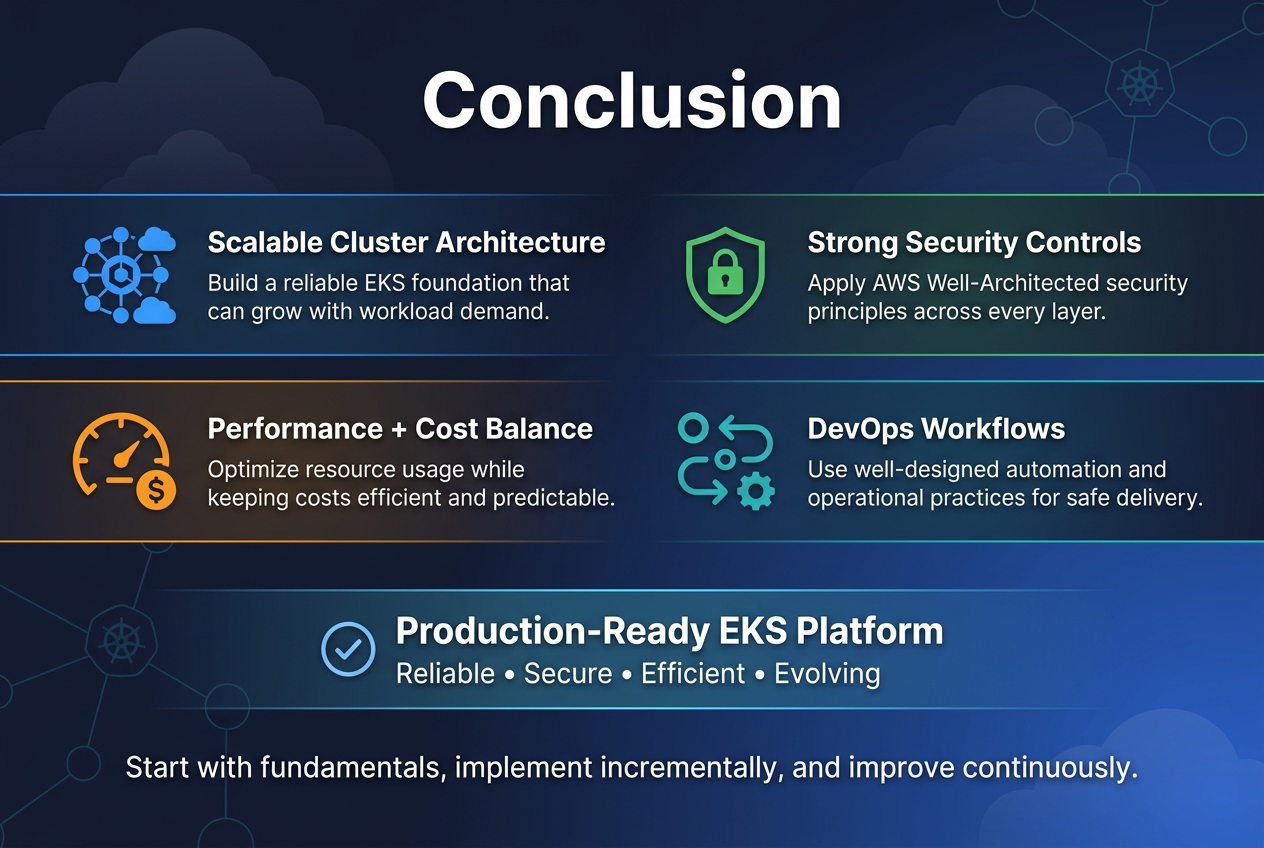
Building a production-grade EKS platform requires careful attention to AWS Well-Architected principles across every layer of your infrastructure. From establishing a scalable cluster architecture to implementing strong security controls, each component plays a vital role in creating a reliable and efficient Kubernetes environment. The journey involves balancing performance optimization with cost management while ensuring your platform can handle real-world workloads safely and efficiently.
Success with EKS comes down to treating it as more than just a container orchestration tool – it’s the foundation of your cloud-native strategy. By focusing on robust security measures, smart resource management, and well-designed DevOps workflows, you’ll create a platform that not only meets today’s requirements but can evolve with your organization’s needs. Start with the fundamentals, implement these practices incrementally, and remember that building a truly production-ready EKS platform is an ongoing process that pays dividends in reliability, security, and operational efficiency.









