


Choosing the right AWS storage solution can make or break your application’s performance. This technical analysis compares S3 vs EBS performance and scalability to help cloud architects, DevOps engineers, and technical decision-makers select the optimal storage service for their workloads.
Amazon S3 and EBS serve different purposes in the AWS storage comparison landscape, yet teams often struggle to understand which delivers better value for specific use cases. S3 excels at web-scale object storage with virtually unlimited capacity, while EBS provides high-performance block storage attached directly to EC2 instances.
We’ll examine S3 performance metrics and EBS performance benchmarks across throughput, latency, and IOPS to reveal each service’s strengths. You’ll also discover how cloud storage scalability differs between these services and learn practical storage performance optimization techniques that can reduce costs while boosting application speed.
By the end, you’ll have clear AWS storage cost analysis data and actionable criteria for making informed storage decisions based on your specific performance requirements and budget constraints.
Understanding S3 and EBS Storage Architectures
Object Storage vs Block Storage Fundamentals
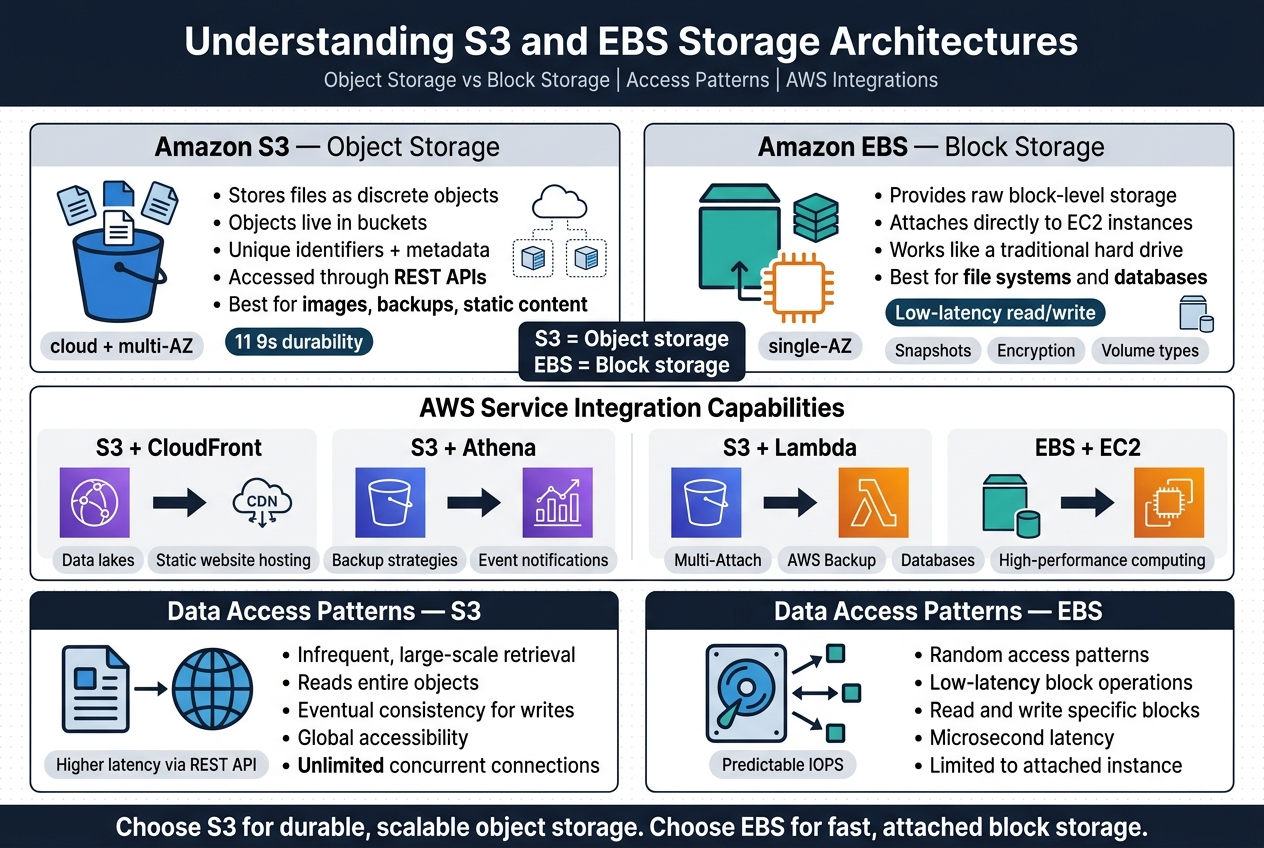
Amazon S3 operates as an object storage system, storing files as discrete objects within buckets with unique identifiers and metadata. Each object can range from bytes to terabytes and gets accessed through REST APIs. EBS functions as block storage, providing raw block-level storage that attaches directly to EC2 instances like traditional hard drives. This fundamental difference shapes how applications interact with data – S3 excels at storing unstructured data like images, backups, and static content, while EBS handles structured data requiring file systems and databases.
The architectural distinction impacts performance characteristics significantly. S3 distributes objects across multiple availability zones automatically, offering eleven 9s of durability through redundant storage. EBS volumes exist within single availability zones but provide consistent, low-latency access for applications requiring frequent read/write operations. Block storage allows for advanced features like snapshots, encryption, and different volume types optimized for various workloads.
AWS Service Integration Capabilities
S3 integrates seamlessly with AWS analytics and content delivery services, making it ideal for data lakes, static website hosting, and backup strategies. Services like CloudFront, Athena, and Lambda can directly access S3 objects without requiring compute instances. EBS volumes integrate tightly with EC2 instances, supporting advanced features like Multi-Attach for shared storage scenarios and integration with AWS Backup for automated snapshot management.
The integration patterns differ based on storage architecture needs. S3 triggers serverless functions through event notifications, enabling real-time data processing workflows. EBS supports advanced database configurations and high-performance computing applications that require direct attached storage with predictable IOPS performance.
Data Access Pattern Differences
S3 access patterns favor infrequent, large-scale data retrieval operations with eventual consistency for write operations. Applications typically read entire objects rather than portions, making it suitable for backup, archival, and content distribution scenarios. The REST API introduces latency overhead but provides global accessibility and unlimited concurrent connections.
EBS supports random access patterns with low-latency operations, enabling applications to read and write specific data blocks efficiently. This makes EBS optimal for operating systems, databases, and applications requiring real-time data access. The direct attachment to EC2 instances provides microsecond latency for local operations but limits accessibility to the attached instance.
Performance Metrics Comparison
Throughput Benchmarks and Real-World Testing
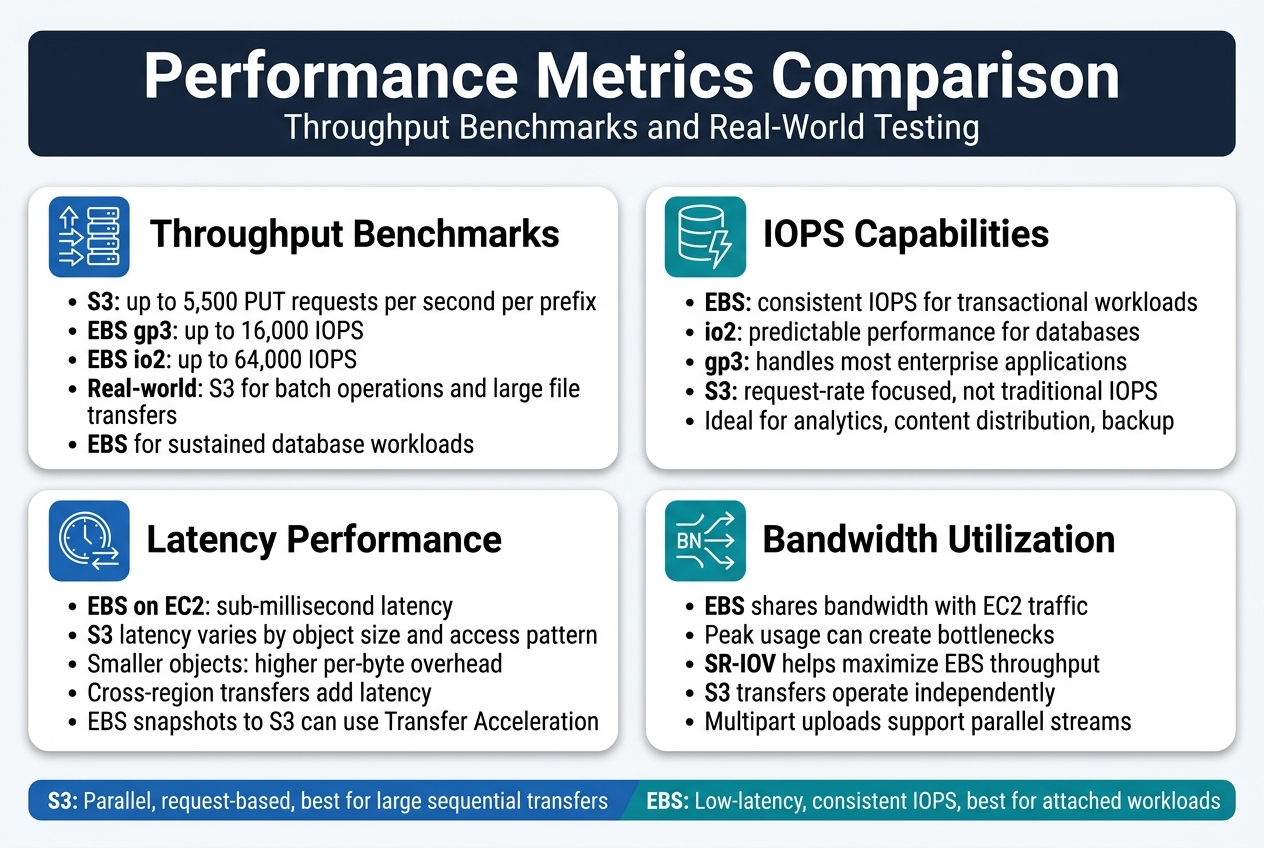
S3 performance metrics show impressive throughput capabilities, with object upload speeds reaching 5,500 PUT requests per second per prefix. EBS performance benchmarks vary significantly by volume type – gp3 volumes deliver up to 16,000 IOPS while io2 volumes can achieve 64,000 IOPS. Real-world testing reveals S3 excels in batch operations and large file transfers, while EBS dominates in sustained database workloads.
IOPS Capabilities for Different Workload Types
EBS volumes shine in transactional workloads requiring consistent IOPS delivery. Database applications benefit from io2 volumes’ predictable performance, while general-purpose gp3 volumes handle most enterprise applications effectively. S3 operates differently, focusing on request rates rather than traditional IOPS – making it ideal for analytics, content distribution, and backup scenarios where sequential access patterns dominate over random I/O operations.
Latency Performance Under Various Conditions
Network proximity significantly impacts both services’ latency characteristics. EBS volumes attached to EC2 instances typically achieve sub-millisecond latency for local operations. S3 latency varies based on object size and access patterns, with smaller objects experiencing higher per-byte overhead. Cross-region transfers introduce additional latency that affects both services, though EBS snapshots to S3 can leverage Transfer Acceleration for improved performance.
Network Bandwidth Utilization Patterns
AWS storage comparison reveals distinct bandwidth consumption patterns between S3 vs EBS. EBS volumes share network bandwidth with EC2 instance traffic, potentially creating bottlenecks during peak usage. Enhanced networking features like SR-IOV help maximize EBS throughput. S3 transfers operate independently, allowing parallel streams to saturate available bandwidth more efficiently, especially when using multipart uploads for large objects.
Scalability Characteristics and Limitations
Storage Capacity Expansion Methods
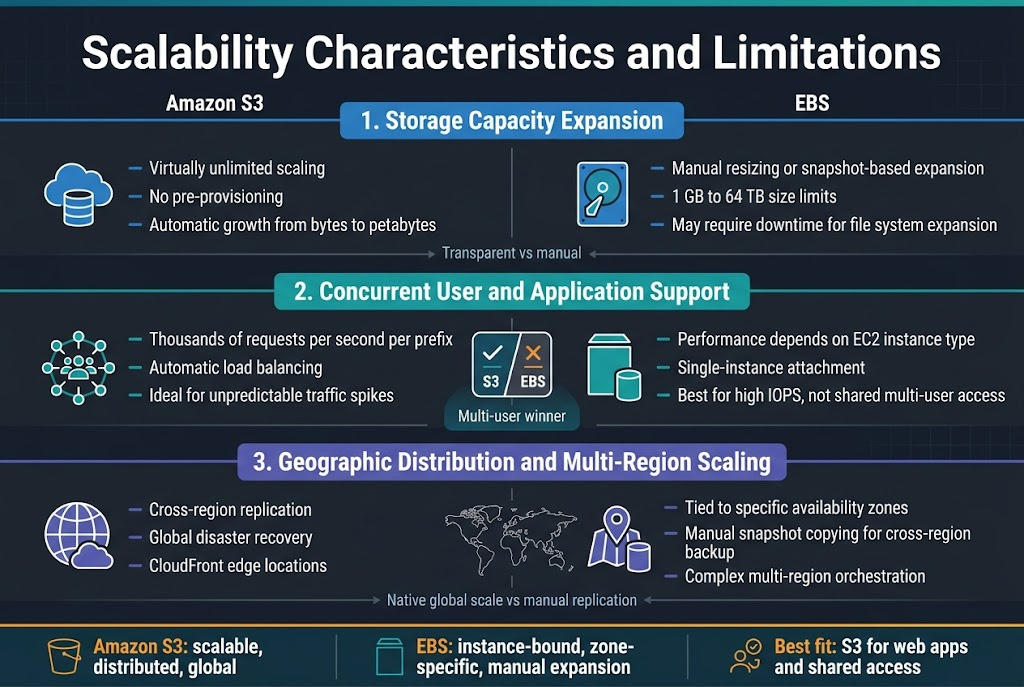
Amazon S3 offers virtually unlimited storage scaling without requiring pre-provisioning or manual intervention. Objects can grow from bytes to petabytes automatically, with the service handling distribution across multiple availability zones. EBS volumes require manual resizing or snapshot-based expansion, with size limits ranging from 1GB to 64TB depending on volume type. EBS scaling often involves downtime for file system expansion, while S3 scaling happens transparently behind the scenes.
Concurrent User and Application Support
S3 excels at handling massive concurrent access patterns, supporting thousands of requests per second per prefix through automatic load balancing. The distributed architecture of S3 makes it ideal for web applications with unpredictable traffic spikes. EBS performance depends heavily on the underlying EC2 instance type and attached volume specifications. While EBS can support high IOPS workloads, it’s limited to single-instance attachment (except Multi-Attach volumes), making S3 the clear winner for multi-user scenarios requiring simultaneous access from different applications.
Geographic Distribution and Multi-Region Scaling
Cross-region replication in S3 enables automatic data distribution across global AWS regions, providing built-in disaster recovery and improved access latency for worldwide users. S3’s edge locations through CloudFront create a truly global content delivery network. EBS volumes remain tied to specific availability zones, requiring manual snapshot copying for cross-region backup strategies. Multi-region EBS deployments need complex orchestration and separate volume management in each region, while S3 handles geographic scaling natively through its global infrastructure.
Cost-Performance Optimization Strategies
Storage Class Selection for Different Use Cases
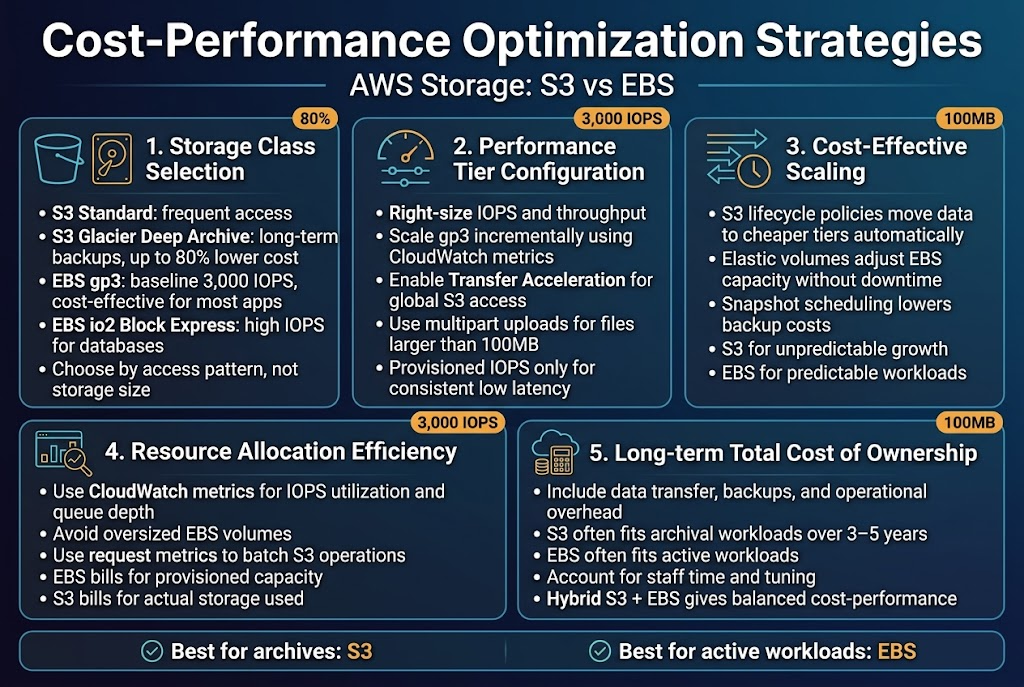
S3 vs EBS storage optimization starts with matching storage classes to workload patterns. S3 Standard works best for frequently accessed data, while S3 Glacier Deep Archive cuts costs for long-term backups by up to 80%. EBS gp3 volumes offer the sweet spot for most applications, providing 3,000 IOPS baseline with cost-effective performance scaling.
AWS storage comparison shows that intelligent tiering automates cost optimization without performance penalties. EBS io2 Block Express delivers consistent high IOPS for database workloads, while S3 Intelligent-Tiering automatically moves data between access tiers. Choose based on access patterns rather than initial storage requirements.
Performance Tier Configuration Best Practices
Configure EBS volumes with right-sized IOPS and throughput to avoid over-provisioning costs. Start with gp3 volumes at 3,000 IOPS baseline and scale incrementally based on CloudWatch metrics. For S3, enable Transfer Acceleration for global applications and use multipart uploads for files larger than 100MB.
Storage performance optimization requires monitoring actual usage patterns. EBS performance scales with volume size up to specific limits, while S3 performance benefits from request parallelization. Use provisioned IOPS only when consistent low-latency access justifies the premium pricing.
Cost-Effective Scaling Approaches
Implement lifecycle policies to automatically transition S3 data to cheaper storage classes based on age and access frequency. For EBS, use elastic volumes to dynamically adjust capacity without downtime. Snapshot scheduling reduces backup costs while maintaining recovery capabilities.
Cloud storage scalability planning should account for growth patterns. S3 scales infinitely without capacity planning, while EBS requires manual volume expansion. Use S3 for unpredictable growth and EBS for predictable workloads with known performance requirements.
Resource Allocation Efficiency Techniques
Right-size EBS volumes by analyzing CloudWatch metrics for IOPS utilization and queue depth. Avoid oversized volumes that waste money on unused capacity. For S3, use request metrics to optimize request patterns and reduce per-request costs through batching operations.
AWS S3 EBS differences in billing models require different optimization strategies. EBS charges for provisioned capacity regardless of usage, while S3 charges for actual storage consumed. Monitor both storage utilization and request patterns to identify optimization opportunities.
Long-term Total Cost of Ownership Analysis
Calculate TCO by factoring in data transfer costs, backup expenses, and operational overhead. S3’s durability eliminates need for cross-region replication in many cases, while EBS requires snapshot management. Include staff time for capacity planning and performance tuning in EBS TCO calculations.
AWS storage cost analysis over 3-5 years often favors S3 for data archival and EBS for active workloads. Factor in potential AWS pricing changes and new service offerings when making long-term storage decisions. Consider hybrid approaches using both services for optimal cost-performance balance.
Use Case Selection Criteria
Database and Transactional Workload Requirements
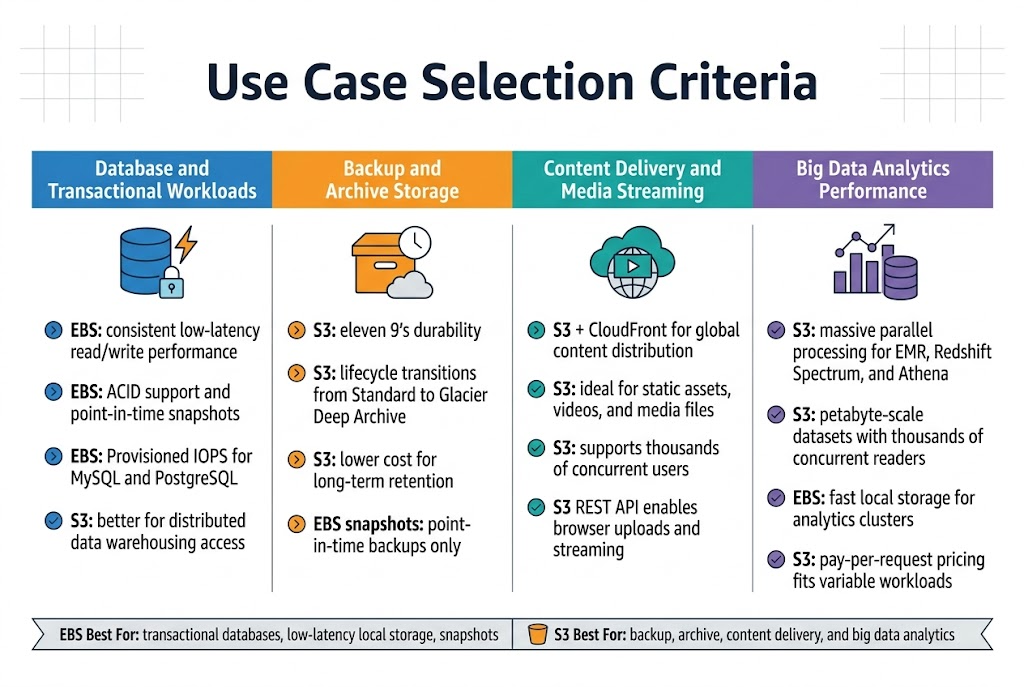
EBS delivers consistent, low-latency performance essential for database operations requiring frequent read/write cycles. The block-level storage provides ACID compliance support and enables snapshots for point-in-time recovery. For high-transaction databases like MySQL or PostgreSQL, EBS volumes with Provisioned IOPS offer predictable performance. S3 works better for data warehousing scenarios where large datasets need distributed access patterns.
Backup and Archive Storage Optimization
S3 excels in backup scenarios with its eleven 9’s durability and lifecycle management capabilities. Organizations can automatically transition data through storage classes – from Standard to Glacier Deep Archive – optimizing costs over time. EBS snapshots provide point-in-time backups but lack S3’s automated tiering. For long-term retention, S3’s archive tiers cost significantly less than maintaining EBS volumes.
Content Delivery and Media Streaming Needs
S3 integrates seamlessly with CloudFront for global content distribution, making it ideal for serving static assets, videos, and media files. The object storage model handles concurrent access from thousands of users without performance degradation. EBS cannot efficiently serve content to multiple external users simultaneously. S3’s REST API enables direct browser uploads and streaming workflows that EBS’s block storage architecture cannot support.
Big Data Analytics Performance Requirements
S3’s massive parallel processing capabilities make it the go-to choice for big data analytics platforms like EMR, Redshift Spectrum, and Athena. The service can handle petabyte-scale datasets with thousands of concurrent readers. EBS works well for analytics clusters requiring fast local storage but hits scalability limits with distributed processing. S3’s pay-per-request pricing model aligns better with variable analytics workloads compared to EBS’s always-on provisioning costs.

When choosing between S3 and EBS for your AWS infrastructure, performance and scalability requirements should drive your decision. S3 excels at handling massive amounts of unstructured data with virtually unlimited storage capacity, making it perfect for backup archives, content distribution, and data lakes. EBS delivers consistent, high-performance block storage that’s ideal for databases, file systems, and applications requiring low-latency access to data.
The key is matching your workload to the right storage type. If you need lightning-fast access to frequently changing data or are running performance-critical applications, EBS is your best bet. For long-term storage, content delivery, or handling unpredictable traffic spikes, S3’s object storage model and automatic scaling will serve you better. Take time to analyze your specific performance needs, budget constraints, and growth projections before making the switch – the right choice will save you both headaches and money down the road.









