AWS Data Lake Architecture: From Raw Data to Production-Ready Analytics
Building a data lake on AWS sounds straightforward until you’re knee-deep in unstructured files, broken pipelines, and a storage bill that makes no sense. Most teams hit the same wall: they get data in, but struggle to make it usable, secure, and affordable at the same time.
This guide is for data engineers, cloud architects, and analytics teams who are moving beyond proof-of-concept and want a production-ready AWS data lake architecture that actually holds up under real workloads.
Here’s what we’ll walk through together:
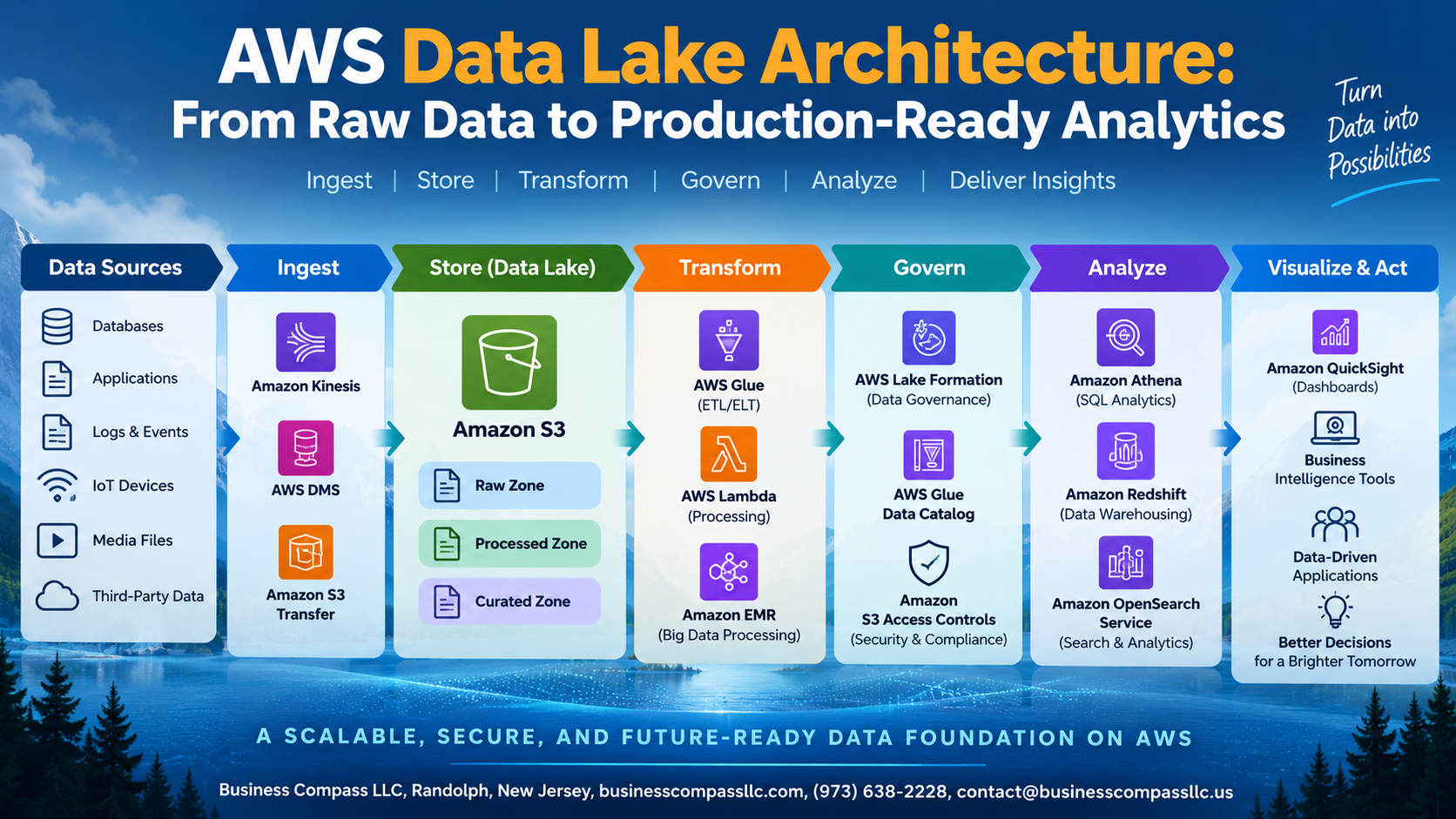
- How to design a layered data lake architecture using AWS S3 as your foundation, so raw data, curated data, and analytics-ready assets each live in the right place
- How to build an AWS ingestion pipeline that pulls from multiple sources without turning into a maintenance nightmare
- How to use AWS Glue ETL and AWS Lake Formation to transform raw data and lock down security without creating bottlenecks for the teams who need access
By the end, you’ll have a clear picture of how the pieces fit together — from the first raw file landing in S3 to a dashboard your business teams can actually trust.
Core Components of a Modern AWS Data Lake

Amazon S3 as the Foundation for Scalable Storage
S3 stores raw, processed, and curated data cheaply at any scale.
AWS Glue for Seamless Data Cataloging and Discovery
Glue crawls your S3 buckets, auto-building a searchable metadata catalog.
Amazon Athena for Cost-Effective Serverless Querying
Query S3 data directly using SQL—no infrastructure needed.
AWS Lake Formation for Centralized Access Control
Lake Formation manages fine-grained permissions across your entire data lake.
Designing a Layered Data Lake Architecture That Scales

Raw Zone: Preserving Original Data Integrity
Store everything as-is in AWS S3—no modifications, ever.
Cleansed Zone: Standardizing Data for Reliability
- Remove duplicates, fix schemas, validate formats using AWS Glue ETL
Curated Zone: Optimizing Data for Business Consumption
Partition and compress data into analytics-ready assets teams actually trust.
Ingesting Data Efficiently from Multiple Sources

Streaming Real-Time Data with Amazon Kinesis
Push live event streams directly into your AWS data lake using Kinesis Data Streams and Firehose.
Batch Ingestion Using AWS Glue ETL
Schedule AWS Glue ETL jobs to pull large datasets on a set cadence.
Automating Pipelines with Step Functions
Chain everything together using Step Functions for end-to-end orchestration.
Transforming Raw Data into High-Quality Analytics-Ready Assets

Building Repeatable ETL Workflows with AWS Glue Studio
Use AWS Glue ETL jobs with visual pipelines to standardize raw data transformation across sources.
Enforcing Data Quality Rules
Add DQ checks directly in Glue to catch nulls and schema mismatches early.
Partitioning and Compressing Data
Partition by date, convert to Parquet, and watch Athena query costs drop significantly.
Securing Your Data Lake Without Slowing Down Teams

Implementing Fine-Grained Permissions with AWS Lake Formation
Use AWS Lake Formation to control table, column, and row-level access without drowning teams in complexity. Pair it with IAM roles, CloudTrail auditing, and S3 encryption (SSE-KMS) to protect your data lake on AWS while keeping analysts moving fast.
Optimizing Costs While Maximizing Analytics Performance

Using S3 Intelligent-Tiering to Reduce Storage Spend
Enable S3 Intelligent-Tiering to automatically move infrequently accessed data to cheaper storage tiers.
Choosing the Right File Formats to Speed Up Queries
Use Parquet or ORC formats in your AWS S3 data lake — they cut query costs dramatically.
Monitoring and Right-Sizing Resources with AWS Cost Explorer
Track spending patterns and eliminate waste regularly.
Connecting Analytics and BI Tools for Production-Ready Insights

Visualizing Data Instantly with Amazon QuickSight
Connect QuickSight directly to your AWS S3 data lake for fast, serverless dashboards.
Running Advanced Analytics with Amazon Redshift Spectrum
Query S3 data without moving it using Redshift Spectrum.
Enabling Data Science Workflows with Amazon SageMaker
Pull clean lake data straight into SageMaker notebooks.
Integrating Third-Party BI Tools via Amazon Athena JDBC Drivers
Tableau, Power BI, and Looker connect seamlessly through Athena JDBC drivers, giving your existing AWS analytics tools integration instant access to production-ready data.

Building a solid AWS data lake is really about getting the right pieces working together — from how you bring data in, to how you store, transform, and secure it, all the way to the dashboards your teams actually use. A layered architecture gives you the flexibility to scale without chaos, and when you pair that with smart cost controls and strong security practices, you end up with something your whole organization can rely on without constantly fighting fires.
The real payoff comes when your analysts and BI tools can access clean, trusted data without waiting on engineering every time they need something new. If you take one thing away from this, it’s to start with a clear structure and build from there — don’t wait until things break to think about governance, performance, or costs. Get those foundations right early, and your data lake becomes an asset that grows with your business instead of a bottleneck that holds it back.