


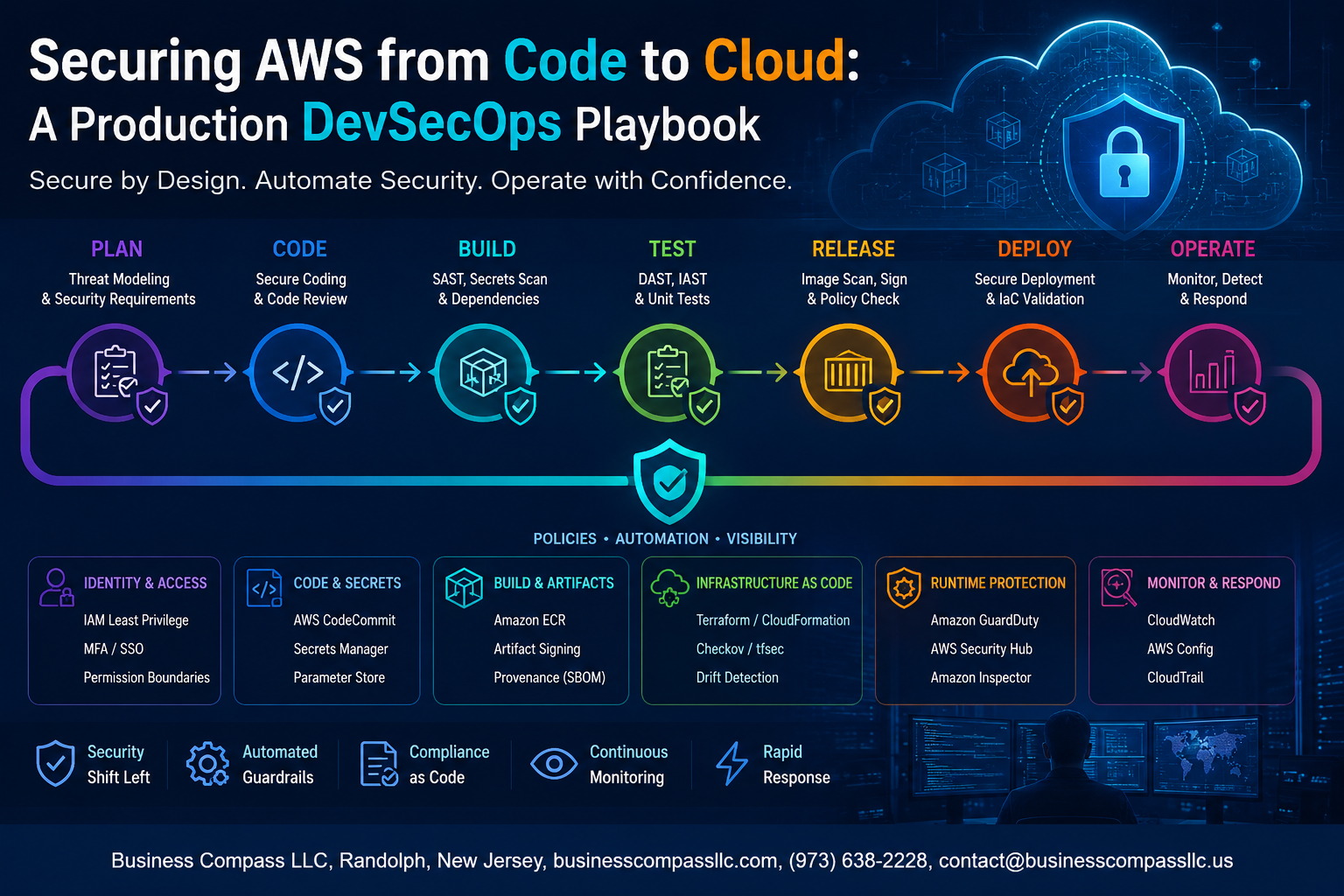
Securing AWS from Code to Cloud: A Production DevSecOps Playbook
Most AWS security breaches don’t happen because teams didn’t care — they happen because security got bolted on at the end instead of baked in from the start. If you’re a DevOps engineer, cloud architect, or security engineer trying to ship fast without leaving your AWS environment wide open, this guide is written for you.
We’re going to walk through what actually works in production — not theory, not checkbox compliance. You’ll learn how to lock down your AWS account foundation before a single line of code gets written, how to embed AWS security automation directly into your CI/CD pipeline so vulnerabilities get caught early, and how to secure infrastructure as code so your Terraform and CloudFormation templates don’t quietly provision risk into your environment.
By the end, you’ll have a working DevSecOps playbook for production that keeps deployments moving without trading speed for safety. Let’s get into it.
Building a Security-First Mindset Across Your DevOps Pipeline

Why Traditional Security Models Fail in Cloud-Native Environments
Old-school security bolt-ons break under cloud speed. AWS DevSecOps best practices demand security woven into every pipeline stage.
Key Principles of Shifting Security Left
- Scan code early, fail fast
- Automate AWS security checks in CI/CD
Aligning Teams Around Shared Goals
Shared dashboards kill blame culture instantly.
Hardening Your AWS Account Foundation Before Writing a Single Line of Code

A. Enforcing Least Privilege with IAM Roles and Permission Boundaries
Grant only what’s needed—nothing more.
B. Locking Down Root Access and Enabling Multi-Factor Authentication
Disable root access immediately; enable MFA across all accounts.
C. Using AWS Organizations and SCPs to Apply Security Guardrails at Scale
- Block risky services organization-wide using SCPs
D. Centralized Logging with CloudTrail and Config
Track every API call from day one.
Embedding Security Directly Into Your CI/CD Pipeline

A. Automating Static Application Security Testing in Your Build Stage
Run SAST tools like Semgrep or Checkmarx automatically on every commit, catching vulnerabilities before they ship.
B. Scanning IaC for Misconfigurations
Use Checkov or tfsec to flag open S3 buckets or missing encryption early.
C. Secrets Detection
Add git-secrets or Trufflehog to block leaked credentials.
D. Security Gates
Fail builds automatically on critical findings.
E. AWS CodePipeline Compliance
Plug in AWS Config and Security Hub for continuous compliance checks across your AWS DevSecOps pipeline.
Securing Infrastructure as Code for Safer AWS Provisioning

Writing Terraform and CloudFormation Modules With Security Defaults Built In
Bake encryption, least-privilege IAM, and private networking directly into reusable modules—so teams can’t accidentally deploy insecure resources.
Detecting and Remediating Drift Between Desired and Actual Cloud State
Use AWS Config and Terraform state checks to catch manual changes fast.
Enforcing Policy as Code Using Open Policy Agent and AWS Config Rules
Block non-compliant infrastructure before it ships.
Protecting Runtime Environments and Workloads in Production

Reducing Attack Surface With VPC Segmentation and Security Groups
Isolate workloads using private subnets, strict security group rules, and least-privilege NACLs.
Securing Containerized Workloads on ECS and EKS With Runtime Controls
- Enable Seccomp profiles and read-only root filesystems
- Scan images continuously with Amazon Inspector
Leveraging AWS GuardDuty and Security Hub for Real-Time Threat Detection
GuardDuty flags anomalous behavior instantly, feeding findings into Security Hub for centralized AWS security automation.
Automating Incident Response With Lambda-Driven Remediation Workflows
Lambda functions auto-isolate compromised instances, keeping your DevSecOps playbook for production responsive without manual intervention.
Managing Secrets and Sensitive Data Without Slowing Down Delivery

Centralizing Secret Storage and Rotation Using AWS Secrets Manager
Store credentials in AWS Secrets Manager with automatic rotation enabled—never in environment variables or config files.
Encrypting Data at Rest and in Transit With KMS Best Practices
Use customer-managed KMS keys with strict IAM policies.
Preventing Hardcoded Credentials From Entering Your Codebase
- Run git-secrets or truffleHog in your AWS DevSecOps CI/CD pipeline pre-commit.
Measuring and Continuously Improving Your DevSecOps Posture

Defining Meaningful Security Metrics That Reflect Real Risk Reduction
Track mean-time-to-remediate, critical vulnerability counts, and failed deployment rates tied to security gates.
Conducting Regular Threat Modeling Sessions Tied to Release Cycles
Run threat modeling before every major release sprint.
Running Automated Compliance Audits
Use AWS Config rules continuously.
Using AWS Security Hub Dashboards
Centralize findings across accounts for full AWS security automation visibility.

Security in AWS isn’t a one-time setup or a box you check before launch. It’s something you build into every layer — from your account foundation and IaC templates to your CI/CD pipelines and production workloads. When security becomes part of how your team works every day, rather than an afterthought, you stop playing catch-up and start shipping with confidence.
Start small if you need to. Pick one area — maybe secrets management or pipeline scanning — and get it right before moving to the next. Track your progress, review your posture regularly, and keep tightening the gaps. The teams that do this well aren’t necessarily the ones with the biggest security budgets. They’re the ones that treat security as a shared responsibility and never stop improving. That’s the real playbook.









