


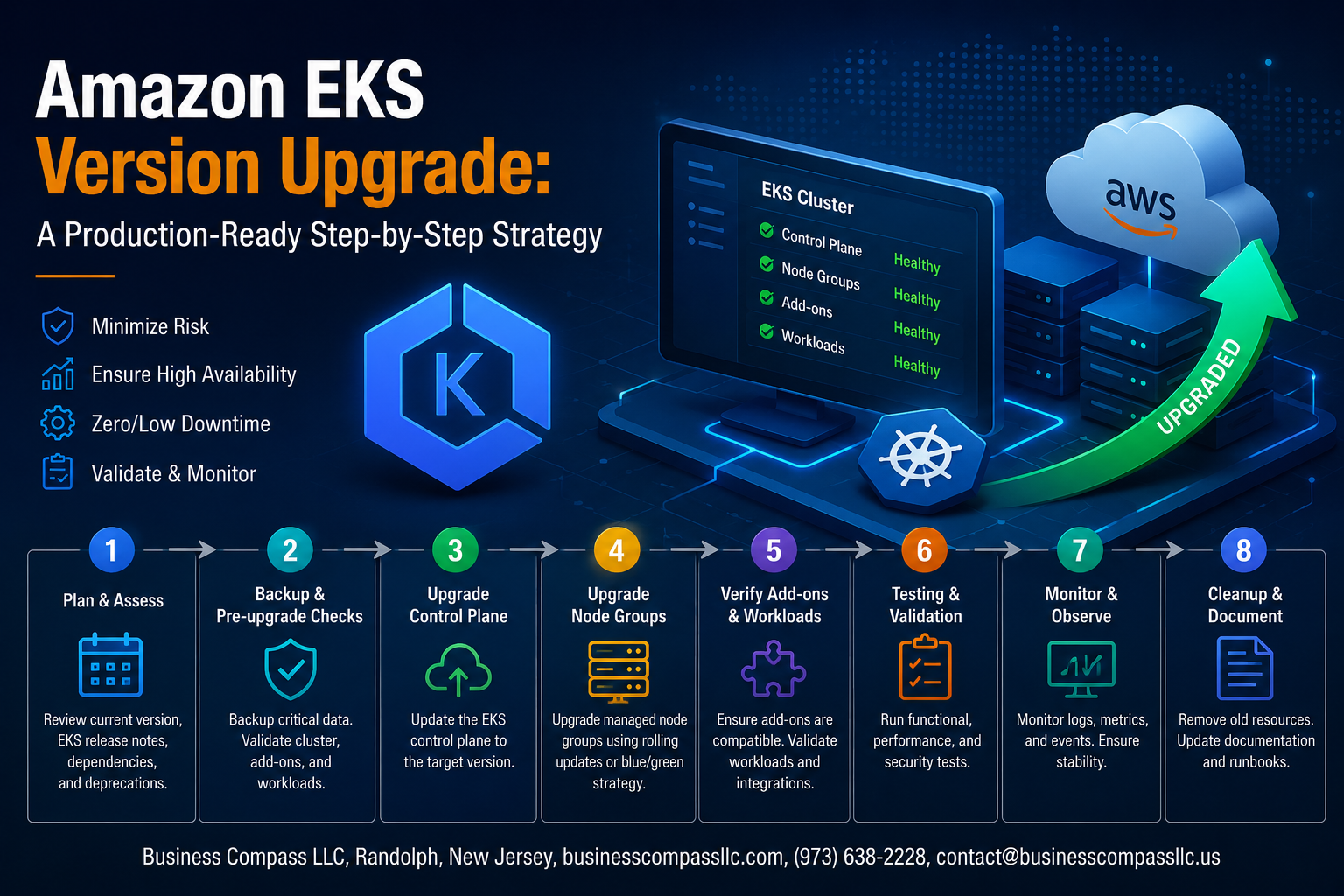
Amazon EKS Version Upgrade: A Production-Ready Step-by-Step Strategy
Keeping your Amazon EKS version upgrade on schedule is one of those tasks that’s easy to push to the back burner — until AWS ends support for your current version and you’re suddenly scrambling. If you’re a DevOps engineer, platform engineer, or SRE managing a live Kubernetes cluster, this guide is written for you.
Here’s what you’ll walk away with:
- A clear pre-upgrade assessment checklist so you know exactly what to audit before touching anything in production
- A safe, sequenced approach to upgrading the EKS control plane and worker nodes without taking down your workloads
- A solid EKS add-ons update strategy and post-upgrade validation routine to make sure everything stays healthy after the upgrade
No fluff, no vague advice. Just a practical EKS upgrade guide built around zero downtime Kubernetes upgrade principles that actually hold up in real production environments.
Understanding the Importance of EKS Version Upgrades

Security and Compliance Benefits
Staying current with your Amazon EKS version upgrade patches critical CVEs before attackers exploit them, keeping you audit-ready.
Performance Improvements
Newer Kubernetes versions ship faster pod scheduling and lower API latency.
Risks of Outdated Versions
Running end-of-life EKS means no patches, broken add-ons, and failed compliance audits.
Pre-Upgrade Assessment and Planning

A. Auditing Your Current EKS Cluster Configuration
Run eksctl get cluster and review nodegroups, IAM roles, and security groups.
B. Reviewing Deprecation Notices
Check Kubernetes deprecation docs and AWS release notes for your target version.
C. Identifying Incompatible Add-Ons
Flag outdated CoreDNS, kube-proxy, and VPC CNI versions.
D. Timeline and Rollback Plan
Schedule upgrades during low-traffic windows; snapshot etcd beforehand.
Setting Up a Safe Upgrade Environment

A. Replicating Production in a Staging Cluster for Testing
Mirror your production setup exactly — same node types, workloads, and configs — before attempting an Amazon EKS version upgrade.
B. Enabling Detailed Logging and Monitoring
Turn on CloudWatch Container Insights and API server logging beforehand.
C. Backing Up Critical Cluster State
Use Velero to snapshot persistent data and etcd state.
Upgrading the EKS Control Plane

A. Choosing the Right Upgrade Method
Use eksctl upgrade cluster or the AWS Console — both work great. Pick eksctl for repeatability.
B. Executing With Minimal Downtime
AWS upgrades the EKS control plane with zero downtime automatically.
C. Validating Control Plane Health
Run kubectl get nodes and check API server responsiveness.
D. Handling Version Skew
Nodes can lag one version behind the control plane safely.
Upgrading Worker Nodes Without Disrupting Workloads

A. Managed vs. Self-Managed Node Upgrade Strategies
- Managed node groups handle rolling updates automatically
- Self-managed nodes need manual AMI swaps
B–E. Safe Node Rotation & Validation
- Blue-green rotation spins fresh nodes before terminating old ones
kubectl drainsafely evicts pods before shutdown- Check node
Readystatus and pod health post-upgrade - Fargate profiles update automatically via pod recycling
Updating Critical Add-Ons and Cluster Components

Upgrading CoreDNS, kube-proxy, and VPC CNI in the Right Order
Always upgrade in this sequence: VPC CNI → kube-proxy → CoreDNS. Skipping steps breaks cluster networking.
Aligning Third-Party Tools and Helm Charts
Check each Helm chart’s Kubernetes compatibility matrix before upgrading.
Retesting Ingress Controllers and Storage Drivers
Run smoke tests on ingress routes and persistent volume claims post-update.
Post-Upgrade Validation and Ongoing Maintenance

A. Running End-to-End Tests
After your Amazon EKS version upgrade, run smoke tests, integration checks, and load simulations against real workloads.
B. Monitoring Cluster Metrics
Watch CPU, memory, and error rates closely for regressions.
C. Documenting Lessons Learned
Log every hiccup to make your next EKS cluster maintenance cycle faster.

Keeping your Amazon EKS cluster up to date is not just a best practice — it’s a core part of running reliable, secure workloads in production. From assessing your current environment and planning the upgrade path, to carefully moving through the control plane, worker nodes, and add-ons, every step plays a role in making sure nothing breaks when it matters most. A structured approach removes the guesswork and helps your team stay confident throughout the process.
Once the upgrade is done, the work doesn’t stop there. Regular post-upgrade validation and a solid maintenance routine are what keep your cluster healthy over time. If you haven’t reviewed your current EKS version lately, now is a great time to start. Pull up your cluster settings, check what version you’re running, and map out your next upgrade window before an end-of-support deadline sneaks up on you.









