


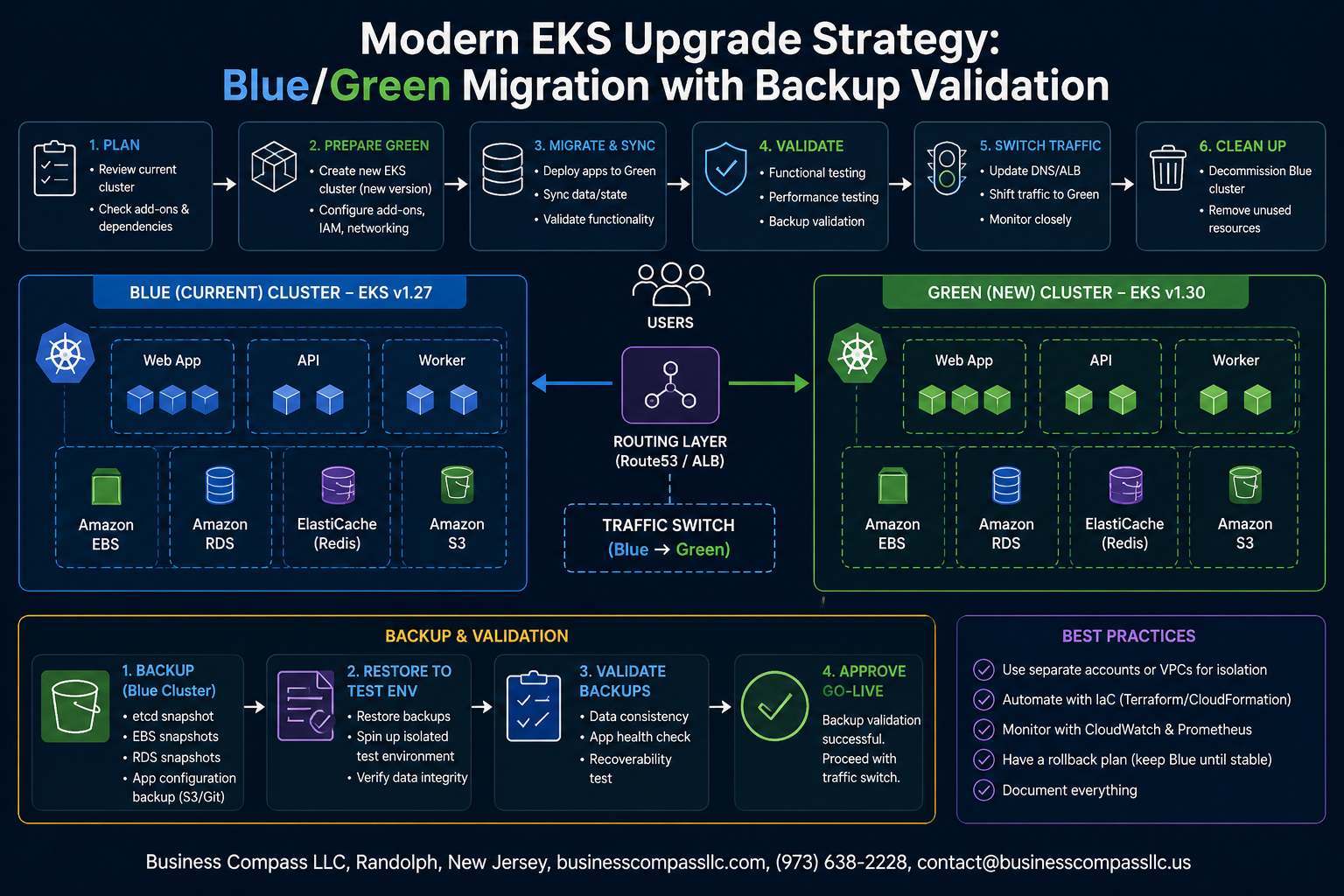
Stop Dreading EKS Upgrades — Here’s a Smarter Way to Do Them
Upgrading an Amazon EKS cluster doesn’t have to mean crossing your fingers and hoping production survives. Yet for most platform engineers and DevOps teams, that’s exactly what it feels like — one wrong move and you’re scrambling to roll back at 2 AM.
This guide is for Kubernetes engineers, cloud architects, and SRE teams who manage EKS clusters in production and want a safer, more controlled way to handle version upgrades without downtime or data loss.
We’ll walk through a blue/green Kubernetes migration approach that keeps your existing cluster running while you build and validate a fresh one alongside it. Along the way, we’ll cover:
- How to plan your EKS blue/green deployment so both clusters coexist cleanly without stepping on each other
- Why Kubernetes backup validation is non-negotiable before you cut over any real traffic
- How to build a repeatable EKS upgrade strategy so the next upgrade takes half the time and a fraction of the stress
No vague theory here — just a practical, step-by-step breakdown of how to run an Amazon EKS cluster upgrade the way teams who’ve done it a dozen times actually do it.
Understanding the Need for a Modern EKS Upgrade Strategy

Why Traditional In-Place Upgrades Create Unnecessary Risk
In-place EKS upgrades sound straightforward on paper, but in practice they put your production workloads on a tightrope. When you upgrade node groups and the control plane sequentially, any compatibility issue, API deprecation, or failed component rollout can cascade into downtime that impacts real users. There’s no clean rollback path — you’re committed the moment you start.
- Control plane and data plane drift can leave your cluster in a partially upgraded state that’s hard to diagnose
- Node group rolling updates may stall if pods have strict disruption budgets or missing tolerations
- Deprecated API versions (like moving from
extensions/v1beta1toapps/v1) silently break workloads mid-upgrade - No safe rollback means a failed upgrade requires manual intervention under pressure
Key Benefits of Blue/Green Migration for Kubernetes Clusters
A blue/green Kubernetes migration gives you something in-place upgrades never can — a fully working escape hatch. You build the new (green) EKS cluster alongside the existing (blue) one, validate everything in isolation, then shift traffic over only when you’re confident.
- Zero production risk during preparation — the green cluster is tested before a single user hits it
- Instant rollback — if something goes wrong, DNS or load balancer changes revert traffic in minutes
- Clean-slate configuration — no accumulated drift, deprecated settings, or orphaned resources carried over
- Parallel validation — run both clusters simultaneously and compare behavior before committing
This EKS blue/green deployment approach also makes Amazon EKS cluster upgrades repeatable and predictable, which ops teams genuinely appreciate.
Common Pitfalls That Cause EKS Upgrade Failures
Even with a solid EKS upgrade strategy, teams trip over the same issues repeatedly:
- Skipping Kubernetes backup validation before migration — if your persistent data isn’t confirmed restorable, you’re gambling
- Ignoring add-on compatibility — CoreDNS, kube-proxy, and the VPC CNI plugin all have version dependencies tied to the Kubernetes version
- Rushing the workload migration — moving all namespaces at once makes it impossible to isolate what broke
- Missing RBAC and IAM alignment — a new cluster means re-validating all service account roles and IRSA bindings from scratch
- Forgetting cluster autoscaler and metrics-server versions — these break quietly and only surface under load
Planning Your Blue/Green EKS Cluster Architecture

Defining Blue and Green Environments for Zero-Downtime Upgrades
Think of your blue cluster as your current production workhorse — it’s live, handling real traffic, and running your existing EKS version. Your green cluster is the fresh environment where the upgraded version lives. Traffic only shifts to green once you’ve confirmed everything works exactly as expected.
- Blue cluster: existing production environment, current EKS version, active workloads
- Green cluster: new environment, target EKS version, parallel workloads running in validation mode
- Both clusters run simultaneously during migration, giving you a real safety net
Choosing the Right EKS Version for Your Green Cluster
Don’t just jump to the latest EKS release because it’s shiny. Check the EKS version support calendar and pick a version that gives you at least 12 months of active support runway. Jumping multiple minor versions in one shot increases risk dramatically — moving one minor version at a time is the smarter Amazon EKS cluster upgrade path.
- Verify add-on compatibility (CoreDNS, kube-proxy, VPC CNI) for your target version
- Confirm your workloads support the updated API deprecations
- Check third-party Helm charts and operators for version compatibility
Mapping Out Networking and Load Balancer Requirements
Your green cluster needs its own VPC setup or shared VPC subnets — both approaches work, but shared VPC is cleaner for gradual traffic shifting. The real magic in a blue/green Kubernetes migration happens at the load balancer layer, where weighted routing rules let you send 10%, 50%, then 100% of traffic to green incrementally.
- Route 53 weighted routing: easiest way to shift traffic gradually between clusters
- AWS Load Balancer Controller: deploy fresh on green cluster with identical ingress configurations
- Security groups: replicate your existing rules precisely to avoid surprise traffic blocks
- Service endpoints: document every internal and external endpoint that needs updating during cutover
Establishing Clear Rollback Criteria Before You Begin
Rollback decisions made in the heat of an incident are almost always bad decisions. Define your rollback triggers before a single workload moves to green. Write them down, share them with your team, and make sure everyone agrees on the thresholds upfront as part of your EKS upgrade strategy.
- Error rate spike above a defined threshold (example: >1% 5xx errors sustained for 5 minutes)
- Pod crash loops exceeding a set count within the first 30 minutes post-cutover
- Latency degradation beyond your SLA baseline
- Failed health checks on critical services after traffic shift
- Data integrity issues flagged by your Kubernetes backup validation checks
Setting Up Reliable Backup Validation Before Migration

Identifying Critical Data and Workloads That Require Backup
Before you touch anything in your EKS upgrade strategy, get clear on what actually matters. Not every workload carries the same risk, so focus your backup efforts where failure would actually hurt.
- Stateful workloads — databases, message queues, and anything writing to persistent volumes need full backup coverage
- Custom resource definitions (CRDs) — these are easy to overlook but critical for restoring cluster behavior
- Secrets and ConfigMaps — application configs and credentials that are painful to recreate manually
- Helm release metadata — tracks deployed chart versions and values, essential for rollback
- Namespace-level RBAC policies — losing these causes access chaos post-migration
Choosing the Right Backup Tools for EKS Environments
For Kubernetes backup, Velero is the go-to choice for most EKS environments. It integrates cleanly with S3, handles PersistentVolume snapshots via AWS EBS, and supports scheduled backups with retention policies. Pair it with AWS Backup for broader coverage across RDS, EFS, and DynamoDB if your workloads touch those services.
- Velero + Restic/Kopia — file-level backup for volumes that don’t support snapshots
- AWS EBS snapshots — fast, point-in-time recovery for stateful pods
- etcd snapshots — critical if you manage your own control plane components
Validating Backup Integrity to Ensure Successful Recovery
A backup you haven’t tested is just a file you’re hoping works. During an Amazon EKS cluster upgrade or blue green Kubernetes migration, discovering a corrupt backup mid-incident is a nightmare.
- Restore backups into an isolated test namespace or a throwaway cluster regularly
- Check that PersistentVolume data matches expected checksums or known record counts
- Confirm CRDs restore correctly and custom resources rehydrate without errors
- Verify application health checks pass after a full namespace restore
Automating Backup Checks to Eliminate Human Error
Manual backup verification gets skipped under pressure — automate it so it happens whether anyone remembers or not.
- Schedule nightly restore tests in a sandbox cluster using Velero’s restore CLI wrapped in a simple cron job or CI pipeline step
- Alert on backup failures through CloudWatch alarms or PagerDuty so nothing silently breaks
- Use Kubernetes Jobs to run post-restore smoke tests that check pod readiness and basic endpoint responses
- Tag every backup with metadata (cluster name, version, timestamp) so you can confidently match them to your EKS blue green deployment timeline
Documenting Restore Procedures for Fast Incident Response
When something goes wrong mid-migration, nobody has time to figure out restore steps from scratch. Keep runbooks short, specific, and stored somewhere everyone can reach — not buried in a Confluence page nobody can find under stress.
- List exact Velero commands for full-namespace and single-resource restores
- Document AWS EBS snapshot restore steps with expected recovery time estimates
- Include contact owners for each critical workload so escalation is instant
- Store runbooks in your Git repo alongside your infrastructure code so they version together
Executing the Blue/Green Migration with Confidence

Provisioning and Configuring the Green EKS Cluster
Spinning up your green cluster means matching your blue cluster’s configuration as closely as possible — same node groups, same instance types, same add-ons like CoreDNS, kube-proxy, and the VPC CNI — but targeting the newer Kubernetes version. Use eksctl or Terraform to codify this so nothing gets missed.
- Pin your green cluster to the target Kubernetes version from the start
- Mirror your node group labels, taints, and auto-scaling settings exactly
- Deploy the same cluster add-ons and confirm their versions are compatible with the new control plane
- Apply your existing IAM roles, security groups, and IRSA configurations before workloads arrive
Migrating Workloads Gradually to Minimize Disruption
Don’t move everything at once. Start with stateless, low-risk workloads — think internal tools or batch jobs — then layer in more critical services as your confidence grows. This staged approach keeps blast radius small if something unexpected pops up.
- Deploy workloads using the same Helm charts or manifests from your GitOps repo
- Validate that persistent volumes and storage classes behave correctly in the new cluster
- Watch pod startup times, resource consumption, and health checks closely during each migration wave
Running Parallel Traffic to Validate Green Cluster Performance
Once your workloads are running, send a slice of real traffic to the green cluster while blue stays live. This is where your Amazon EKS blue/green deployment really earns its keep — you get genuine performance data without putting users fully at risk.
- Use weighted routing in Route 53 or your load balancer to split traffic, starting around 10%
- Monitor error rates, latency, and pod restarts in real time using CloudWatch Container Insights or Prometheus
- Gradually shift more traffic — 25%, 50%, 75% — only after each increment looks clean
Cutting Over Traffic Safely with DNS and Load Balancer Updates
When the green cluster checks out, the final cutover is a DNS or load balancer update pointing all production traffic to the new environment. Keep the blue cluster running for a short rollback window — usually 24 to 48 hours — before you tear it down.
- Update your Route 53 records or ALB target groups to direct 100% of traffic to green
- Lower your DNS TTLs well before cutover so the switch propagates fast
- Keep blue completely intact and ready to receive traffic again if a rollback is needed
Validating Success and Decommissioning the Blue Cluster

Key Metrics to Confirm Your Green Cluster Is Production Ready
Before cutting traffic fully to your green cluster, check these signals closely:
- Node readiness: All nodes should show
Readystatus with no taints blocking scheduling - Pod restart counts: Elevated restarts signal config drift or missing secrets from your Amazon EKS cluster upgrade
- API server latency: Should match or beat baseline from the blue cluster
- PVC mount success rate: Persistent volumes need clean attachment confirmations
- HPA and cluster autoscaler behavior: Watch scaling events for the first 30 minutes post-cutover
Monitoring Application Performance Post-Migration
Your EKS blue green deployment isn’t truly done the moment DNS flips. Keep a close watch on:
- Error rate spikes in your APM tool (Datadog, New Relic, or CloudWatch Container Insights)
- P95/P99 latency across critical service endpoints compared to pre-migration baselines
- Database connection pool saturation, especially if connection strings changed during the blue green Kubernetes migration
- Log anomalies in CloudWatch Logs — filter for
ERRORandWARNwithin the first hour
Set up a dedicated dashboard for the 24-hour observation window. This is your safety net before you pull the plug on blue.
Safely Draining and Terminating the Blue Cluster Resources
Once your green cluster holds steady, decommission blue cleanly:
- Run
kubectl drainon blue nodes with--ignore-daemonsets --delete-emporary-datato gracefully evict remaining pods - Scale blue node groups to zero in the AWS Console or via Terraform before deletion
- Delete the blue cluster’s IAM roles, security groups, and VPC resources in the right order to avoid dependency errors
- Remove Route 53 weighted routing records that still pointed to blue
- Archive your Kubernetes backup snapshots tied to the blue cluster — keep them for at least 30 days as part of your EKS upgrade strategy audit trail
Building a Repeatable Upgrade Process for Long-Term Reliability

Documenting Lessons Learned to Improve Future Migrations
Every EKS upgrade teaches you something new — a workload that behaved unexpectedly, a webhook that broke traffic routing, or a backup that restored slower than expected. Capture these details right after migration while they’re fresh. Keep a shared doc where your team logs what went wrong, what nearly went wrong, and what saved the day. Tag entries by Kubernetes version so patterns emerge over time.
Creating Upgrade Runbooks Your Team Can Follow Consistently
A solid runbook removes the “tribal knowledge” problem where only one person knows how to run a blue/green Kubernetes migration safely. Your runbook should cover:
- Pre-migration checklist — backup validation steps, Velero snapshot verification, node group readiness
- Traffic cutover sequence — DNS/Route 53 weights, ALB target group switching, rollback triggers
- Go/no-go criteria — health check thresholds that must pass before decommissioning the blue cluster
- Rollback procedure — step-by-step instructions anyone on the team can execute under pressure
Store runbooks in version control alongside your infrastructure code so they stay in sync with your actual Amazon EKS cluster upgrade process.
Integrating Blue/Green Upgrades into Your CI/CD Pipeline
Automating your EKS blue/green deployment workflow through CI/CD pipelines reduces human error and makes upgrades predictable. Wire Terraform or eksctl cluster provisioning into your pipeline, automate Velero backup checks as a pipeline gate, and script the weighted DNS shift so traffic migration is a single pipeline stage rather than a manual scramble.
Scheduling Regular EKS Upgrades to Stay Ahead of EOL Versions
AWS supports each EKS Kubernetes version for roughly 14 months. Running a consistent EKS upgrade strategy on a planned schedule — rather than reacting to end-of-life pressure — means smaller version jumps, less risk, and teams that stay practiced and confident with the process.

Upgrading EKS clusters doesn’t have to feel like defusing a bomb. With a solid blue/green strategy backed by proper validation, you can move workloads to a new cluster version with a clear safety net underneath you. The key pieces all work together — thoughtful architecture planning, backup validation before you flip any traffic, and a clean execution process that leaves little room for surprises. When something does go sideways, you have a path back, and that peace of mind changes everything about how your team approaches upgrades.
The real win here isn’t just surviving one migration — it’s building a repeatable process your team can run again and again with growing confidence. Document what worked, automate where you can, and treat each upgrade cycle as a chance to tighten the playbook. Start with your next planned upgrade and put these steps into practice. The clusters that stay healthy long-term are the ones managed by teams who made upgrade discipline a habit, not an afterthought.









