Deploying a full-stack web application on AWS can feel overwhelming, especially when you need to balance accessibility with security. This guide walks you through secure web app deployment AWS best practices using a properly configured AWS VPC setup with both public and private subnets.
Who this is for: Developers, DevOps engineers, and system administrators who want to deploy production-ready applications with enterprise-level security on AWS.
You’ll learn how to architect your AWS network infrastructure to keep your frontend accessible while protecting your backend services. We’ll cover AWS public private subnets configuration to ensure your database and API servers stay hidden from direct internet access, and walk through implementing comprehensive security controls including security groups, NACLs, and IAM policies that work together to create multiple layers of protection.
By the end, you’ll have a blueprint for AWS full-stack deployment that follows security best practices without sacrificing performance or user experience.
Understanding AWS Network Architecture for Full-Stack Applications
Benefits of Multi-Tier Architecture with Public and Private Subnets
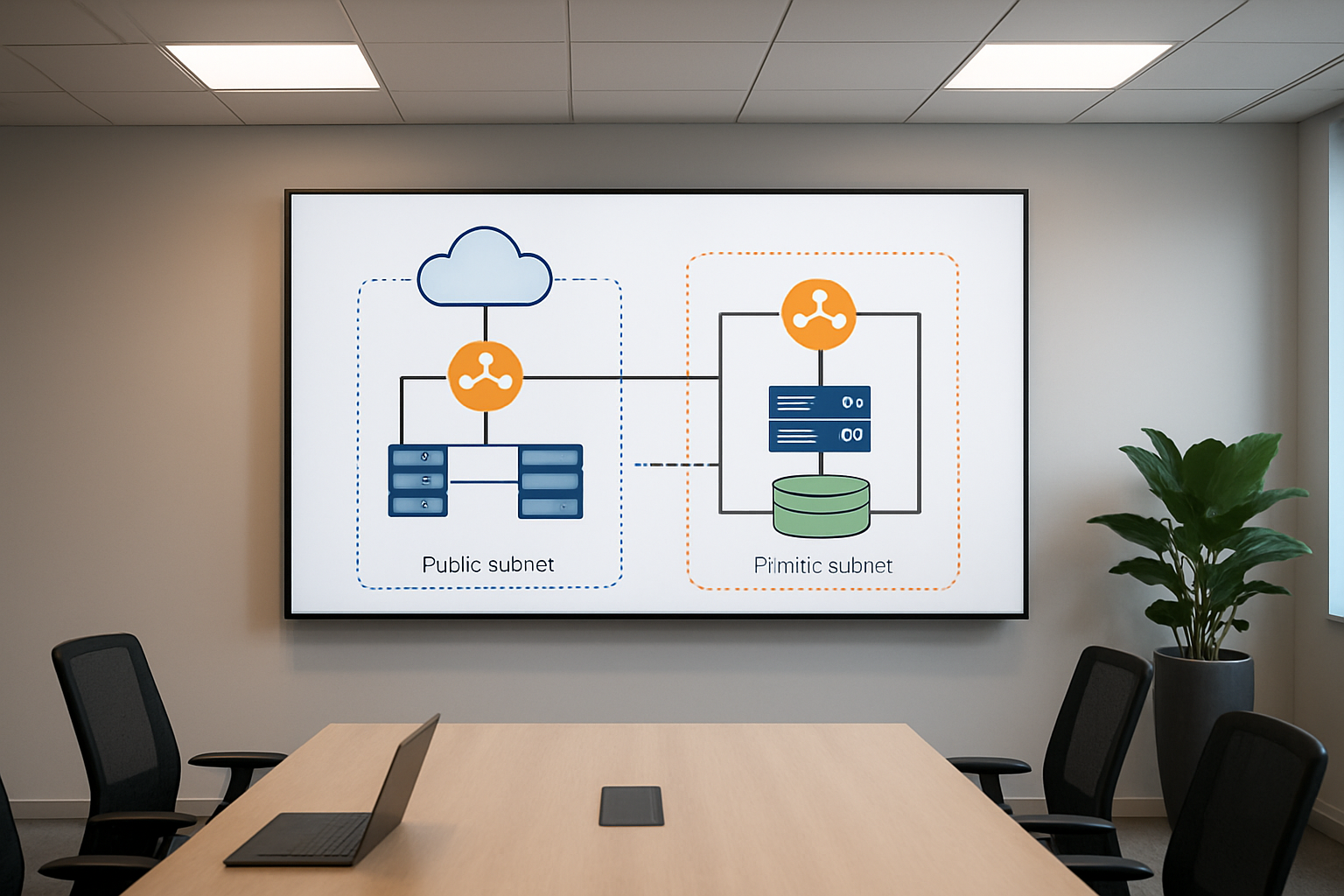
AWS full-stack deployment with public and private subnets creates a fortress-like structure for your web applications. The public subnet houses your frontend components – web servers, load balancers, and user-facing services – while the private subnet protects your backend infrastructure like databases, application servers, and sensitive business logic.
This separation brings massive security advantages. Your database servers and API endpoints never get direct internet exposure, making them invisible to external threats. Even if attackers breach your frontend, they still face another layer of protection before reaching your critical data.
Performance benefits shine through improved network efficiency. Frontend components can communicate directly with users through internet gateways, while backend services talk to each other through high-speed internal networks. This AWS network architecture reduces latency and creates predictable traffic patterns.
Cost optimization happens naturally with this setup. You only pay for internet gateways and NAT instances where needed, not for every component. Private subnet backend deployment eliminates unnecessary public IP addresses and reduces data transfer costs.
Scaling becomes surgical rather than broad-brush. You can independently scale your web servers in public subnets based on user demand while keeping your database tier stable in private subnets. This granular control prevents over-provisioning and maintains consistent performance during traffic spikes.
Key Components: VPC, Subnets, Route Tables, and Security Groups
Your Virtual Private Cloud acts as the foundation – a logically isolated section of AWS where you control the entire network environment. Think of it as your private data center in the cloud with complete control over IP addressing, routing, and access policies.
AWS VPC setup requires careful planning of your address space. Most applications work well with a /16 CIDR block, giving you 65,536 IP addresses to work with. Reserve specific ranges for different tiers – perhaps 10.0.1.0/24 for public subnets and 10.0.2.0/24 for private ones.
Subnets divide your VPC into smaller network segments, each tied to a specific Availability Zone. Public subnets connect to an Internet Gateway, allowing direct internet access. Private subnets route through NAT Gateways for outbound connections while blocking inbound traffic from the internet.
Route tables determine where network traffic goes. Public subnet route tables point to the Internet Gateway for internet-bound traffic. Private subnet routes send internet traffic through NAT Gateways while keeping internal communication flowing directly between subnets.
Security Groups act as virtual firewalls for your instances. They work at the instance level, controlling both inbound and outbound traffic. Unlike traditional firewalls, Security Groups are stateful – when you allow inbound traffic, the corresponding outbound response gets automatic approval.
Network Access Control Lists provide subnet-level protection. They’re stateless, meaning you must explicitly allow both inbound and outbound traffic. Use them for broad rules while relying on Security Groups for granular instance-level control.
Traffic Flow Between Frontend and Backend Components
Web application AWS deployment creates specific traffic patterns you need to understand. Users connect to your application load balancer in the public subnet through the Internet Gateway. The load balancer distributes requests across multiple web servers, also running in public subnets across different Availability Zones.
Your web servers process user requests and communicate with application servers in private subnets. This communication happens entirely within your VPC, never touching the public internet. Database queries flow from application servers to database instances, again staying within the secure private network.
Outbound traffic from private subnets follows a different path. When your application servers need to download updates or communicate with external APIs, traffic routes through NAT Gateways. These managed services provide internet access while preventing inbound connections from reaching your private resources.
AWS security controls govern every connection. Security Groups attached to your web servers allow HTTP/HTTPS traffic from anywhere but restrict SSH access to your IP range. Application server Security Groups only accept connections from web server Security Groups, creating a chain of trust.
Database Security Groups take this further by only accepting connections from application server Security Groups on specific database ports. This creates multiple security barriers that attackers must breach to reach your data.
Load balancer health checks continuously verify your application stack. These checks flow from the load balancer to web servers, then cascade through your application tier to ensure database connectivity. Failed health checks trigger automatic replacement of unhealthy instances, maintaining application availability without manual intervention.
Cross-zone traffic within your VPC travels over AWS’s high-performance backbone network. This internal communication bypasses internet routing, delivering microsecond latencies between your application components while maintaining security through Network ACLs and Security Group rules.
Setting Up Your AWS Virtual Private Cloud Foundation

Creating a VPC with Proper CIDR Block Configuration
Your AWS VPC setup starts with choosing the right CIDR block, which acts as the foundation for your entire network architecture. Think of CIDR blocks as defining the size of your digital neighborhood – too small and you’ll run out of space, too large and you’ll waste valuable IP addresses.
The most common approach for AWS full-stack deployment involves using a /16 CIDR block like 10.0.0.0/16, giving you 65,536 IP addresses to work with. This provides enough room for multiple subnets across different availability zones while maintaining efficient IP address allocation.
When planning your VPC setup, consider these key factors:
- Future growth: Plan for at least 3-5 years of expansion
- Multi-AZ deployment: Reserve space for redundancy across availability zones
- Service segmentation: Allocate separate ranges for web, application, and database tiers
- Development environments: Account for staging and testing environments
Popular CIDR configurations include:
10.0.0.0/16for production environments10.1.0.0/16for staging10.2.0.0/16for development
Avoid overlapping with your on-premises networks if you plan to establish VPN connections later.
Configuring Public Subnets for Web-Facing Resources
Public subnets serve as your application’s front door, hosting resources that need direct internet access. These subnets house your load balancers, web servers, and NAT gateways that face the public internet.
Create public subnets across multiple availability zones for high availability. A typical configuration uses /24 subnets, providing 256 IP addresses each:
10.0.1.0/24in us-east-1a10.0.2.0/24in us-east-1b10.0.3.0/24in us-east-1c
Each public subnet requires:
- Route table: Direct traffic to the Internet Gateway for outbound internet access
- Auto-assign public IP: Enable for instances that need immediate internet connectivity
- Network ACL: Configure appropriate inbound and outbound rules
Security considerations for public subnets:
- Deploy only essential internet-facing resources
- Use security groups with restrictive rules
- Implement web application firewalls (WAF) for additional protection
- Regular security audits and vulnerability assessments
Establishing Private Subnets for Database and Application Servers
Private subnets provide the secure backbone for your AWS network architecture, hosting sensitive components like databases, application servers, and internal APIs. These subnets don’t have direct internet access, significantly reducing your attack surface.
Design private subnets with larger CIDR blocks since they typically host more resources:
- Application tier:
10.0.10.0/24,10.0.20.0/24,10.0.30.0/24 - Database tier:
10.0.11.0/24,10.0.21.0/24,10.0.31.0/24
Private subnet configuration includes:
- Custom route tables: Route internet-bound traffic through NAT gateways
- No auto-assign public IP: Prevents accidental internet exposure
- Restrictive NACLs: Additional layer of network-level security
Best practices for private subnet backend deployment:
- Separate application and database tiers into different subnets
- Use different availability zones for redundancy
- Implement least-privilege access principles
- Monitor traffic patterns for unusual activity
Setting Up Internet Gateway and NAT Gateway Connections
Internet Gateway (IGW) and NAT Gateway form the connectivity backbone of your AWS VPC setup. The IGW provides bidirectional internet access for public subnets, while NAT Gateways enable secure outbound internet access for private subnet resources.
Internet Gateway Configuration:
- Attach one IGW per VPC (AWS limitation)
- Update public subnet route tables with
0.0.0.0/0pointing to IGW - No additional configuration needed once attached
NAT Gateway Setup:
Deploy NAT gateways in each availability zone for high availability:
- Place NAT gateways in public subnets
- Allocate Elastic IP addresses for each NAT gateway
- Update private subnet route tables to direct internet traffic through NAT gateways
Route table configurations:
Public Subnet Route Table:
- 10.0.0.0/16 → local
- 0.0.0.0/0 → Internet Gateway

Private Subnet Route Table:
- 10.0.0.0/16 → local
- 0.0.0.0/0 → NAT Gateway
Cost optimization tips:
- Use single NAT gateway for development environments
- Consider NAT instances for lower-traffic scenarios
- Monitor NAT gateway data processing charges
- Implement VPC endpoints for AWS service access to reduce NAT gateway usage
This foundation enables secure full-stack web app deployment with proper network segmentation and controlled internet access.
Deploying Frontend Components in Public Subnets
Launching Web Servers with Auto Scaling Groups
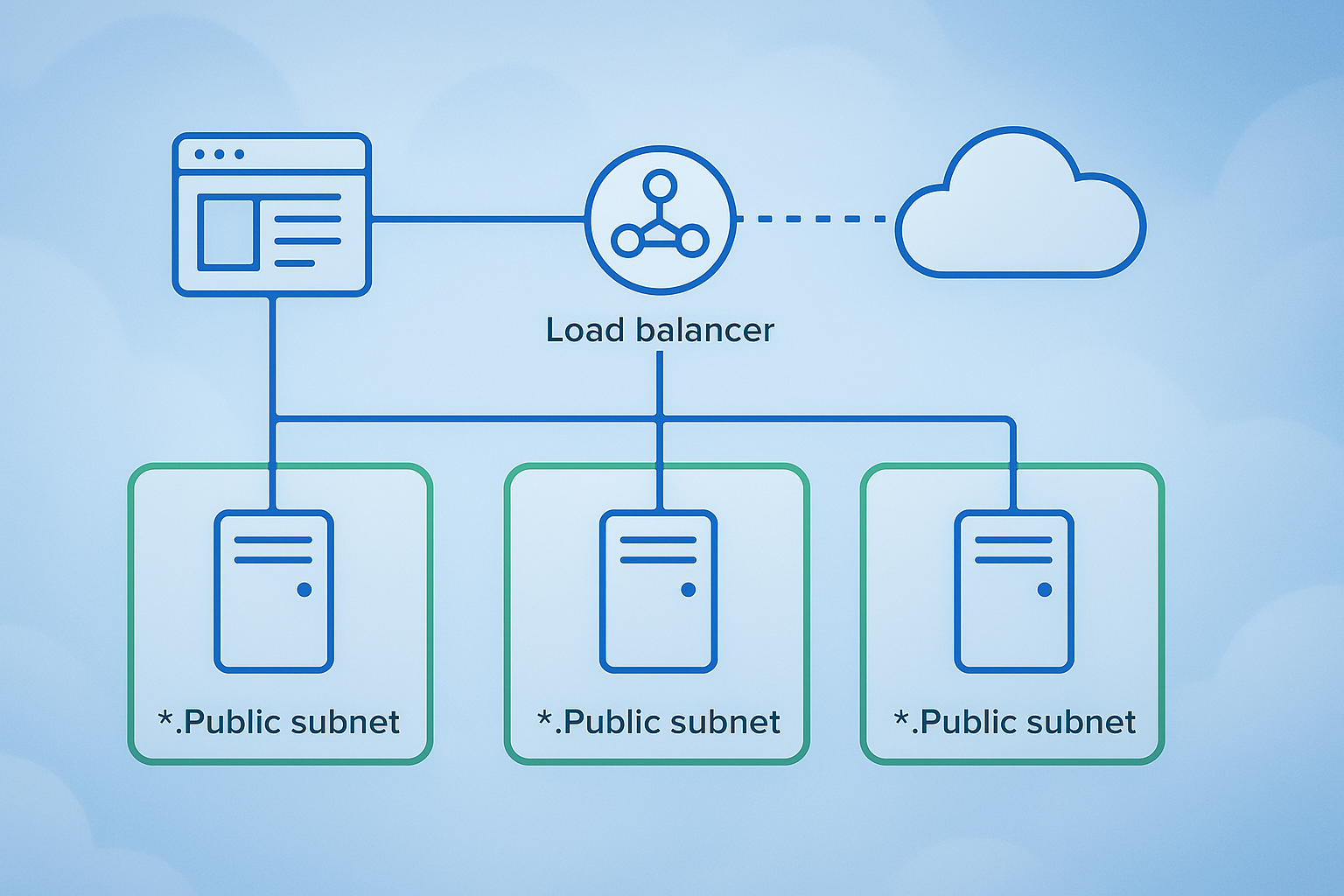
Setting up your frontend infrastructure in public subnets requires careful orchestration of EC2 instances through Auto Scaling Groups (ASG). These groups automatically manage the number of running instances based on demand, making sure your AWS full-stack deployment stays responsive even during traffic spikes.
Start by creating a launch template that defines your web server configuration. Include your AMI ID, instance type, security groups, and user data scripts that install your web server software and deploy your application code. The launch template acts as a blueprint for every new instance the ASG creates.
Configure your Auto Scaling Group to span multiple Availability Zones within your public subnets. This setup provides redundancy – if one zone experiences issues, your application continues running in the other zones. Set minimum, desired, and maximum capacity values based on your expected traffic patterns. A common starting point might be 2 minimum instances, 3 desired, and 6 maximum instances.
Attach scaling policies that respond to CloudWatch metrics like CPU utilization or request count. Scale-out policies add instances when demand increases, while scale-in policies remove instances during low traffic periods. This dynamic scaling optimizes both performance and costs for your secure web app deployment AWS infrastructure.
Configure health checks to automatically replace unhealthy instances. The ASG monitors instance health through EC2 status checks and can integrate with your load balancer for application-level health verification.
Configuring Application Load Balancer for High Availability
Your Application Load Balancer (ALB) serves as the entry point for all incoming traffic to your frontend components. Deploy the ALB in your public subnets across multiple Availability Zones to ensure high availability and fault tolerance.
Create target groups that contain your EC2 instances from the Auto Scaling Group. The ALB distributes incoming requests across these healthy targets using algorithms like round-robin or least outstanding requests. Configure health check parameters including the health check path, interval, timeout, and healthy/unhealthy thresholds. The ALB only routes traffic to instances that pass these health checks.
Set up listener rules to handle different types of traffic. Create separate listeners for HTTP (port 80) and HTTPS (port 443) traffic. For production environments, configure HTTP listeners to redirect all traffic to HTTPS, ensuring encrypted communication from the start.
Configure sticky sessions if your application requires users to maintain connections to specific servers. However, stateless applications work better with load balancing since they can handle requests from any server without session dependencies.
Enable access logs to monitor traffic patterns and troubleshoot issues. These logs provide detailed information about every request, including response codes, processing times, and client IP addresses. Store logs in an S3 bucket for long-term analysis and compliance requirements.
Implementing SSL/TLS Certificates for HTTPS Traffic
Securing your web application traffic requires proper SSL/TLS certificate implementation through AWS Certificate Manager (ACM). This service provides free certificates that automatically renew, eliminating the complexity of manual certificate management in your AWS VPC setup.
Request a certificate for your domain name through ACM. You can choose between DNS validation or email validation methods. DNS validation proves more reliable for automated renewals and works well with Route 53 hosted zones. Add the required CNAME records to your DNS configuration to complete the validation process.
Attach the validated certificate to your Application Load Balancer’s HTTPS listener. Configure the security policy to use modern TLS versions (TLS 1.2 or higher) and strong cipher suites. AWS provides predefined security policies that balance compatibility with security requirements.
Set up HTTP to HTTPS redirection rules in your load balancer listeners. This configuration automatically redirects any HTTP requests to the secure HTTPS version, preventing accidental transmission of sensitive data over unencrypted connections. The redirection returns a 301 permanent redirect status code.
Consider implementing HTTP Strict Transport Security (HSTS) headers in your web application. These headers instruct browsers to always use HTTPS when communicating with your domain, providing additional protection against downgrade attacks.
Monitor certificate expiration dates through CloudWatch alarms, even though ACM handles automatic renewal. Set up notifications to alert you if renewal fails, allowing time to address any issues before certificate expiration affects your application availability.
Securing Backend Services in Private Subnets

Deploying Application Servers Without Direct Internet Access
Your application servers need zero direct internet connectivity when placed in private subnets. This setup creates a rock-solid security foundation for your AWS full-stack deployment by eliminating the attack surface that comes with public-facing servers.
Deploy your EC2 instances exclusively in private subnets with carefully configured security groups that only allow traffic from specific sources. Your web servers should accept connections solely from the Application Load Balancer in the public subnet, while API servers receive traffic only from authenticated frontend components.
Configure a NAT Gateway or NAT Instance in your public subnet to enable outbound internet access for software updates and external API calls. This allows your private subnet backend deployment to pull security patches and communicate with third-party services without exposing inbound ports to the internet.
Use AWS Systems Manager Session Manager for secure server access instead of SSH bastion hosts. This eliminates the need for SSH keys and provides detailed logging of all administrative sessions without requiring direct network connectivity.
Setting Up Database Instances with Enhanced Security
Position your RDS instances deep within private subnets where they remain completely isolated from internet traffic. Create dedicated database subnets across multiple Availability Zones to ensure high availability while maintaining strict network isolation.
Configure database security groups to accept connections only from application server security groups, never from broad IP ranges. This creates a precise allowlist that blocks unauthorized database access attempts.
Enable RDS encryption at rest using AWS KMS keys and enforce SSL/TLS connections for all database traffic. Set up automated backups with encryption and configure Multi-AZ deployments for production workloads to maintain both security and reliability.
Implement database parameter groups with security-hardened settings, including connection limits, timeout values, and logging configurations that capture all database activities for compliance and monitoring purposes.
Configuring Internal Load Balancing for Backend Services
Deploy Application Load Balancers (ALB) within private subnets to distribute traffic across your backend services without exposing them to external networks. This internal load balancing approach maintains the security benefits of private subnet backend deployment while ensuring high availability.
Configure target groups that perform health checks on your application servers using internal endpoints. Set up weighted routing or path-based routing to direct traffic to appropriate microservices based on request characteristics.
Use Network Load Balancers for TCP-level traffic distribution when you need ultra-low latency or when handling non-HTTP protocols between your backend tiers. These load balancers preserve source IP addresses and provide consistent performance for database connections and internal API calls.
Implement cross-zone load balancing to ensure even traffic distribution across all Availability Zones, preventing hot spots that could impact performance or create single points of failure in your secure web app deployment AWS architecture.
Establishing Secure Communication Between Tiers
Create security group rules that follow the principle of least privilege, allowing only necessary traffic between application tiers. Frontend servers should communicate with backend APIs through specific ports, while database connections remain restricted to application servers only.
Use AWS VPC endpoints for services like S3, DynamoDB, and Lambda to keep traffic within the AWS network backbone. This eliminates internet routing for AWS service calls and reduces both latency and security risks.
Implement TLS encryption for all inter-tier communication, including internal API calls and database connections. Use AWS Certificate Manager to automatically provision and renew SSL certificates for internal load balancers and application endpoints.
Configure VPC Flow Logs to monitor all network traffic between subnets and identify any unusual communication patterns. Set up CloudWatch alarms that trigger when unexpected traffic flows occur between your application tiers, providing early warning of potential security incidents.
Consider implementing AWS PrivateLink for third-party integrations, allowing secure connectivity to external services without internet gateways or NAT instances. This approach maintains the isolation benefits of private subnets while enabling necessary external communications for your full-stack application security requirements.
Implementing Robust Security Controls

Designing Security Group Rules for Least Privilege Access
Security groups act as virtual firewalls for your EC2 instances, controlling inbound and outbound traffic at the instance level. When deploying AWS full-stack applications across public and private subnets, crafting precise security group rules becomes critical for maintaining a secure environment.
Start by creating separate security groups for each application tier. Your web servers in public subnets need different access patterns than database servers in private subnets. For frontend components, allow HTTP (port 80) and HTTPS (port 443) traffic from anywhere (0.0.0.0/0), but restrict SSH access (port 22) to specific IP addresses or bastion hosts only.
Backend services require more restrictive rules. Database security groups should only accept connections from application servers on specific ports—MySQL on port 3306 or PostgreSQL on port 5432. Never allow direct database access from the internet. Application servers should accept traffic only from load balancers or web servers, not from arbitrary sources.
Apply the principle of least privilege by:
- Specifying exact port ranges instead of broad ranges
- Using security group references instead of IP ranges when possible
- Regularly auditing and removing unused rules
- Documenting the purpose of each rule for future maintenance
Remember that security group rules are stateful—responses to allowed inbound traffic automatically flow back out, regardless of outbound rules.
Configuring Network ACLs for Additional Layer Protection
Network Access Control Lists (NACLs) provide subnet-level security, creating an additional defense layer beyond security groups. Unlike security groups that are stateful, NACLs are stateless, meaning you must explicitly allow both inbound and outbound traffic for each connection.
Default NACLs allow all traffic, which isn’t ideal for secure web app deployment AWS environments. Create custom NACLs for both public and private subnets with specific rules. For public subnets hosting frontend components, allow:
- Inbound HTTP/HTTPS traffic (ports 80, 443)
- Outbound responses on ephemeral ports (1024-65535)
- Specific management traffic like SSH from authorized networks
Private subnet NACLs should be more restrictive:
- Allow inbound traffic only from public subnet IP ranges
- Permit database connections from application servers
- Block all direct internet access
- Allow outbound traffic for software updates through NAT gateways
Configure rules with specific port ranges and source/destination IP addresses. Avoid using 0.0.0.0/0 in private subnet NACLs. Number your rules strategically—lower numbers take precedence, so place most specific rules first and broader rules later.
Test NACL configurations carefully, as overly restrictive rules can break application functionality. Unlike security groups, NACLs can easily block legitimate traffic if not properly configured.
Setting Up IAM Roles and Policies for Resource Access
Identity and Access Management (IAM) roles provide secure, temporary credentials for AWS resources without embedding long-term access keys in your applications. This approach is essential for full-stack application security in AWS environments.
Create specific IAM roles for each application component. Web servers need different permissions than database instances or Lambda functions. For example, a web server role might need:
- S3 access for static content storage
- CloudWatch permissions for logging
- Parameter Store access for configuration secrets
- Limited EC2 permissions for auto-scaling operations
Database instances require minimal permissions—typically just CloudWatch logging and backup operations. Never grant unnecessary permissions like EC2 management or IAM modifications to application roles.
Use AWS managed policies as building blocks, then create custom policies for specific needs:
{
  "Version": "2012-10-17",
  "Statement": [
    {
      "Effect": "Allow",
      "Action": [
        "s3:GetObject",
        "s3:PutObject"
      ],
      "Resource": "arn:aws:s3:::your-app-bucket/*"
    }
  ]
}
Implement policy conditions to restrict access based on IP addresses, time of day, or MFA requirements. Regular policy auditing helps identify and remove excessive permissions that accumulate over time.
Cross-account access requires careful role assumption policies. Trust relationships should specify exact account IDs and external IDs when possible, preventing unauthorized cross-account access that could compromise your AWS security controls.
Monitoring and Maintaining Your Deployed Application

Setting Up CloudWatch for Performance and Security Monitoring
CloudWatch serves as your eyes and ears for AWS full-stack deployment monitoring, providing real-time insights into application performance and security events. Start by creating custom dashboards that track key metrics for both your frontend in public subnets and backend services in private subnets.
Configure CloudWatch Logs for application-level monitoring by setting up log groups for your web servers, databases, and application servers. Enable VPC Flow Logs to monitor network traffic between your public and private subnets, helping detect unusual patterns or potential security threats. Set up custom metrics to track application-specific KPIs like user login attempts, API response times, and database query performance.
Create CloudWatch Alarms for critical thresholds such as CPU utilization above 80%, memory usage spikes, or failed authentication attempts. These alarms should trigger SNS notifications to alert your team immediately. For security monitoring, configure alarms for unusual network traffic patterns, multiple failed login attempts, or unauthorized access attempts to your private subnet resources.
Use CloudWatch Insights to analyze log data across your entire AWS network architecture. Query logs to identify performance bottlenecks, security incidents, or application errors that could impact user experience.
Implementing Automated Backup and Recovery Procedures
Automated backups protect your full-stack application data and ensure business continuity. Configure RDS automated backups for your database instances in private subnets, setting retention periods based on your recovery requirements. Enable Multi-AZ deployments for critical databases to provide automatic failover capabilities.
Set up AWS Backup to create centralized backup policies across all your resources. Create backup plans that include EC2 instances, EBS volumes, RDS databases, and DynamoDB tables. Schedule daily backups for production environments and weekly backups for development systems to balance protection with cost efficiency.
Implement cross-region backup replication for critical data to protect against regional disasters. Use S3 Cross-Region Replication for static assets and application artifacts stored in your frontend deployment buckets. Configure automated snapshots for EBS volumes hosting your application servers.
Test your recovery procedures regularly by performing restore operations in isolated environments. Document recovery time objectives (RTO) and recovery point objectives (RPO) for different application components. Create runbooks detailing step-by-step recovery processes for various failure scenarios.
Establishing Update and Patch Management Processes
Systematic update management keeps your secure web app deployment AWS infrastructure protected against vulnerabilities. Use AWS Systems Manager Patch Manager to automate operating system updates across your EC2 instances in both public and private subnets. Create maintenance windows during low-traffic periods to minimize user impact.
Implement blue-green deployment strategies for application updates, maintaining parallel environments to enable quick rollbacks if issues arise. Use AWS CodeDeploy or similar tools to automate application deployments while maintaining zero-downtime operations.
Create update schedules that prioritize security patches while allowing adequate testing time for major updates. Establish staging environments that mirror your production AWS VPC setup to validate changes before deploying to live systems. Use Infrastructure as Code tools like CloudFormation or Terraform to ensure consistent updates across environments.
Monitor security advisories from AWS and your application framework vendors. Subscribe to AWS Security Bulletins and configure automated notifications for critical security updates affecting your deployed components.
Cost Optimization Strategies for Long-Term Operations
Smart cost management ensures your AWS subnet configuration remains economically sustainable while maintaining security and performance. Implement auto-scaling groups for your frontend and backend components to automatically adjust capacity based on demand patterns. This prevents over-provisioning during low-traffic periods while ensuring adequate resources during peak usage.
Use Reserved Instances for predictable workloads and Spot Instances for non-critical batch processing tasks. Analyze your usage patterns monthly using AWS Cost Explorer to identify opportunities for rightsizing instances or switching to more cost-effective instance types.
Configure lifecycle policies for S3 buckets storing logs, backups, and static assets. Move older data to cheaper storage classes like S3 Infrequent Access or Glacier based on access patterns. Set up intelligent tiering to automatically optimize storage costs without manual intervention.
Review and clean up unused resources regularly, including orphaned EBS volumes, unattached Elastic IPs, and idle load balancers. Use AWS Trusted Advisor to identify cost optimization opportunities and implement recommendations that don’t compromise your web application AWS deployment security posture.
Monitor data transfer costs between availability zones and regions, optimizing your network architecture to minimize unnecessary cross-zone traffic while maintaining high availability requirements.
Your full-stack application now has a solid foundation on AWS with proper network segmentation and security controls in place. By splitting your frontend and backend across public and private subnets, you’ve created a deployment that balances accessibility with protection. Your users can reach your application easily while your sensitive backend services stay hidden from direct internet access.
The monitoring and maintenance strategies we covered will help you catch issues before they become problems and keep your application running smoothly. Start with a simple setup and gradually add more sophisticated security measures as your application grows. Remember to regularly review your security groups, update your monitoring dashboards, and test your backup procedures. Your AWS deployment is now ready to handle real-world traffic while keeping your data and services secure.