


Stop Hardcoding AWS Credentials — Here’s a Better Way
If you’re still storing AWS access keys in environment variables or CI/CD secrets, you’re sitting on a ticking time bomb. Leaked long-lived AWS credentials are one of the most common causes of cloud security incidents, and the fix is simpler than you might think.
This guide is for developers, DevOps engineers, and platform teams who want to lock down their AWS deployments without adding complexity to their workflows. Whether you’re running GitHub Actions, GitLab CI, or any other modern pipeline, AWS OIDC authentication gives you a clean, keyless way to connect.
Here’s what we’ll walk through together:
- Why long-lived AWS credentials are a real problem — and what actually happens when they leak
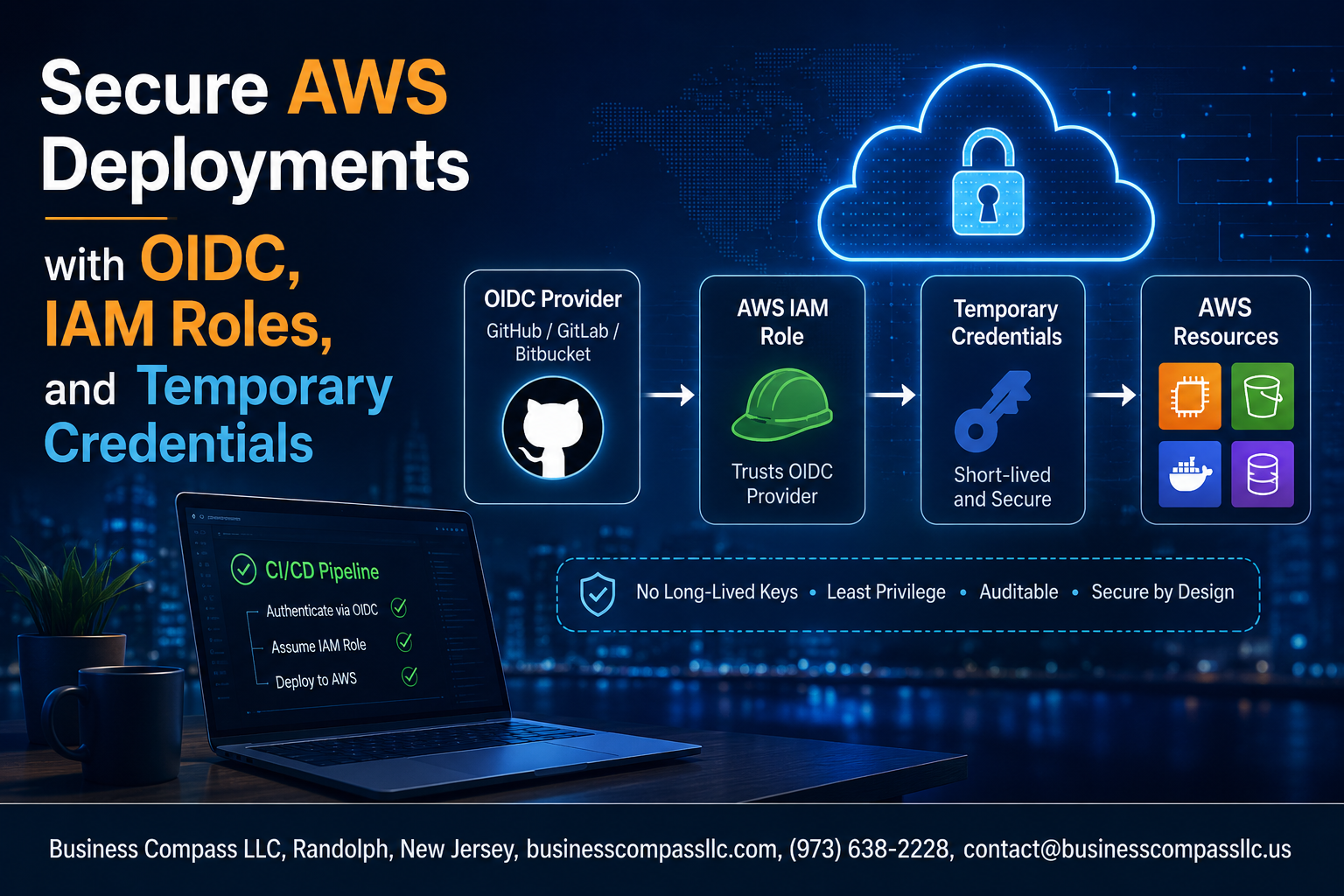
- How OpenID Connect (OIDC) eliminates permanent AWS credentials by letting your CI/CD pipeline request IAM roles with temporary credentials on the fly
- How to configure IAM roles and OIDC in your pipeline so access stays scoped, auditable, and locked to exactly what your workload needs
By the end, you’ll have a solid mental model of AWS credential management best practices and a clear path to implementing OIDC in your own setup. No more secrets sitting in .env files. No more rotating keys at 2am after a breach. Just clean, temporary, automatically expiring credentials that do the job and disappear.
Let’s get into it.
Understanding the Security Risks of Long-Lived AWS Credentials

Why Static Access Keys Put Your Infrastructure at Risk
Long-lived AWS credentials are a ticking time bomb. Static access keys never expire, meaning one leaked key gives attackers permanent infrastructure access.
Common Attack Vectors
- Exposed GitHub repositories
- Compromised CI/CD pipelines
- Misconfigured environment variables
The Cost of a Breach
Data theft, regulatory fines, and full account takeover.
How OIDC Eliminates the Need for Permanent AWS Credentials

What OpenID Connect Is and How It Works with AWS
AWS OIDC authentication lets your identity provider vouch for your workload without storing permanent credentials. Instead of hardcoding secrets, AWS trusts signed JWT tokens from providers like GitHub Actions, exchanging them for short-lived IAM roles temporary credentials automatically.
Configuring IAM Roles for Secure, Scoped Access

Creating an IAM Role with an OIDC Trust Policy
Configure your IAM role’s trust policy to accept tokens only from your OIDC provider, specifying the exact aud and sub claims.
Applying the Principle of Least Privilege
- Grant only the permissions your workload actually needs
Using Condition Keys to Restrict Role Assumption
Lock down access using StringEquals conditions on specific repositories or branches.
Generating and Using Temporary Credentials Safely

How AWS STS Issues Short-Lived Access Tokens
AWS STS generates temporary credentials—access key, secret key, session token—valid for minutes to hours, drastically reducing exposure compared to IAM user keys.
Setting Appropriate Session Durations
- CI/CD pipelines: 15–60 minutes
- Developer sessions: 1–4 hours
Automatically Rotating Credentials
OIDC handles rotation automatically—no manual intervention needed, eliminating long-lived AWS credentials entirely.
Implementing OIDC Authentication in Your CI/CD Pipeline

Configuring GitHub Actions to Authenticate with AWS via OIDC
Add the id-token: write permission, then use aws-actions/configure-aws-credentials with your IAM role ARN — no stored secrets needed.
Setting Up GitLab CI and Other Platforms for Keyless Deployments
GitLab uses CI_JOB_JWT_V2; Jenkins and CircleCI have similar OIDC token variables.
Validating Claims to Prevent Unauthorized Pipeline Access
- Lock roles to specific repos/branches using
Conditionkeys - Reject broad wildcard trust policies
Monitoring and Auditing Temporary Credential Usage

Tracking Role Assumptions with AWS CloudTrail
Enable CloudTrail to log every AssumeRoleWithWebIdentity call, capturing:
- Who assumed the role
- When and from which pipeline
Setting Up Alerts for Suspicious Activity
Use CloudWatch alarms to flag unusual patterns like off-hours role assumptions.
Reviewing IAM Policies & Compliance
Regularly audit access logs to tighten permissions and meet AWS credential security policies.

Keeping your AWS deployments secure doesn’t have to be complicated. By ditching long-lived credentials in favor of OIDC and temporary credentials, you dramatically cut down the risk of unauthorized access. Pairing that with tightly scoped IAM roles means that even if something goes wrong, the blast radius stays small. Add OIDC authentication into your CI/CD pipeline, and you’ve got a setup that’s both secure and smooth to work with.
The last piece of the puzzle is staying on top of how those temporary credentials are being used. Regular monitoring and auditing keep you aware of what’s happening in your environment and help you catch anything unusual before it becomes a real problem. Start with one pipeline, get comfortable with the setup, and then roll it out across your infrastructure. Your future self will thank you.









