Stop DNS Threats Before They Reach Your AWS Workloads
If you’re running workloads in AWS, DNS security probably isn’t the first thing keeping you up at night — but it should be on your radar. DNS is one of the most abused attack vectors in cloud environments, and most teams don’t realize they have a gap until something goes wrong.
This guide is for cloud architects, DevOps engineers, and security teams who want a practical handle on AWS Route 53 DNS Firewall — not a theoretical overview, but a real look at how it works and how to get it running in your environment.
Here’s what we’ll walk through:
- The DNS security risks that make cloud environments a target — including DNS data exfiltration and malicious domain abuse
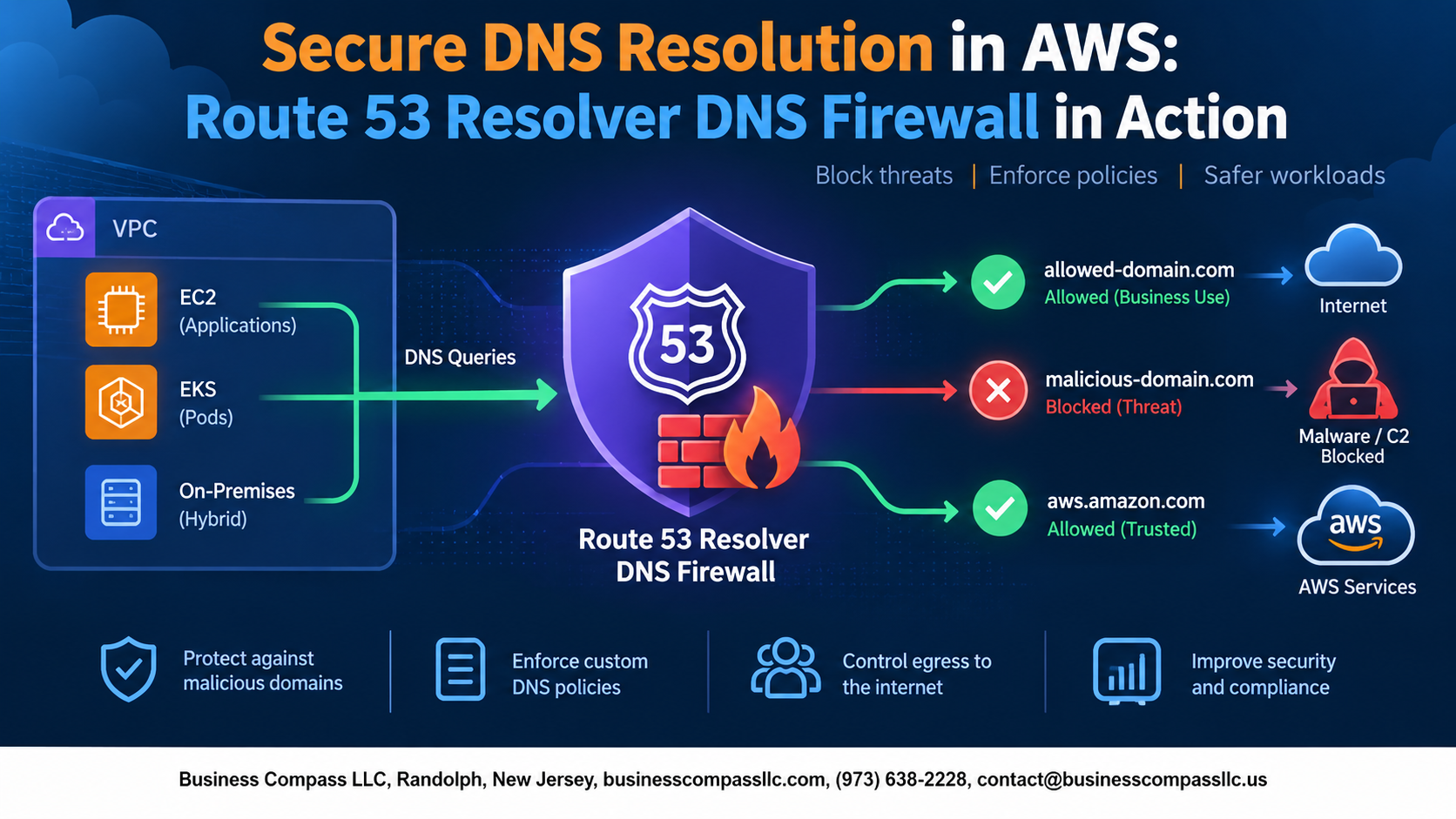
- How Route 53 Resolver DNS Firewall works and what it actually does to protect your AWS network at the resolver level
- How to set it up, block threats, and monitor it in real time so you’re not flying blind after deployment
By the end, you’ll know how to tighten your AWS network security, cut off common DNS-based attack paths, and keep an eye on what’s happening with your DNS traffic — all without overcomplicating your architecture.
Let’s get into it.
Understanding DNS Security Risks in Cloud Environments

Why DNS Vulnerabilities Pose a Serious Threat to AWS Workloads
DNS is the internet’s phone book — and attackers know it. Without secure DNS resolution in AWS, your workloads are exposed to hijacking, tunneling, and cache poisoning attacks that bypass traditional security controls entirely.
Common DNS-Based Attack Vectors
- DNS tunneling for data theft
- Domain generation algorithm (DGA) malware
- Cache poisoning redirecting traffic
Business Cost of Unprotected DNS Traffic
Breaches average $4.5M per incident.
What Route 53 Resolver DNS Firewall Brings to the Table
Core Capabilities That Set It Apart From Traditional DNS Filters
- Filters DNS queries in real time using managed or custom domain lists
- Blocks malicious domains AWS-wide before connections establish
How It Integrates Seamlessly With Existing AWS Networking
- Works natively with VPCs, no extra agents needed
Key Benefits for Security and Compliance Teams
- Simplifies DNS data exfiltration prevention and audit logging
Essential Components of Route 53 Resolver DNS Firewall

Domain List Groups, Rule Groups, and Actions
AWS Route 53 DNS Firewall runs on three core building blocks:
- Domain list groups – custom or AWS-managed domain collections that define what gets filtered
- Rule groups – prioritized sets of rules referencing those lists
- Actions – Block, Allow, or Alert on matched DNS queries
AWS-managed lists cover known malware and botnet domains automatically.
Deploying DNS Firewall Across Your AWS Environment

Step-by-Step Setup Using the AWS Management Console
Open the Route 53 console, navigate to DNS Firewall, and create a rule group with domain lists.
Associating Rule Groups With Your VPCs Effectively
- Attach rule groups directly to target VPCs
- Set priority order carefully
Automating Deployment With Infrastructure as Code
Use Terraform or CloudFormation for repeatable, consistent Route 53 Resolver firewall setup.
Scaling DNS Firewall Across Multi-Account Environments With AWS Firewall Manager
AWS Firewall Manager pushes DNS firewall policies organization-wide automatically.
Blocking Malicious Domains and Preventing Data Exfiltration

Stopping Command-and-Control Communication in Its Tracks
AWS Route 53 DNS Firewall blocks C2 traffic by filtering malicious domains before connections establish.
Preventing DNS Tunneling Used for Data Theft
DNS data exfiltration prevention works by detecting abnormal query patterns and dropping suspicious requests automatically.
Customizing Block Responses to Redirect Suspicious Traffic
- Return
NODATA,NXDOMAIN, or custom override responses - Redirect flagged traffic to honeypot endpoints for analysis
Monitoring and Optimizing Your DNS Firewall in Real Time

Leveraging CloudWatch Metrics, Query Logs, and Rule Tuning
Track DNS query patterns using CloudWatch metrics, spot anomalies fast, and dig into Route 53 Resolver query logging for granular visibility. When fine-tuning AWS DNS firewall monitoring rules, review blocked domains regularly—whitelist legitimate traffic causing false positives while keeping cloud DNS threat protection tight against real malicious domains.

DNS security isn’t something you want to leave to chance, especially when your cloud environment is constantly handling sensitive data and traffic. Route 53 Resolver DNS Firewall gives you a practical, hands-on way to block malicious domains, stop data exfiltration before it happens, and keep a close eye on what’s moving through your network. From setting up the core components to deploying it across your AWS environment, the steps are manageable and the payoff is real protection against threats that often fly under the radar.
If you haven’t already taken a hard look at your DNS security setup, now’s a great time to start. Get your firewall rules in place, connect your monitoring tools, and make sure you’re reviewing the data regularly. A DNS firewall that’s actively tuned and watched is one of the strongest lines of defense you can build into your AWS environment.