


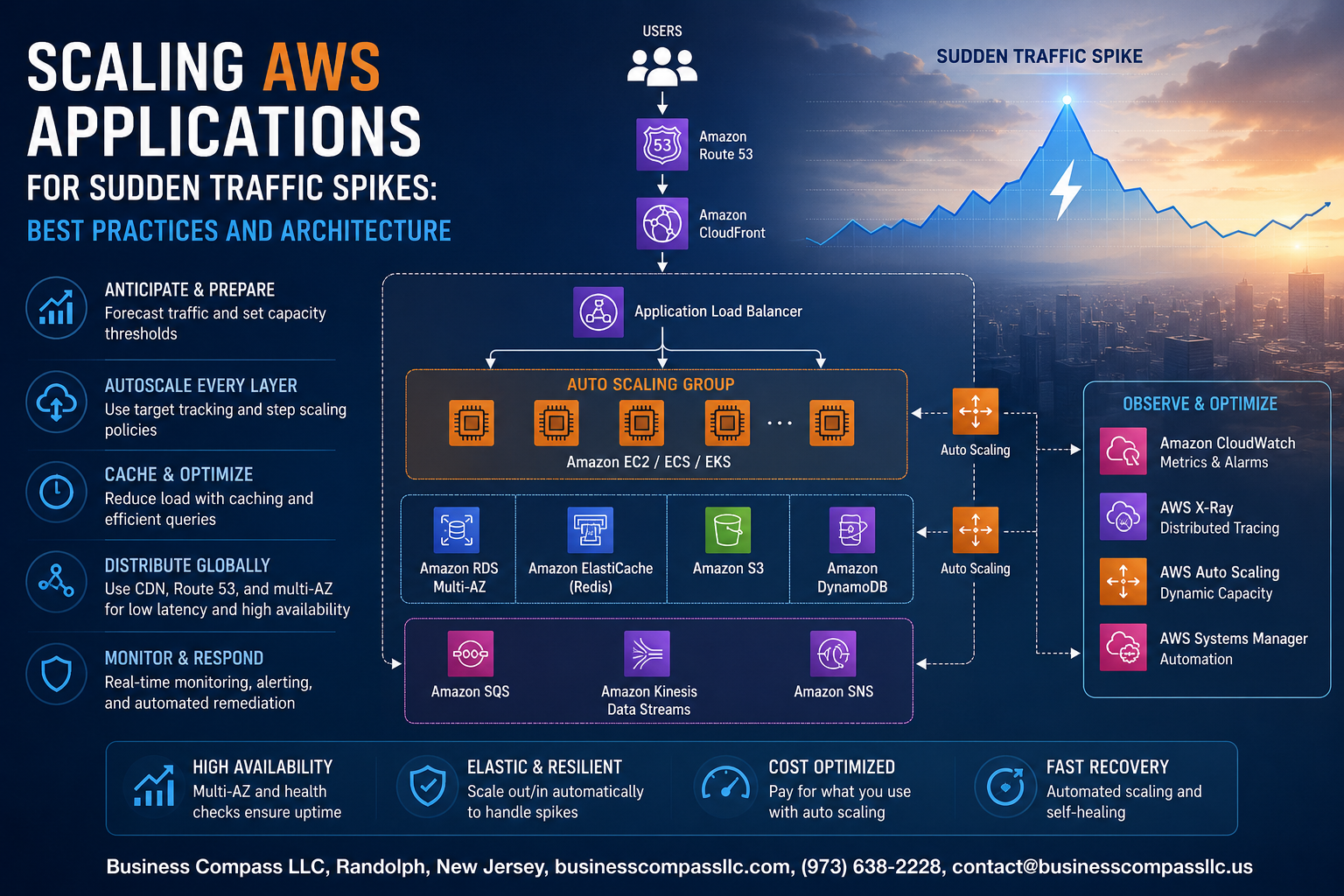
When Traffic Explodes Overnight, Your AWS Setup Either Holds or Breaks
You’ve seen it happen. A product goes viral, a marketing email lands at the wrong time, or a news cycle sends thousands of users to your app all at once. If your AWS infrastructure isn’t ready, users hit errors, pages time out, and you’re scrambling at 2 AM trying to figure out what went wrong.
This guide is for cloud engineers, DevOps teams, and startup CTOs who need a solid game plan for scaling AWS applications for traffic spikes without burning through their budget or losing sleep.
Here’s what we’ll walk through together:
- How to build a scalable AWS architecture from the ground up — so your system can handle a 10x traffic surge without a complete redesign
- AWS auto scaling best practices and elastic load balancing — the core tools that do the heavy lifting when demand shoots up unexpectedly
- AWS cost optimization during scaling — because throwing more servers at the problem is easy, but keeping your cloud bill sane is where the real skill comes in
No fluff, no vague advice. Just practical strategies you can actually apply to your AWS setup before the next traffic wave hits.
Understanding the Impact of Sudden Traffic Spikes on AWS Applications

How Unexpected Traffic Surges Affect Application Performance
Sudden traffic spikes can overwhelm servers, causing slow load times, crashes, and failed transactions. Without proper AWS auto scaling best practices, even well-built apps buckle under pressure.
Common Business Scenarios That Trigger Sudden Spikes
- Flash sales
- Viral content
- Product launches
The Cost of Downtime and Poor Scalability
Every minute offline costs revenue and trust.
Core AWS Services That Enable Rapid Scaling

Auto Scaling Groups, ELB, CloudFront & Lambda Work Together
When traffic spikes hit, these four AWS services handle the heavy lifting:
- Auto Scaling Groups spin up EC2 instances automatically based on demand
- Elastic Load Balancing spreads incoming requests across healthy instances
- CloudFront caches content at edge locations, cutting origin server load
- Lambda scales serverless functions instantly, handling unpredictable bursts effortlessly
Designing a Scalable Architecture From the Ground Up

A. Decoupling Components With Amazon SQS and SNS
Use SQS queues and SNS topics to separate services, preventing one slow component from crashing everything else during traffic spikes.
B. Horizontal vs. Vertical Scaling
- Horizontal: Add more instances (preferred for AWS auto scaling best practices)
- Vertical: Upgrade instance size (quick but limited)
Proactive Monitoring and Alerting to Stay Ahead of Traffic Spikes

Setting Up Amazon CloudWatch Metrics and Alarms
Track CPU, latency, and request counts with custom CloudWatch dashboards. Set alarms that trigger Auto Scaling policies before users notice slowdowns.
Using AWS Trusted Advisor to Identify Scaling Bottlenecks
Trusted Advisor flags underutilized resources and service limit risks proactively.
Implementing Predictive Scaling With Machine Learning Insights
Predictive Scaling analyzes historical traffic patterns to pre-launch capacity automatically.
Cost Optimization Strategies While Scaling Under Pressure

Using Spot Instances and Reserved Capacity to Reduce Spend
Mix Spot Instances for fault-tolerant workloads with Reserved Capacity for baseline traffic to cut costs significantly.
Setting Scaling Limits to Prevent Runaway Costs
Always cap your Auto Scaling max instances to avoid unexpected bills.
Analyzing Cost With AWS Cost Explorer During High Traffic Events
Track spending patterns in real time using AWS Cost Explorer.
Testing and Validating Your Scaling Strategy Before Traffic Arrives

A. Load Testing With AWS Distributed Load Testing
Run simulated traffic using AWS Distributed Load Testing to catch bottlenecks early.
B. Chaos Engineering
Break things intentionally using AWS Fault Injection Simulator to expose hidden weaknesses.
C. Simulate Real Traffic
Mirror actual user patterns for accurate scaling results.
D. Refine Auto Scaling Policies
Regularly revisit AWS auto scaling best practices to handle sudden traffic surges confidently.

Handling sudden traffic spikes doesn’t have to feel like putting out fires. With the right AWS services in place, a well-thought-out architecture, and proactive monitoring, your application can handle whatever gets thrown at it without breaking a sweat. Pair that with smart cost optimization and regular stress testing, and you’re not just surviving traffic surges — you’re ready for them.
The real win here is preparation. Don’t wait for a traffic spike to expose the weak spots in your setup. Start auditing your current architecture, run load tests, and make sure your auto-scaling policies actually match how your traffic behaves. A little work upfront goes a long way when thousands of users suddenly land on your platform at once.









