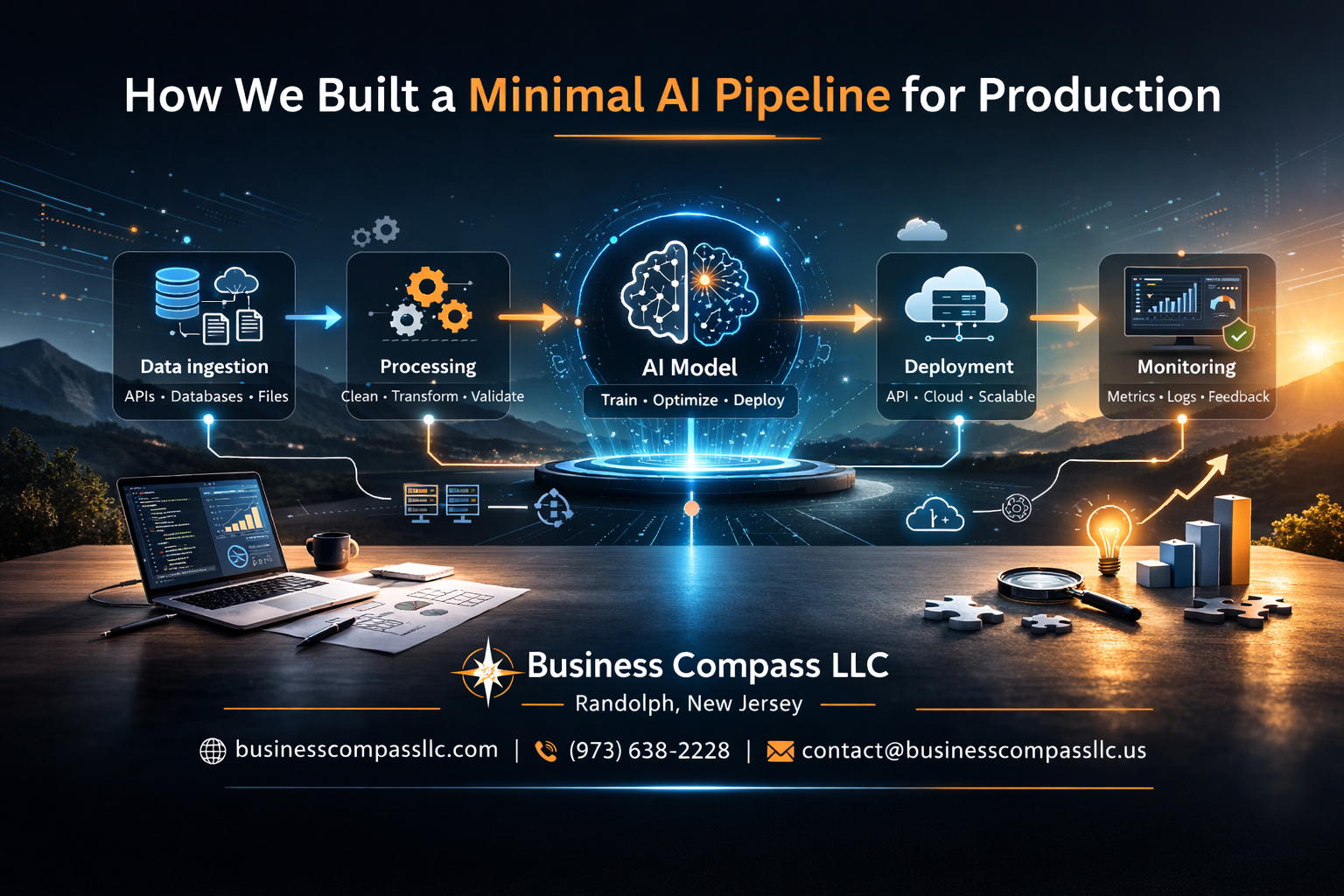
Building a minimal AI pipeline production system doesn’t require complex enterprise solutions or massive infrastructure investments. This guide walks data scientists, ML engineers, and startup technical teams through creating a streamlined, production-ready system that actually works in the real world.
Most AI projects fail because teams overcomplicate their machine learning deployment from day one. We’ll show you how our team built a lightweight yet robust AI infrastructure design that handles real traffic without breaking the bank or your sanity.
You’ll learn how to design a streamlined data processing architecture that cuts through the noise and focuses on what matters. We’ll cover automated ML deployment strategies that save hours of manual work every week. Finally, we’ll walk through AI system monitoring approaches that catch problems before your users do.
Define Your AI Pipeline Requirements and Constraints

Identify Core Business Objectives and Success Metrics
Before jumping into any AI pipeline production setup, you need crystal clear business goals. What problem are you actually solving? Are you trying to reduce customer service response times, improve product recommendations, or automate quality control processes? Pin down the specific business outcome you’re targeting.
Your success metrics should be measurable and tied directly to business value. Instead of vague goals like “improve accuracy,” define concrete targets: “reduce false positive rates by 15%” or “process customer queries 3x faster than manual methods.” These metrics will guide every technical decision in your minimal AI architecture.
Document both primary and secondary objectives. Your main goal might be automating invoice processing, but secondary benefits could include reducing human error rates or freeing up staff for higher-value tasks. This comprehensive view helps you make smart trade-offs during development.
Assess Available Computational Resources and Budget Limitations
Take an honest inventory of what you’re working with. How much can you spend on cloud infrastructure? Do you have existing hardware that could handle machine learning deployment workloads? Understanding your financial boundaries upfront prevents scope creep and helps you design within realistic constraints.
Consider both upfront and ongoing costs. That powerful GPU instance might seem affordable initially, but running it 24/7 adds up fast. Factor in data storage, bandwidth, monitoring tools, and potential scaling costs. A minimal approach often means starting small and growing incrementally.
Map out your compute resources across development, staging, and production environments. You might get away with shared resources for development but need dedicated infrastructure for production ML pipeline stability. Cloud providers offer cost calculators that help estimate expenses based on expected usage patterns.
Determine Data Volume and Processing Speed Requirements
Your data characteristics drive architectural decisions. Are you processing thousands of transactions per second or handling batch jobs overnight? Real-time inference demands different infrastructure than batch processing workflows.
Measure your current data volumes and growth projections. A system handling 1GB daily needs different design patterns than one managing 1TB hourly. Factor in peak loads, seasonal variations, and business growth expectations. Your streamlined data processing architecture should handle current needs while accommodating reasonable growth.
Consider data freshness requirements. Some use cases tolerate hour-old predictions, while others need millisecond responses. This timing constraint influences everything from model complexity to caching strategies in your AI infrastructure design.
Evaluate Team Expertise and Maintenance Capabilities
Be realistic about your team’s skills and available time for system maintenance. If you have strong Python developers but limited DevOps experience, choose tools that align with existing strengths. Building complex Kubernetes orchestration might not be the minimal approach if nobody can debug it at 2 AM.
Assess your team’s capacity for ongoing maintenance. AI systems need continuous monitoring, model retraining, and infrastructure updates. A truly minimal pipeline accounts for limited maintenance resources by choosing stable, well-documented technologies over cutting-edge but complex solutions.
Consider the learning curve for new technologies. While that trendy framework might offer impressive features, the time investment for team training could derail your project timeline. Sometimes the “boring” technology choice enables faster delivery and more reliable long-term operation.
Choose the Right Tools and Technologies for Minimal Complexity

Select lightweight frameworks over heavyweight solutions
When building a minimal AI pipeline production system, choosing lean frameworks can make the difference between a project that ships quickly and one that gets bogged down in complexity. FastAPI stands out as an excellent choice for serving machine learning models – it’s incredibly fast, has automatic API documentation, and requires minimal boilerplate code compared to heavier alternatives like Django or Flask with extensive plugins.
For machine learning itself, scikit-learn remains unbeatable for traditional ML tasks. Its simple API and extensive documentation mean you can prototype and deploy models without wrestling with complex abstractions. When you need deep learning capabilities, PyTorch Lightning strips away much of the boilerplate from raw PyTorch while maintaining flexibility. Avoid the temptation to jump straight to heavyweight platforms like Kubeflow or MLflow unless your team size and complexity truly demands it.
The key is matching your tool’s complexity to your actual needs. A startup with three engineers doesn’t need the same infrastructure as Google. Simple tools often perform better because they have fewer moving parts to break, less configuration to manage, and clearer debugging paths when things go wrong.
Prioritize cloud-native services for reduced infrastructure overhead
Cloud-native services eliminate the need to manage underlying infrastructure while providing enterprise-grade reliability. AWS Lambda or Google Cloud Functions excel for lightweight inference workloads, automatically scaling from zero to thousands of requests without server management. For batch processing, services like AWS Batch or Google Cloud Run Jobs handle the heavy lifting of job scheduling and resource allocation.
Managed databases like Amazon RDS or Google Cloud SQL remove database administration overhead entirely. You get automated backups, security patches, and high availability without dedicating engineering time to database operations. For model storage and versioning, cloud object storage (S3, GCS) provides virtually unlimited capacity with built-in versioning and lifecycle management.
Cloud-native monitoring services like AWS CloudWatch or Google Cloud Operations Suite offer pre-built dashboards and alerting for your AI infrastructure. These services integrate seamlessly with other cloud components, providing end-to-end observability without custom instrumentation.
The cost predictability of managed services often surprises teams. While per-unit costs might seem higher than self-managed alternatives, the reduction in operational overhead and the elimination of over-provisioning usually results in lower total cost of ownership.
Implement containerization for consistent deployment environments
Docker containers solve the “works on my machine” problem that plagues AI model deployment. By packaging your model, dependencies, and runtime environment together, containers ensure identical behavior across development, staging, and production environments. This consistency is crucial for machine learning deployment where subtle differences in library versions can cause significant model performance variations.
Creating effective containers for AI workloads requires attention to image size and security. Multi-stage builds help minimize final image size by separating build dependencies from runtime requirements. Use official Python slim images as base images rather than full Ubuntu distributions – they contain everything needed for Python applications while staying under 100MB.
Container orchestration platforms like Kubernetes provide powerful deployment capabilities, but for minimal complexity, consider alternatives like AWS ECS Fargate or Google Cloud Run. These services offer container orchestration benefits without the operational complexity of managing Kubernetes clusters directly.
Version your container images alongside your model versions. This creates a complete deployment artifact that includes both code and model weights, enabling easy rollbacks and A/B testing. Registry services like Docker Hub, AWS ECR, or Google Container Registry provide secure, private storage for your containerized applications with vulnerability scanning built-in.
Design a Streamlined Data Processing Architecture

Create efficient data ingestion pipelines with minimal transformation steps
Building efficient data ingestion starts with keeping transformations simple and focused. Your streamlined data processing should handle raw data with just essential cleaning steps – think removing duplicates, handling null values, and basic format standardization. Skip complex feature engineering at this stage and save it for dedicated preprocessing components.
Design your ingestion pipeline around batch processing for training data and real-time streaming for inference. Use tools like Apache Kafka for streaming or simple cron jobs with Python scripts for batch processing. The key is avoiding over-engineering – start with what works and scale when needed.
Keep transformation logic in version-controlled scripts that can run independently. This approach makes debugging easier and allows you to replay data processing when issues arise. Your AI pipeline production benefits from this predictable, repeatable approach.
Implement automated data validation and quality checks
Data validation catches problems before they reach your machine learning model. Set up automated checks that run every time new data enters your system. Focus on schema validation, data type consistency, and range checks for numerical fields.
Build simple validation rules that flag obvious issues:
- Missing required fields
- Values outside expected ranges
- Unexpected data types or formats
- Duplicate records based on key identifiers
Create alerts that notify your team when validation fails, but don’t stop the entire pipeline unless the issues are critical. Log validation results for later analysis and trending. This monitoring helps you understand data quality patterns over time.
Use lightweight validation libraries like Great Expectations or write custom validation functions. The goal is catching data drift and quality issues early in your minimal AI architecture without adding unnecessary complexity.
Establish clear data flow patterns from source to model
Map out your data journey from source systems to model inference with clear, documented pathways. Your streamlined data processing should follow predictable patterns that anyone on your team can understand and troubleshoot.
Create distinct data flow stages:
- Raw data landing: Unchanged data from source systems
- Cleaned data: After validation and basic transformations
- Model-ready data: Final preprocessing for training or inference
- Prediction outputs: Model results and metadata
Use consistent naming conventions and folder structures across environments. Each stage should have clear inputs, outputs, and transformation logic. This clarity becomes crucial during debugging and when onboarding new team members.
Document data lineage so you can trace any prediction back to its source data. Simple tools like DVC (Data Version Control) or even well-organized file systems with clear naming can provide this traceability without complex data catalog solutions.
Build scalable storage solutions for training and inference data
Your storage strategy should balance cost, performance, and simplicity. Use cloud storage like AWS S3 or Google Cloud Storage for training data that doesn’t need immediate access. These solutions scale automatically and cost less than high-performance databases for large datasets.
For inference data requiring quick access, consider managed databases like AWS RDS or cloud-based Redis for caching frequently accessed features. Keep storage architecture simple – avoid complex data warehousing solutions unless your data volume truly demands it.
Implement data lifecycle management to control costs. Archive old training data to cheaper storage tiers and set retention policies for inference logs. Your production ML pipeline should automatically clean up temporary data and compress historical datasets.
Consider data partitioning strategies that support your access patterns. Partition training data by date or model version, and structure inference data for quick retrieval. This organization improves query performance and makes data management easier as your AI infrastructure design evolves.
Develop and Optimize Your Machine Learning Model

Start with simple algorithms before exploring complex solutions
Building a minimal AI pipeline means resisting the temptation to jump straight into the latest neural network architectures. Linear regression, decision trees, and random forests often deliver surprisingly strong results with minimal computational overhead. These simple algorithms train faster, debug easier, and require less infrastructure to run in production.
Start by establishing a baseline with the simplest possible model that makes sense for your problem. For classification tasks, logistic regression or basic ensemble methods work well. For regression problems, linear models provide excellent starting points. Document your baseline performance metrics carefully—you’ll need these numbers to justify any complexity you add later.
Once you have solid baseline performance, gradually introduce complexity only when you can measure clear improvements. A random forest might outperform your linear model by 5%, but does that improvement justify the additional computational cost and maintenance burden? Make these decisions based on your specific business requirements rather than what sounds impressive in research papers.
Focus on feature engineering that delivers maximum impact
Smart feature engineering often delivers bigger performance gains than switching to complex algorithms. Raw data rarely tells the complete story, so spend time understanding what signals actually matter for your problem.
Create features that capture domain-specific patterns. If you’re working with time series data, consider rolling averages, seasonal decompositions, or lag features. For text data, simple TF-IDF vectors might work better than complex embeddings. Geographic data benefits from distance calculations, clustering features, or demographic enrichments.
Test feature combinations systematically. Sometimes the ratio between two existing features reveals more signal than either feature alone. Cross-validation helps you identify which engineered features actually improve generalization rather than just memorizing training patterns.
Document your feature engineering process thoroughly. Future team members need to understand why certain transformations were applied and how to reproduce them consistently across training and inference environments.
Implement efficient model training workflows
Production AI pipelines need reproducible training processes that run reliably without manual intervention. Design your training workflow to handle common failure scenarios gracefully and provide clear feedback when things go wrong.
Structure your training code with clear separation between data loading, preprocessing, model definition, and evaluation steps. Use configuration files to manage hyperparameters and training settings rather than hardcoding values. This approach makes experiments reproducible and simplifies the process of testing different configurations.
Build in data validation checks before training begins. Verify that your input data matches expected schemas, contains reasonable value ranges, and doesn’t have unexpected missing patterns. Catching data issues early prevents wasted training time and confusing results.
Implement checkpointing for longer training runs. Save model states at regular intervals so you can resume training after interruptions or compare performance across different epochs. This becomes especially important when training distributed across multiple machines.
Establish robust model versioning and experiment tracking
Every experiment you run should be tracked and reproducible. Without proper versioning, you’ll waste time trying to remember which combination of features and hyperparameters produced your best results.
Use tools like MLflow, Weights & Biases, or even simple spreadsheets to log your experiments. Track not just final metrics, but also hyperparameters, feature sets, training time, and resource usage. This information becomes invaluable when optimizing for production constraints.
Version your models using semantic versioning or timestamp-based schemes. Store both the trained model artifacts and the exact code used to create them. Container technologies like Docker help ensure that model training environments remain consistent over time.
Create clear naming conventions for your experiments. Include relevant details like algorithm type, feature set version, and key hyperparameters in the experiment names. Future you will thank present you for this organization when debugging production issues.
Create automated model evaluation and comparison processes
Manual model evaluation doesn’t scale and introduces human error into critical decisions. Build automated evaluation pipelines that run consistent tests across all your model candidates.
Define your evaluation metrics upfront based on business requirements. Accuracy might matter less than precision for fraud detection, while recall could be critical for medical diagnosis applications. Calculate multiple metrics to get a complete picture of model performance across different scenarios.
Implement holdout test sets that never touch your training or validation data. These pristine datasets provide unbiased estimates of how your models will perform on completely new data. Resist the temptation to peek at test results during development—save them for final model selection.
Build comparison dashboards that make it easy to visualize performance differences across models. Include confidence intervals around your metrics and test for statistical significance when comparing results. A 1% improvement might not be meaningful if it falls within measurement uncertainty.
Build Production-Ready Inference Infrastructure

Design low-latency API endpoints for real-time predictions
Building fast API endpoints starts with choosing the right framework. FastAPI consistently outperforms Flask for production ML inference due to its async capabilities and automatic request validation. The key is keeping your prediction pipeline lean – preload your models during application startup, not during individual requests.
Cache predictions when possible. If you’re serving the same inputs repeatedly, Redis can dramatically reduce response times. Set reasonable TTL values based on how often your model outputs change. For image classification or text analysis, a few hours of caching often works well.
Implement proper request batching at the API level. Even for “real-time” endpoints, collecting requests for 10-50 milliseconds and processing them together can improve throughput without noticeable latency increases. This approach works especially well with GPU inference where batch processing provides significant speedups.
Use connection pooling and keep-alive headers to reduce network overhead. Load balancers should distribute traffic evenly across inference servers, with health checks that actually test model availability, not just server responsiveness.
Implement efficient batch processing for large-scale inference
Batch processing requires a different mindset than real-time serving. Design your system around data chunks that fit comfortably in memory while maximizing GPU utilization. For most models, processing 1000-10000 samples at once hits the sweet spot between memory efficiency and throughput.
Apache Airflow or similar orchestration tools help manage complex batch workflows. Create DAGs that handle data ingestion, preprocessing, model inference, and result storage as separate, recoverable steps. This separation makes debugging easier and allows you to rerun specific parts when things go wrong.
Implement checkpointing for long-running jobs. Save progress every few thousand predictions so you can resume from failures without starting over. Use distributed storage like S3 or GCS to ensure checkpoints survive instance failures.
Consider using spot instances for batch processing to reduce costs. Your orchestration system should handle instance terminations gracefully, automatically moving work to available resources.
Create automated scaling mechanisms based on demand
Horizontal Pod Autoscaler (HPA) in Kubernetes provides solid auto-scaling for AI inference workloads. Configure it to scale based on CPU utilization for CPU-bound models or custom metrics like queue depth for more complex scenarios. Start conservative with scaling policies – rapid scaling can cause resource thrashing.
For GPU workloads, consider cluster autoscaling that adds nodes when GPU resources run low. Cloud providers offer managed node groups that automatically provision GPU instances when needed. Set reasonable maximum limits to avoid unexpected costs.
Implement circuit breakers to handle scaling delays gracefully. When traffic spikes faster than your infrastructure can scale, circuit breakers prevent cascading failures by temporarily rejecting requests instead of overwhelming existing resources.
Pre-warming strategies help with cold start problems. Keep a minimum number of replicas running during low-traffic periods, and use predictive scaling based on historical patterns when possible.
Establish comprehensive monitoring and alerting systems
Monitor model performance metrics alongside traditional infrastructure metrics. Track prediction latency, throughput, and accuracy drift over time. Set alerts for when prediction accuracy drops below acceptable thresholds – this often indicates data drift or model degradation.
Implement request tracing to track individual predictions through your entire pipeline. Tools like Jaeger help identify bottlenecks in multi-step inference workflows. Log prediction inputs and outputs (respecting privacy constraints) to enable debugging and model improvement.
Create meaningful dashboards that show both technical and business metrics. Your AI infrastructure design should include visibility into prediction volumes, error rates, resource utilization, and model performance trends. Grafana with Prometheus provides excellent tooling for ML monitoring.
Set up proper alerting hierarchies. Not every metric change needs immediate attention. Create alerts for critical issues (service down, high error rates) that page on-call engineers, and separate notifications for trends that need investigation but aren’t urgent.
Deploy with Confidence Using Automated CI/CD Practices

Create automated testing pipelines for model and code validation
Building robust testing pipelines forms the backbone of reliable automated ML deployment. Your testing strategy should cover multiple layers, starting with traditional unit tests for data preprocessing functions and API endpoints. Create dedicated model validation tests that check prediction accuracy against benchmark datasets, verify output formats, and catch data drift issues before they reach production.
Set up integration tests that validate the entire AI pipeline production workflow from data ingestion to model inference. These tests should simulate real-world scenarios, including edge cases like malformed input data or network timeouts. Use containerized testing environments to ensure consistency across different stages of your CI/CD pipeline.
Implement automated performance benchmarks that measure inference latency, memory usage, and throughput under various load conditions. Your testing pipeline should automatically flag any degradation in these metrics before deployment proceeds. Consider using tools like pytest for Python-based ML models, combined with MLflow for experiment tracking and model registry management.
Don’t forget to test your monitoring and alerting systems as part of the validation process. Create synthetic scenarios that trigger alerts to verify your observability stack works correctly when issues arise.
Implement blue-green deployment strategies for zero-downtime updates
Blue-green deployment provides a safety net for machine learning deployment by maintaining two identical production environments. This approach proves especially valuable for AI systems where model performance can vary unpredictably with new data patterns.
Start by setting up two complete environment replicas – your “blue” environment serves live traffic while “green” remains idle. When deploying a new model version, route traffic to the green environment first with a small percentage of requests. Monitor key metrics like prediction accuracy, response times, and error rates during this initial phase.
Gradually increase traffic to the green environment while monitoring system health. If everything looks good, complete the switch by routing all traffic to green, making it your new production environment. The previous blue environment becomes your standby, ready for the next deployment cycle.
Use load balancers or service mesh technologies to manage traffic routing between environments. Tools like AWS Application Load Balancer, NGINX, or Istio can handle this seamlessly. Container orchestration platforms like Kubernetes make blue-green deployments even more manageable with built-in service discovery and load balancing features.
Build rollback mechanisms for quick recovery from issues
Quick rollback capabilities can save your AI pipeline production system when things go wrong. Design your deployment architecture to maintain multiple model versions simultaneously, allowing instant switching between them when performance degrades.
Create automated rollback triggers based on key performance indicators like prediction accuracy drops, increased error rates, or response time spikes. Set up monitoring dashboards that track these metrics in real-time and automatically initiate rollbacks when thresholds are breached. This prevents human error during high-stress incident response situations.
Maintain a model registry that stores metadata about each deployment, including performance benchmarks and rollback procedures. Version your models using semantic versioning or timestamp-based schemes that make it easy to identify stable releases for rollback targets.
Database migrations deserve special attention in your rollback strategy. Ensure your data schema changes are backward-compatible, or maintain separate database versions that align with your model versions. Test your rollback procedures regularly through chaos engineering exercises to verify they work when you need them most.
Document your rollback procedures clearly and automate them where possible. Create runbooks that team members can follow during incidents, but prioritize automated responses for common failure scenarios. The goal is getting back to a stable state quickly, then investigating root causes after service restoration.
Monitor Performance and Maintain System Health

Track Model Accuracy and Drift Detection in Production
Your AI system monitoring starts with keeping a close eye on model performance. Set up automated accuracy tracking by comparing your model’s predictions against actual outcomes whenever they become available. This requires implementing a feedback loop where ground truth data flows back into your monitoring system.
Data drift poses a silent threat to production ML systems. Monitor input feature distributions continuously and flag when they deviate significantly from training data patterns. Tools like Evidently AI or custom statistical tests can detect when your model encounters data it wasn’t trained to handle effectively.
Create dashboards that visualize key metrics including:
- Prediction accuracy over time
- Feature drift scores
- Prediction confidence intervals
- Data quality indicators
Monitor System Performance Metrics and Resource Utilization
Production AI infrastructure demands constant performance monitoring beyond just model accuracy. Track API response times, throughput rates, and error frequencies to ensure your AI pipeline production meets service level agreements.
Resource utilization monitoring prevents costly surprises. Watch CPU usage, memory consumption, GPU utilization, and storage requirements across your entire pipeline. Container orchestration platforms like Kubernetes provide built-in metrics, but custom monitoring captures application-specific insights.
Key system metrics to monitor include:
- Request latency and throughput
- Memory and CPU usage patterns
- Queue depths for async processing
- Database query performance
- Network bandwidth utilization
Implement Automated Retraining Workflows Based on Performance Thresholds
Manual model retraining doesn’t scale in production environments. Build automated workflows that trigger retraining when specific conditions are met. Define clear thresholds for accuracy drops, drift scores, or data volume accumulation that warrant model updates.
Your retraining pipeline should handle data collection, preprocessing, model training, validation, and deployment automatically. Version control every model iteration and maintain rollback capabilities. Tools like MLflow or Kubeflow can orchestrate these complex workflows while maintaining reproducibility.
Establish retraining triggers such as:
- Accuracy drops below acceptable levels
- Drift detection scores exceed thresholds
- Sufficient new training data accumulates
- Scheduled periodic retraining intervals
Establish Incident Response Procedures for Production Issues
Production AI systems will experience issues – preparation makes the difference between minor hiccups and major outages. Develop clear incident response procedures that define roles, communication channels, and escalation paths when problems arise.
Create runbooks for common scenarios like model performance degradation, infrastructure failures, or data pipeline issues. Document troubleshooting steps, rollback procedures, and contact information for subject matter experts. Practice these procedures regularly through incident simulation exercises.
Your incident response framework should include:
- Alert severity levels and escalation criteria
- On-call rotation schedules for AI system monitoring
- Communication templates for stakeholder updates
- Post-incident review processes for continuous improvement

Building a minimal AI pipeline for production doesn’t have to be overwhelming. By focusing on clear requirements, choosing simple tools, and designing a streamlined architecture, you can create a system that works reliably without unnecessary complexity. The key is starting with your constraints and building up from there – develop your model thoughtfully, create solid inference infrastructure, and set up proper deployment practices.
Your AI pipeline is only as strong as your monitoring and maintenance practices. Once you’ve deployed your system, keep a close eye on performance metrics and be ready to make adjustments. Remember that “minimal” doesn’t mean cutting corners on the important stuff – it means being smart about what you really need and avoiding the temptation to over-engineer. Start simple, deploy confidently, and scale when you actually need to.