The Kubernetes Gateway API is replacing traditional Ingress controllers as the new standard for managing traffic in Kubernetes clusters. This comprehensive Kubernetes Gateway API migration guide walks you through converting your existing Ingress resources to the modern Gateway API format.
This tutorial targets DevOps engineers, platform teams, and Kubernetes administrators who need to modernize their cluster networking setup. You’ll get practical, step-by-step instructions for migrating from Kubernetes Ingress to Gateway API without disrupting your production workloads.
We’ll cover the essential differences between Gateway API vs Ingress to help you understand why this migration matters for your infrastructure. You’ll also learn how to prepare your Kubernetes environment for migration and convert your existing Ingress configurations to Gateway API format. Finally, we’ll show you how to test your new setup and manage the transition process smoothly.
By the end of this Gateway API tutorial, you’ll have successfully implemented Gateway API in your cluster and gained access to advanced traffic management features that weren’t possible with traditional Ingress controllers.
Understanding the Key Differences Between Ingress and Gateway API
Compare resource models and architectural approaches
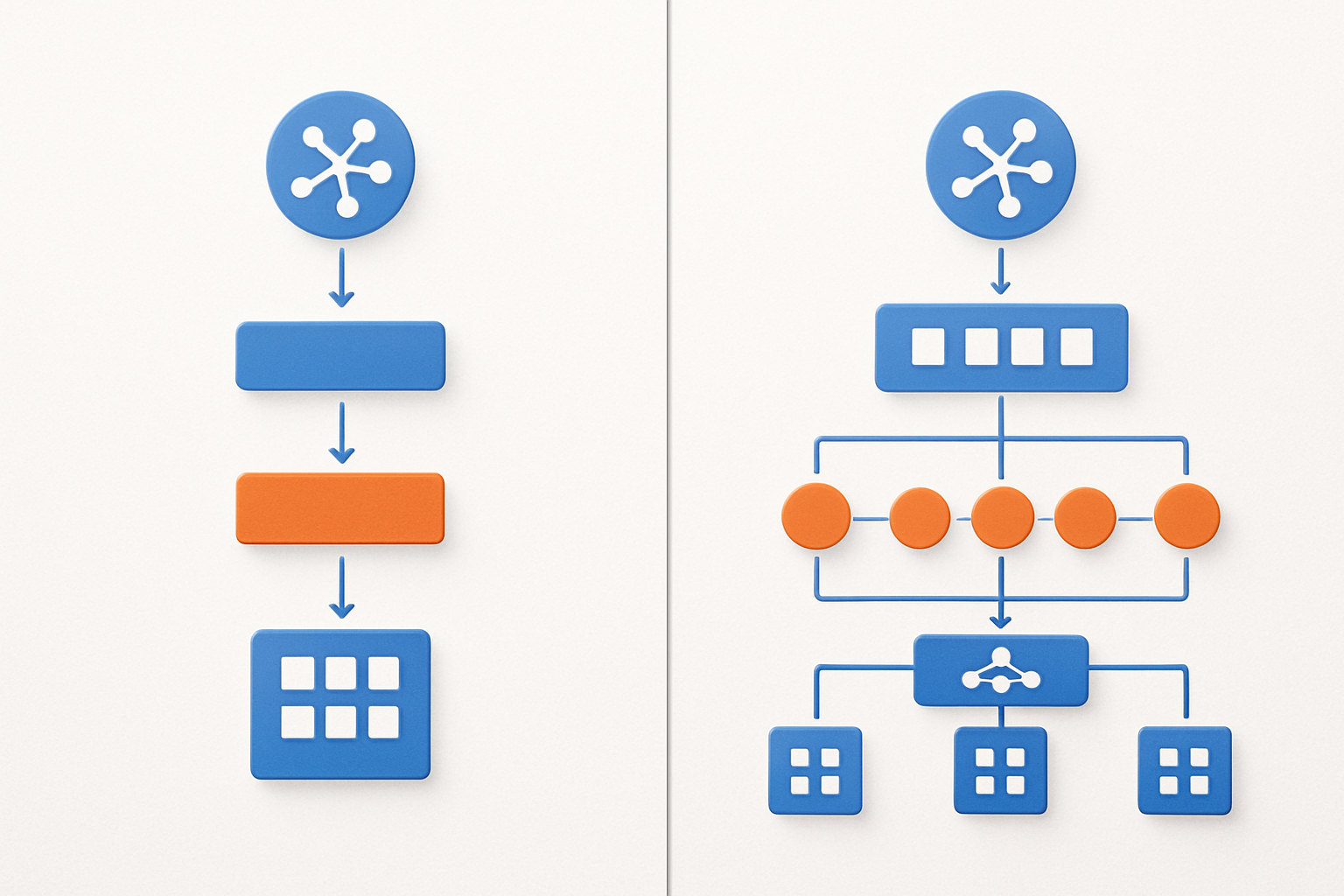
Traditional Kubernetes Ingress relies on a single resource type that handles basic HTTP routing, while the Gateway API introduces a multi-resource architecture separating infrastructure management from traffic routing. This separation allows platform operators to control gateway infrastructure through GatewayClass and Gateway resources, while developers manage application routing via HTTPRoute resources. The Gateway API’s role-based design creates clearer boundaries between infrastructure and application concerns, improving collaboration between platform teams and developers.
Evaluate enhanced traffic management capabilities
Gateway API delivers sophisticated traffic management features that surpass basic Ingress functionality, including header manipulation, request mirroring, and weighted traffic splitting for advanced deployment strategies like canary releases. The API supports multiple protocols beyond HTTP/HTTPS, enabling TCP and UDP traffic management through dedicated route resources. These enhanced capabilities eliminate the need for vendor-specific annotations, providing standardized methods for complex routing scenarios that previously required proprietary ingress controller extensions.
Assess role-based access control improvements
The Gateway API migration brings granular RBAC controls that separate infrastructure management from application routing permissions. Platform administrators control GatewayClass and Gateway resources, while application teams manage only their specific routes without accessing broader networking infrastructure. This separation reduces security risks and enables self-service deployment models where developers can configure routing rules independently without requiring cluster-wide networking permissions or intervention from platform teams.
Analyze vendor-neutral implementation benefits
Moving to Gateway API eliminates vendor lock-in by providing a standardized specification that works consistently across different ingress controller implementations. The vendor-neutral approach removes dependency on proprietary annotations and custom configurations, making applications portable between different Kubernetes distributions and cloud providers. This standardization simplifies multi-cluster deployments and reduces operational complexity when switching between gateway implementations, ensuring consistent behavior regardless of the underlying infrastructure provider.
Preparing Your Kubernetes Environment for Migration
Verify cluster compatibility and version requirements
Your Kubernetes cluster needs version 1.21 or higher to support Gateway API migration effectively. Check your current version using kubectl version and ensure your cluster nodes meet the minimum resource requirements. Most cloud providers like EKS, GKS, and AKS fully support Gateway API, but verify your specific platform’s compatibility documentation before starting the migration process.
Install Gateway API CRDs and controllers
Installing Gateway API requires deploying the custom resource definitions first using kubectl apply -f https://github.com/kubernetes-sigs/gateway-api/releases/download/v0.8.0/standard-install.yaml. Choose a compatible gateway controller like Istio, NGINX Gateway Fabric, or Contour based on your existing infrastructure. Each controller offers different features and performance characteristics that align with specific use cases.
Backup existing Ingress configurations and resources
Create comprehensive backups of all Ingress resources, associated ConfigMaps, and TLS certificates before beginning your Gateway API migration. Use kubectl get ingress -o yaml > ingress-backup.yaml to export configurations across all namespaces. Document your current routing rules, middleware configurations, and load balancer settings to ensure smooth conversion and quick rollback capabilities if needed.
Converting Ingress Resources to Gateway API Format

Transform basic HTTP routing rules to HTTPRoute objects
Converting your Ingress routing rules to HTTPRoute objects represents the core transformation in Gateway API migration. HTTPRoute resources provide enhanced routing capabilities beyond traditional Ingress, supporting advanced matching conditions like query parameters and request headers. Start by creating HTTPRoute manifests that mirror your existing host-based routing patterns while leveraging the expanded feature set.
The transformation process involves mapping Ingress paths to HTTPRoute matches with improved granularity. Gateway API’s HTTPRoute structure separates concerns more clearly, defining parentRefs to connect with Gateway resources and rules that specify precise matching criteria and backend services for streamlined traffic management.
Convert TLS configurations to Gateway listeners
Migrate path-based routing to match conditions
Update service references and backend configurations
Implementing Advanced Gateway API Features

Configure Cross-Namespace Routing with ReferenceGrant
Gateway API implementation opens up powerful cross-namespace routing capabilities that weren’t possible with traditional Kubernetes Ingress. ReferenceGrant resources act as security barriers, allowing you to define which namespaces can reference services in other namespaces. This feature becomes essential when your Gateway API conversion involves microservices spread across multiple namespaces.
Creating a ReferenceGrant requires specifying the source namespace (where your Gateway or HTTPRoute lives) and target namespace (where your backend services reside). You’ll need to define allowed resource types and names to maintain security boundaries while enabling flexible routing patterns that make your Gateway API migration more robust.
Set Up Traffic Splitting and Weighted Routing
Traffic splitting transforms how you handle deployments and A/B testing in your Gateway API implementation. Unlike Ingress controllers that require external tools, Gateway API natively supports weighted routing through HTTPRoute resources. You can distribute traffic percentages across different service versions, making canary deployments seamless during your Kubernetes Gateway API migration.
Configure weighted backends by specifying multiple services with corresponding weight values in your HTTPRoute specification. This approach lets you gradually shift traffic from old to new versions, providing safer deployment strategies that weren’t easily achievable with standard Ingress resources.
Apply Request/Response Header Modifications
Header manipulation capabilities in Gateway API exceed what most Ingress controllers offered. You can add, remove, or modify both request and response headers directly within HTTPRoute configurations. This feature eliminates the need for separate middleware or annotation-based approaches that complicated your previous Ingress setup.
Request filters allow you to inject authentication headers, modify routing decisions based on user agents, or add correlation IDs for better observability. Response filters enable you to remove sensitive headers, add security headers, or modify content types. These modifications happen at the Gateway level, providing consistent behavior across all your services without requiring application-level changes during your Gateway API conversion.
Testing and Validating Your Migration

Verify application connectivity and routing functionality
After completing your Gateway API migration, start by testing all application endpoints to confirm traffic flows correctly through your new routing configuration. Check that HTTP and HTTPS requests reach their intended services by accessing each route defined in your Gateway and HTTPRoute resources. Use tools like curl or browser developer tools to verify response codes, headers, and content delivery match your expectations from the original Ingress setup.
Pay special attention to path-based routing and host-based routing scenarios, as Gateway API handles these differently than traditional Ingress controllers. Test edge cases like trailing slashes, query parameters, and different HTTP methods to catch any routing inconsistencies that might have emerged during the conversion process.
Test SSL/TLS certificate handling and termination
Certificate management represents a critical validation point in your Kubernetes Gateway API migration. Verify that TLS termination works properly by testing HTTPS endpoints with various certificate configurations, including wildcard certificates and multi-domain setups. Check certificate chain validity using tools like openssl or online SSL checkers to confirm proper certificate installation and trust chain establishment.
Test automatic certificate renewal workflows if you’re using cert-manager or similar automation tools. Validate that HTTP-to-HTTPS redirects function correctly and that security headers like HSTS are properly configured. Monitor certificate expiration dates and renewal processes to prevent service disruptions.
Validate load balancing and traffic distribution
Load balancing behavior often changes when migrating from Kubernetes Ingress to Gateway API due to different implementation approaches across gateway controllers. Test traffic distribution by sending multiple requests to your applications and monitoring which backend pods receive the traffic. Use monitoring tools or application logs to verify that requests are distributed according to your load balancing strategy.
Examine session affinity configurations if your applications require sticky sessions. Test failover scenarios by temporarily taking backend pods offline to confirm that traffic automatically redirects to healthy instances without service interruption.
Monitor performance metrics and error rates
Establish baseline performance metrics immediately after your Gateway API implementation to compare against your previous Ingress setup. Monitor response times, throughput, and error rates across all application endpoints. Use Kubernetes native monitoring tools like Prometheus and Grafana, or your existing observability stack to track key performance indicators.
Watch for any unusual patterns in HTTP status codes, connection timeouts, or increased latency that might indicate configuration issues. Set up alerts for error rate thresholds and performance degradation to catch problems before they impact users. Document these metrics as part of your Gateway API best practices for future reference and troubleshooting.
Managing the Transition and Cleanup Process

Execute gradual traffic switching strategies
Start your Gateway API migration by running both systems in parallel. Set up traffic splitting where 90% goes through existing Ingress controllers and 10% routes through your new Gateway API implementation. Monitor application performance and gradually shift traffic percentages as confidence grows. Use weighted routing rules in your Gateway configuration to control the split precisely.
Remove deprecated Ingress resources safely
Once traffic fully flows through Gateway API, begin removing old Ingress resources systematically. Delete Ingress objects only after confirming their Gateway API equivalents handle all traffic correctly. Keep backups of your original Ingress configurations during this phase. Remove associated RBAC policies, annotations, and custom resource definitions that were specific to your previous Ingress controller setup.
Update CI/CD pipelines and deployment scripts
Modify your deployment automation to reference Gateway API resources instead of Ingress objects. Update Helm charts, Kustomize overlays, and infrastructure-as-code templates to deploy HTTPRoutes and Gateway configurations. Change monitoring alerts and dashboards to track Gateway API metrics. Train your team on the new resource types and ensure documentation reflects the updated Kubernetes networking migration workflow.

Moving from Kubernetes Ingress to Gateway API doesn’t have to be overwhelming when you break it down into manageable steps. The key differences between these two approaches become clear once you understand that Gateway API offers more flexibility, better role separation, and advanced traffic management capabilities. By properly preparing your environment, carefully converting your existing Ingress resources, and taking advantage of the new features like traffic splitting and header manipulation, you’ll unlock powerful networking capabilities that weren’t possible before.
The migration process requires patience and thorough testing, but the payoff is worth it. Start small with non-critical workloads, validate each step carefully, and don’t rush the cleanup phase. Your team will appreciate the improved traffic control and easier troubleshooting that Gateway API provides. Take your time with this migration – your future self will thank you for doing it right the first time.