Distributed CI/CD with Jenkins: Controller and Agent Architecture
Modern software teams need scalable build systems that can handle multiple projects simultaneously without bottlenecks. Jenkins distributed architecture solves this challenge by splitting workloads between a central controller and multiple agents, creating a robust CI/CD pipeline distribution system that grows with your needs.
This guide is designed for DevOps engineers, build administrators, and development teams who want to move beyond single-server Jenkins setups. You’ll learn how to architect a distributed Jenkins deployment that handles heavy workloads while maintaining reliability and security.
We’ll walk through the fundamentals of Jenkins controller agent setup, showing you how to configure your master node for optimal performance. You’ll also discover best practices for Jenkins agent management, including secure communication protocols and strategies for Jenkins build distribution across your infrastructure. Finally, we’ll cover Jenkins pipeline performance optimization techniques that keep your builds running smoothly at scale.
Whether you’re managing a growing development team or preparing for enterprise-level CI/CD demands, this comprehensive approach to Jenkins distributed CI/CD will help you build a system that scales efficiently and performs reliably.
Understanding Jenkins Distributed Architecture Fundamentals

Core Components of Jenkins Controller-Agent Model
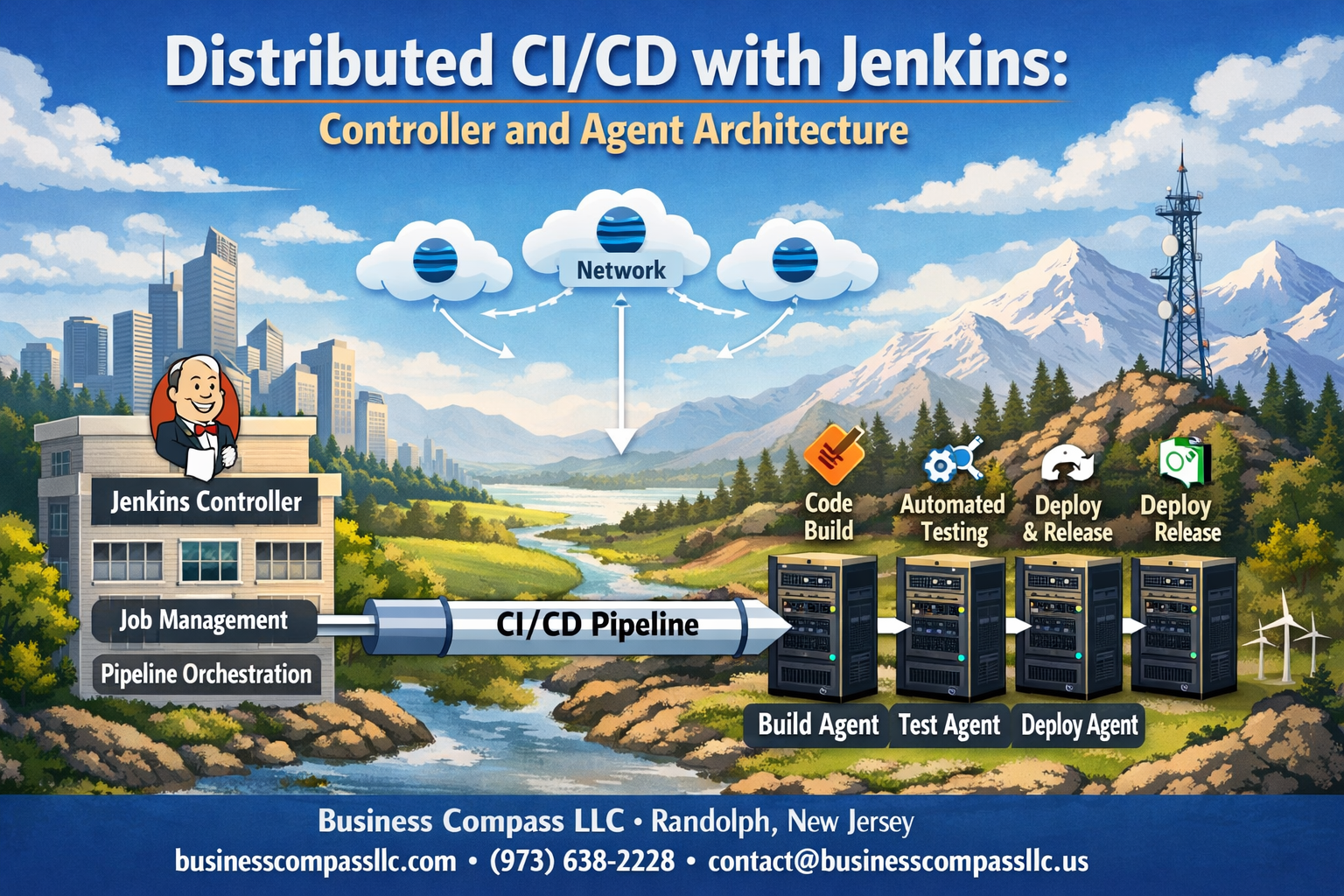
The Jenkins controller-agent model operates on a simple yet powerful principle: one central controller orchestrates multiple distributed agents to execute builds and deployments across different environments. The controller serves as the brain of your Jenkins distributed architecture, managing job scheduling, user interfaces, and configuration data while delegating the actual work to agents.
The controller maintains the web UI, handles authentication, stores job configurations, and monitors agent health. Agents, previously called slaves, are lightweight worker nodes that connect to the controller and execute the actual build tasks. This separation allows you to scale your CI/CD pipeline distribution horizontally by adding more agents without overloading the controller.
Communication between controllers and agents happens through various protocols including SSH, Java Network Launch Protocol (JNLP), or through cloud provider APIs. Each agent registers with the controller, receives build instructions, executes them in isolated environments, and reports results back.
Agents can run on different operating systems, architectures, or environments – Windows agents for .NET applications, Linux agents for containerized workloads, or macOS agents for iOS development. This flexibility makes Jenkins agent management incredibly versatile for diverse development stacks.
Benefits of Distributed vs Monolithic CI/CD Systems
Moving from a single Jenkins instance to a distributed Jenkins deployment transforms how your development teams work. Monolithic systems create bottlenecks where all builds compete for the same resources, leading to queue buildups during peak development hours.
Distributed systems eliminate these bottlenecks by spreading workloads across multiple agents. When one team pushes code for a resource-intensive integration test, it doesn’t block another team’s quick unit tests. Each agent can specialize in specific types of builds, creating dedicated lanes for different workload patterns.
Fault tolerance improves dramatically with distribution. If one agent goes down, builds automatically redirect to healthy agents. The controller remains operational even when individual agents fail, maintaining continuous integration capabilities across your organization.
Geographic distribution becomes possible with Jenkins remote agents deployed in different regions. Teams can have local agents that reduce network latency for artifact transfers while still maintaining centralized control through the controller.
Scalability Advantages for Enterprise Development Teams
Enterprise development teams face unique scaling challenges that Jenkins controller optimization addresses effectively. As development teams grow from dozens to hundreds of developers, build demands can spike unpredictably throughout the day.
The controller-agent model scales both horizontally and vertically. Add more agents to handle increased volume, or provision more powerful agents for compute-intensive builds. Cloud providers make this scaling dynamic – agents can spin up automatically during busy periods and shut down when idle.
Different projects can have dedicated agent pools. Your mobile app team gets iOS-capable agents, your data science team gets GPU-enabled agents for machine learning workloads, and your web team gets containerized agents for microservices deployment. This specialization prevents resource conflicts and optimizes performance.
Jenkins cluster setup enables multiple controllers working together, providing high availability and further distributing management overhead across multiple servers. Teams can maintain separate controllers for different security domains while sharing agent resources.
Resource Optimization Through Workload Distribution
Smart workload distribution maximizes hardware utilization across your infrastructure. Instead of one powerful server sitting idle between builds, multiple smaller agents maintain higher average utilization rates. Jenkins build distribution algorithms can consider agent capacity, current load, and build requirements when assigning tasks.
Agent labeling and node selection strategies ensure builds land on appropriate hardware. CPU-intensive compilation jobs route to high-core-count agents, while memory-hungry integration tests target RAM-optimized instances. Docker-based builds automatically select agents with container runtime capabilities.
Resource pools can be shared across multiple teams while maintaining isolation through workspace management. A single powerful agent can handle sequential builds from different projects without interference, maximizing the return on hardware investments.
Jenkins pipeline performance optimization becomes achievable through parallel execution across multiple agents. Long-running test suites split across several agents, reducing total pipeline duration from hours to minutes. Matrix builds that test across multiple environments run simultaneously instead of sequentially.
Setting Up Jenkins Controller for Maximum Efficiency

Hardware Requirements and Performance Considerations
Your Jenkins controller serves as the brain of your distributed CI/CD operation, so getting the hardware right makes all the difference. The controller handles job scheduling, managing build queues, storing configuration data, and coordinating communication with multiple agents across your infrastructure.
Start with at least 4 CPU cores and 8GB of RAM for small to medium deployments. If you’re running hundreds of builds daily across multiple teams, bump this up to 8-16 cores and 32GB of RAM. The Jenkins controller keeps build histories, artifacts, and workspace data, so storage becomes critical. A fast SSD with at least 100GB is your baseline, but plan for 500GB or more if you’re managing large codebases or storing build artifacts locally.
Memory allocation deserves special attention in Jenkins controller optimization. Set your JVM heap size to roughly 50-70% of available RAM, leaving room for the operating system and other processes. Monitor garbage collection performance regularly – frequent full GC cycles indicate you need more memory or better tuning.
Network bandwidth often becomes the bottleneck in distributed Jenkins deployment scenarios. Your controller needs sufficient bandwidth to handle artifact transfers, log streaming, and agent communication simultaneously. A gigabit connection works for most setups, but consider 10Gbps for high-throughput environments with frequent large artifact transfers.
Security Configuration for Multi-Agent Environments
Security takes on new dimensions when your Jenkins infrastructure spans multiple machines and networks. The controller becomes a high-value target that needs protection from both external threats and potential insider risks.
Enable role-based access control (RBAC) from day one. Create specific user roles for developers, administrators, and service accounts, granting only the minimum permissions needed. Never run builds with administrative privileges – create dedicated service accounts with limited scope for different project types.
Configure HTTPS for all Jenkins controller communications. Generate proper SSL certificates rather than using self-signed ones, especially in production environments. This encrypts all data flowing between users, the controller, and connected agents.
Agent authentication requires careful planning in distributed setups. Use the Jenkins agent protocol (JNLP) with proper authentication tokens rather than SSH connections where possible. Each agent should have unique credentials that you can revoke individually if needed. Store these secrets in Jenkins’ credential store, never in plain text configuration files.
Set up audit logging to track all administrative actions, user logins, and job executions. This becomes invaluable when troubleshooting issues or investigating security incidents across your distributed Jenkins cluster setup.
Network Architecture Planning for Distributed Systems
Network design can make or break your Jenkins distributed architecture performance. Plan your network topology carefully to minimize latency while maintaining security boundaries between different environments.
Place your Jenkins controller in a central network location with reliable connectivity to all agent networks. Avoid routing agent traffic through multiple network hops – each additional hop introduces latency that affects build performance. If agents span multiple data centers or cloud regions, consider deploying multiple controllers in a federated setup.
Firewall configuration needs special attention for Jenkins remote agents. The controller typically initiates connections to agents on port 50000 (or your configured JNLP port), but agents also need to establish callbacks for real-time communication. Create specific firewall rules rather than opening broad port ranges.
Design your network with build traffic patterns in mind. Large artifact downloads, Docker image pulls, and source code checkouts generate significant bandwidth spikes. Implement Quality of Service (QoS) rules to prioritize Jenkins traffic during peak usage periods, ensuring build performance remains consistent.
Consider network segmentation for different types of builds. Production deployment pipelines might run on agents in a secured network segment, while development builds use agents in a more open environment. This isolation improves security while maintaining the flexibility that makes distributed CI/CD pipeline distribution so powerful.
Configuring and Managing Jenkins Agents Effectively

Agent Installation Methods Across Different Platforms
Setting up Jenkins agents varies significantly across platforms, but the process remains straightforward once you understand the fundamentals. For Windows environments, you can deploy agents through Java Web Start (JNLP), Windows services, or SSH connections. The JNLP method works particularly well for dynamic environments where agents need to connect back to the controller automatically.
Linux and Unix systems offer more flexibility with SSH-based connections being the most common approach. Simply configure SSH keys between your controller and agent machines, then Jenkins handles the rest. Docker containers provide another excellent option for agent deployment, especially when you need consistent environments across different stages of your pipeline.
Cloud platforms like AWS, Azure, and Google Cloud Platform support automated agent provisioning through their respective plugins. These integrations allow you to spin up agents on-demand and terminate them when builds complete, optimizing costs while maintaining performance.
For macOS environments, you’ll typically use SSH connections or launch agents as LaunchDaemons for persistent operation. The key is ensuring your Java runtime environment matches between controller and agent systems to avoid compatibility issues.
Dynamic vs Static Agent Provisioning Strategies
Dynamic agent provisioning transforms how you approach Jenkins distributed CI/CD by creating agents only when needed. This approach works brilliantly for teams with variable workloads or those running in cloud environments where cost optimization matters. Cloud providers like AWS EC2, Google Cloud, and Azure integrate seamlessly with Jenkins plugins that automatically launch instances when build queues grow and terminate them during idle periods.
The Docker plugin exemplifies dynamic provisioning at its finest. Your Jenkins controller spins up containerized agents with specific toolchains for each job type, ensuring clean environments while preventing configuration drift between builds. Kubernetes takes this concept even further, orchestrating agent pods across your cluster and scaling based on demand.
Static agents shine in scenarios requiring specialized hardware, persistent caches, or specific software licenses. Build servers with custom development boards, performance testing environments with dedicated resources, or systems requiring lengthy setup procedures benefit from always-on static agents. These agents maintain their state between builds, preserving downloaded dependencies, compiled artifacts, and environment configurations.
Hybrid approaches combine both strategies effectively. Core build agents might run statically for frequent jobs, while specialized agents for integration testing or deployment tasks operate dynamically. This balance optimizes resource usage while maintaining the responsiveness your development teams expect.
Resource Allocation and Capacity Planning
Smart resource allocation prevents bottlenecks that can cripple your entire CI/CD pipeline. Start by analyzing your build patterns – which jobs run simultaneously, peak usage times, and resource consumption per build type. This data becomes the foundation for effective capacity planning in your Jenkins agent management strategy.
CPU allocation requires careful consideration of your build types. Compilation-heavy projects need multiple cores, while simple test suites might run efficiently on single-core agents. Memory allocation follows similar logic – Maven builds with large dependency trees consume significantly more RAM than simple shell script executions.
Jenkins allows you to specify executor counts per agent, controlling how many concurrent jobs each machine handles. Setting this number too high causes resource contention and slower builds. Too low wastes available capacity. Monitor system performance metrics during builds to find the sweet spot for each agent type.
Disk space planning often gets overlooked until builds start failing. Factor in workspace requirements, artifact storage, and log files when sizing agent storage. Consider implementing workspace cleanup policies and artifact rotation to prevent disk exhaustion.
Network bandwidth affects distributed builds more than many realize. Agents downloading large dependencies or transferring substantial artifacts need adequate connection speeds. Plan for network capacity, especially in cloud environments where bandwidth costs can escalate quickly.
Agent Labeling for Targeted Job Execution
Agent labels act as the traffic control system for your Jenkins distributed architecture, ensuring jobs reach the right execution environments. Effective labeling strategies prevent builds from running on incompatible agents while maximizing resource utilization across your infrastructure.
Platform-specific labels form the foundation: linux, windows, macos ensure basic compatibility. Architecture labels like x64, arm64 prevent builds from attempting execution on unsupported hardware. Version-specific labels such as ubuntu-20.04 or windows-2019 provide granular control for environment-sensitive applications.
Capability-based labeling proves invaluable for specialized requirements. Labels like docker, kubernetes, mobile-testing, or gpu-enabled direct jobs to agents equipped with necessary tools and resources. This approach prevents the frustration of builds failing due to missing dependencies.
Performance-tier labels help optimize build distribution. Use labels like high-memory, fast-cpu, or ssd-storage to route resource-intensive jobs to appropriate agents while leaving lighter tasks for standard hardware.
Environment labels distinguish between development, staging, and production deployment agents. This separation maintains security boundaries while ensuring consistent deployment procedures across environments.
Geographic labels become important for globally distributed teams. Labels indicating regions or data centers help minimize network latency for location-sensitive operations or compliance requirements.
Monitoring Agent Health and Performance Metrics
Proactive monitoring prevents small agent issues from becoming major pipeline disruptions. Jenkins provides built-in monitoring capabilities, but comprehensive agent health tracking requires additional tools and strategies for optimal Jenkins remote agents performance.
System-level metrics reveal agent health patterns before they impact builds. Monitor CPU utilization, memory consumption, disk space, and network connectivity across all agents. Tools like Prometheus with Grafana dashboards provide excellent visualization for these metrics, making trends and anomalies immediately visible.
Jenkins-specific metrics offer deeper insights into agent performance. Track build queue times, executor utilization rates, and job failure patterns per agent. High queue times might indicate insufficient capacity, while frequent job failures on specific agents could signal hardware problems or configuration issues.
Network connectivity monitoring becomes critical in distributed Jenkins deployments. Intermittent network issues can cause agent disconnections, leading to failed builds and frustrated developers. Implement ping monitoring and connection quality metrics to identify problematic network paths.
Build performance metrics help identify optimization opportunities. Compare build times across different agents for similar jobs – significant variations might indicate performance disparities or configuration differences requiring attention.
Automated alerting prevents minor issues from escalating. Configure notifications for agent disconnections, high resource utilization, low disk space, or unusual failure rates. Early detection allows proactive intervention before users experience problems.
Log aggregation tools like ELK stack or Splunk centralize agent logs, making troubleshooting and pattern analysis more efficient. Searching across distributed agent logs becomes trivial when everything feeds into a central logging system.
Implementing Secure Communication Between Controllers and Agents

Authentication Mechanisms for Agent Connections
Setting up robust authentication between your Jenkins controller and agents is the foundation of a secure distributed Jenkins deployment. The default approach uses SSH key-based authentication, which provides strong security without the overhead of password management. Generate unique SSH key pairs for each agent connection and never reuse keys across multiple environments.
For SSH-based connections, configure the Jenkins controller with private keys while distributing corresponding public keys to agent machines. Store private keys securely in Jenkins credentials and reference them in agent configurations. This method works exceptionally well for Linux-based agents and provides excellent security when properly implemented.
Windows environments benefit from Java Web Start (JNLP) connections with secret tokens. Each agent receives a unique connection secret that authenticates the initial handshake. These secrets should be rotated regularly and stored securely. Consider implementing automated secret rotation using Jenkins API calls to maintain security without manual intervention.
Certificate-based authentication offers enterprise-grade security for large Jenkins distributed architecture deployments. Generate client certificates for each agent and configure the controller to validate these certificates during connection establishment. This approach scales well across hundreds of agents while maintaining strict access controls.
Multi-factor authentication adds an extra security layer for sensitive environments. Combine SSH keys with additional verification mechanisms like time-based tokens or IP address restrictions to create defense-in-depth security strategies.
Network Security Best Practices and Firewall Configuration
Network segmentation plays a crucial role in securing Jenkins controller agent setup communications. Place your Jenkins controller in a protected network segment with restricted access from external networks. Agents should connect through designated network paths with specific firewall rules allowing only necessary traffic.
Configure firewall rules to permit outbound connections from agents to the controller on specific ports. The standard Jenkins JNLP port 50000 should be accessible from agent networks, while HTTP/HTTPS ports 8080/8443 need access for web-based management. Restrict these connections to known agent IP ranges whenever possible.
Implement network access control lists (ACLs) that define exactly which agents can connect to your controller. This prevents unauthorized systems from attempting connections even if they possess valid credentials. Document all firewall rules and review them regularly to ensure they align with your current deployment topology.
VPN tunnels provide additional security for Jenkins remote agents connecting across untrusted networks. Site-to-site VPNs work well for permanent agent locations, while agent-initiated VPN connections suit dynamic or cloud-based agents. This creates encrypted tunnels that protect all communication channels between controllers and agents.
Network monitoring tools should track all connections between controllers and agents. Set up alerts for unusual connection patterns, failed authentication attempts, or traffic spikes that might indicate security issues. Regular network traffic analysis helps identify potential vulnerabilities before they become problems.
SSL Certificate Management for Encrypted Communications
SSL certificates encrypt all data flowing between Jenkins controllers and agents, protecting sensitive build information and credentials from network-based attacks. Start by generating proper SSL certificates for your Jenkins controller, either through internal certificate authorities or trusted external providers.
Self-signed certificates work for internal deployments but require careful management of certificate stores on all agent machines. Each agent must trust the controller’s certificate to establish secure connections. Automate certificate distribution using configuration management tools to ensure consistency across your distributed Jenkins CI/CD infrastructure.
Certificate rotation becomes critical for long-running Jenkins deployments. Plan certificate renewal well before expiration dates and test the renewal process in non-production environments. Automated certificate management tools like Let’s Encrypt or internal CA systems can streamline this process significantly.
Configure Jenkins to enforce SSL connections for all agent communications. Disable non-encrypted fallback options to prevent accidental plain-text transmissions. This ensures that even configuration errors won’t compromise communication security between distributed components.
Certificate revocation procedures should be documented and tested. When agents are decommissioned or compromised, revoke their certificates immediately and update certificate revocation lists across your infrastructure. This prevents unauthorized access using previously valid certificates.
Access Control and Permission Management
Role-based access control (RBAC) in Jenkins distributed deployments requires careful planning to balance security with operational efficiency. Create specific roles for agent management that separate build execution permissions from administrative controls. This prevents build scripts from modifying agent configurations or accessing sensitive controller settings.
Agent-specific permissions control which jobs can execute on particular agents. Use node labels and build restrictions to ensure sensitive workloads only run on appropriately secured agents. This becomes especially important in mixed environments where some agents handle production deployments while others process development builds.
Credential management across distributed Jenkins cluster setup demands centralized control with distributed access. Store all sensitive credentials in the Jenkins controller’s credential store and configure agents to retrieve them securely during build execution. Never store credentials directly on agent machines or in build configurations.
Implement the principle of least privilege by granting agents only the minimum permissions required for their intended functions. Build agents shouldn’t have administrative access to the Jenkins controller, and specialized agents should only access resources relevant to their specific build requirements.
Audit logging tracks all access control decisions and permission changes across your distributed deployment. Regular audit reviews help identify permission creep or unauthorized access attempts. Configure centralized logging to collect security events from all controllers and agents for comprehensive monitoring.
Regular permission reviews ensure that access controls remain aligned with organizational needs. Quarterly reviews of user permissions, agent access rights, and credential usage help maintain security posture as your Jenkins pipeline performance optimization efforts evolve and grow.
Optimizing Build Distribution and Pipeline Performance

Load Balancing Strategies for Multiple Agents
Effective load balancing across your Jenkins agent pool requires a strategic approach that considers both computational resources and job characteristics. Jenkins offers several built-in mechanisms for distributing builds, with the fair share approach being particularly effective for teams with varying workload patterns.
The node-level configuration allows you to set specific executors per agent based on hardware capabilities. A typical strategy involves assigning 2-4 executors for CPU-intensive builds on powerful machines, while keeping lightweight testing agents at 6-8 executors. Label-based distribution becomes crucial here – organizing agents by capabilities like “docker-enabled,” “gpu-available,” or “high-memory” ensures builds land on appropriate hardware.
Queue priority management helps balance urgent hotfixes against routine builds. Configure build priorities through job properties, allowing critical production deployments to jump ahead of feature branch testing. Pipeline throttling prevents resource starvation by limiting concurrent builds per project or team.
The least connection algorithm works well for mixed workloads, directing new builds to agents with the fewest active jobs. However, weighted round-robin proves more effective when agents have significantly different performance characteristics. Monitor agent utilization through Jenkins’ built-in metrics or external tools like Prometheus to identify bottlenecks and adjust distribution accordingly.
Pipeline Configuration for Distributed Execution
Pipeline design significantly impacts performance in distributed Jenkins environments. The key lies in breaking monolithic pipelines into parallelizable stages that can leverage multiple agents simultaneously.
Matrix builds excel at running identical tests across different environments. Instead of sequential execution across various operating systems or browser versions, matrix configurations spawn parallel jobs across available agents with matching labels. This approach can reduce total pipeline time from hours to minutes for comprehensive test suites.
The parallel directive within Pipeline scripts enables concurrent stage execution. Structure your Jenkinsfile to run unit tests, integration tests, and static analysis simultaneously on different agents:
stage('Parallel Testing') {
    parallel {
        stage('Unit Tests') {
            agent { label 'unit-test' }
            steps { /* test commands */ }
        }
        stage('Integration Tests') {
            agent { label 'integration' }
            steps { /* integration commands */ }
        }
    }
}
Dynamic agent allocation proves valuable for pipelines with varying resource requirements. Use the agent any directive at the pipeline level, then specify different agents for individual stages based on their computational needs. Memory-intensive compilation stages can target high-RAM agents while lightweight deployment steps run on standard nodes.
Artifact Management Across Distributed Environments
Managing build artifacts across distributed Jenkins environments requires careful planning to avoid bottlenecks and ensure consistency. The default Jenkins artifact storage works for small teams but becomes problematic at scale when agents need to share large binary files or complex deployment packages.
External artifact repositories like Artifactory, Nexus, or cloud storage solutions provide better scalability than Jenkins’ built-in storage. Configure your pipelines to publish artifacts directly to these repositories immediately after build completion. This approach eliminates the need to transfer large files back to the Jenkins controller, reducing network overhead and improving build times.
Artifact fingerprinting becomes critical in distributed setups where multiple agents might produce identical artifacts. Jenkins fingerprinting helps track artifact lineage and prevents redundant rebuilds of unchanged components. Enable fingerprinting for key artifacts like compiled binaries, Docker images, or deployment packages.
Smart archiving strategies prevent storage bloat while maintaining necessary build history. Implement retention policies that archive only essential artifacts long-term while cleaning up intermediate build outputs. Use the Pipeline archiveArtifacts step with specific patterns to capture only deployment-ready artifacts rather than entire build directories.
Caching Strategies to Reduce Build Times
Implementing effective caching dramatically improves Jenkins distributed CI/CD pipeline performance by reducing redundant downloads and computations across builds. The strategy varies significantly depending on your build tools and agent infrastructure.
Workspace caching provides the most immediate performance gains. Rather than clean workspaces for every build, implement selective cleanup that preserves dependency caches while removing build outputs. Tools like Maven, npm, and pip maintain local caches that can be reused across builds on the same agent. Configure your pipeline to preserve .m2/repository, node_modules, or virtual environment directories between builds.
Docker layer caching becomes essential when using containerized builds. Configure agents with Docker to reuse intermediate layers, dramatically reducing image build times. The Jenkins Docker Pipeline plugin supports cache-from directives that leverage previously built layers. For teams using Kubernetes agents, implement persistent volume claims to maintain Docker caches across pod lifecycles.
Shared cache strategies work well for distributed teams. Network-attached storage or cloud-based caching solutions allow multiple agents to share dependency caches. Tools like ccache for C++ compilation or BuildCache for Gradle provide distributed caching capabilities that can cut build times by 50-80% for large codebases.
Agent-specific optimization involves tuning cache sizes based on available disk space and build patterns. Monitor cache hit rates and adjust retention policies to balance storage usage with performance gains. Implement cache warming strategies that pre-populate frequently used dependencies on newly provisioned agents.
Troubleshooting Common Distributed Jenkins Issues

Agent Connection Problems and Resolution Steps
When Jenkins agents refuse to connect to your controller, network connectivity issues often top the suspect list. Start by verifying that the agent can reach the controller’s JNLP port (typically 50000) using telnet or netcat. Firewall configurations frequently block these connections, especially in corporate environments with strict security policies.
Check the Jenkins controller logs for connection attempts and error messages. The agent logs provide valuable insights too – look for SSL handshake failures, authentication errors, or timeout messages. Common culprits include:
- Incorrect agent secret or name – Verify the agent configuration matches what’s defined in the Jenkins controller
- Java version mismatches – Ensure compatible Java versions between controller and agent
- Certificate issues – SSL problems often occur when using self-signed certificates or expired certificates
- Network proxies – Corporate proxy settings can interfere with agent-controller communication
For SSH-based agents, authentication failures usually stem from incorrect SSH keys or user permissions. Verify that the Jenkins user can access the private key and that the corresponding public key exists in the agent’s authorized_keys file.
The Jenkins distributed CI/CD architecture requires proper DNS resolution between components. If agents connect using IP addresses instead of hostnames, DNS issues might cause intermittent connection problems.
Quick resolution steps include restarting the Jenkins agent service, clearing the agent’s work directory, and regenerating agent secrets from the controller interface. For persistent issues, enable debug logging on both controller and agent to capture detailed connection attempts.
Performance Bottlenecks Identification and Solutions
Jenkins distributed architecture performance problems manifest in several ways: slow job startup times, queue backlogs, and resource exhaustion on either controllers or agents. Identifying the bottleneck location determines your optimization strategy.
Monitor controller CPU and memory usage during peak build times. High controller load often indicates too many concurrent jobs or insufficient hardware resources. The controller handles job scheduling, plugin execution, and web interface requests – overloading it creates system-wide slowdowns.
Agent-side bottlenecks commonly occur when:
- Multiple resource-intensive jobs run simultaneously on the same agent
- Disk I/O becomes saturated from large artifact transfers
- Network bandwidth limits slow artifact downloads or repository clones
- Insufficient RAM causes excessive swapping
Use Jenkins’ built-in monitoring tools and plugins like Monitoring or Performance Plugin to track system metrics. The Load Statistics page shows controller load and agent utilization patterns over time.
Queue analysis reveals scheduling inefficiencies. Long queues might indicate insufficient agents for your workload or poorly configured job labels. Review your Jenkins pipeline performance optimization by examining:
- Build distribution patterns across available agents
- Job duration trends and resource consumption
- Network transfer times for large artifacts
- Plugin performance impacts
Implement agent pools for different job types (build, test, deployment) to optimize resource allocation. Configure appropriate executor counts based on agent hardware specifications – more isn’t always better if it leads to resource contention.
Build Failure Analysis in Distributed Environments
Distributed build failures require systematic investigation across multiple components. Unlike single-instance Jenkins setups, distributed environments introduce additional failure points: network connectivity, agent availability, and artifact synchronization issues.
Start failure analysis by examining the build console output for clear error indicators. Network-related failures often appear as connection timeouts, DNS resolution errors, or artifact transfer interruptions. These issues might be intermittent, making them harder to diagnose.
Agent-specific failures include:
- Disk space exhaustion preventing build execution
- Missing dependencies or tools not installed on specific agents
- Environment variable differences between agents
- File permission issues in agent workspaces
Check the Jenkins controller system log for agent disconnection events coinciding with build failures. Sudden agent disconnections during job execution cause builds to fail and potentially corrupt workspace data.
Artifact-related failures frequently occur in Jenkins distributed deployment scenarios. Large artifacts might fail to transfer between controller and agents due to network timeouts or storage limitations. Implement artifact retention policies and consider using external artifact repositories for large files.
Compare successful builds on different agents to identify environment inconsistencies. Use Jenkins pipeline scripts that capture agent information (hostname, environment variables, installed tools) to standardize your build environment across all agents.
The distributed Jenkins deployment complexity requires comprehensive logging strategies. Enable job-level logging and configure log rotation to prevent disk space issues while maintaining sufficient detail for failure analysis. Consider implementing centralized logging solutions for better visibility across your entire Jenkins infrastructure.

Setting up a distributed Jenkins architecture with controllers and agents transforms your CI/CD pipeline from a single point of bottleneck into a scalable, efficient system. You’ve learned how to establish a robust controller setup, configure agents that match your specific build requirements, and secure the communication channels between them. The key is finding the right balance between build distribution and resource management while keeping security at the forefront of your configuration decisions.
The real power of distributed Jenkins comes alive when you start optimizing your pipeline performance and proactively addressing common issues before they impact your development workflow. Take the time to monitor your build distribution patterns, fine-tune your agent configurations, and establish clear troubleshooting procedures for your team. Start small with a few agents, master the fundamentals, and gradually scale your distributed setup as your projects grow and evolve.